







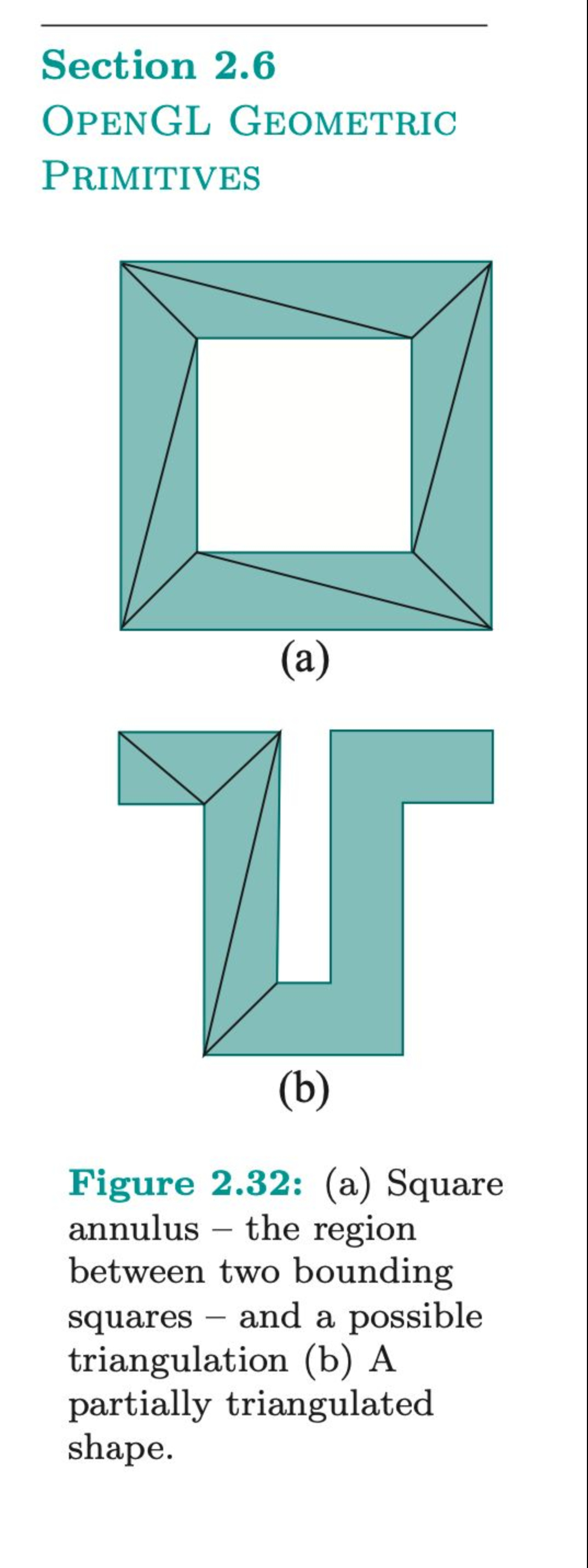
Question: Section 2 . 6 OpenGL Geometric PRIMITIVES ( a ) ( b ) Figure 2 . 3 2 : ( a ) Square annulus -
Section
OpenGL Geometric
PRIMITIVES
a
b
Figure : a Square
annulus the region
between two bounding
squares and a possible
triangulation b A
partially triangulated
shape. I want to generate these diagrams in output using open gl i have generated first diagram and its code is mentioned below. i want you to write a single program for generating both graphics. Here is code for first one.
squareAnnulusmodified.cpp
This program draws a square annulus as a wireframe only boundaries
using glVertexf for specifying vertices, confined to the upper
middle half of the window.
Sumanta Guha
#include
#include
#include
Drawing routine.
void drawScenevoid
glClearGLCOLORBUFFERBIT;
Draw outer square boundary.
glColorf; Set color to black.
glBeginGLLINELOOP;
glVertexf; Bottom left.
glVertexf; Top left.
glVertexf; Top right.
glVertexf; Bottom right.
glEnd;
Draw inner square boundary.
glBeginGLLINELOOP;
glVertexf; Bottom left.
glVertexf; Top left.
glVertexf; Top right.
glVertexf; Bottom right.
glEnd;
Draw square annulus triangles.
glBeginGLLINES;
Bottom side.
glVertexf;
glVertexf;
glVertexf;
glVertexf;
glVertexf;
glVertexf;
Left side.
glVertexf;
glVertexf;
glVertexf;
glVertexf;
glVertexf;
glVertexf;
Top side.
glVertexf;
glVertexf;
glVertexf;
glVertexf;
glVertexf;
glVertexf;
Right side.
glVertexf;
glVertexf;
glVertexf;
glVertexf;
glVertexf;
glVertexf;
glEnd;
glFlush;
Initialization routine.
void setupvoid
glClearColor;
OpenGL window reshape routine.
void resizeint w int h
glViewport h w h ; Set viewport to upper middle half of the window.
glMatrixModeGLPROJECTION;
glLoadIdentity;
glOrtho; Orthographic projection.
glMatrixModeGLMODELVIEW;
glLoadIdentity;
Main routine.
int mainint argc, char argv
glutInit&argc, argv;
glutInitContextVersion;
glutInitContextProfileGLUTCOMPATIBILITYPROFILE;
glutInitDisplayModeGLUTSINGLE GLUTRGBA;
glutInitWindowSize;
glutInitWindowPosition;
glutCreateWindowsquareAnnulusmodified.cpp;
glutDisplayFuncdrawScene;
glutReshapeFuncresize;
glewExperimental GLTRUE;
glewInit;
setup;
glutMainLoop;
return ;
REMEMBER, YOUR code should run properly in visual studio.
Step by Step Solution
There are 3 Steps involved in it
1 Expert Approved Answer
Step: 1 Unlock

Question Has Been Solved by an Expert!
Get step-by-step solutions from verified subject matter experts
Step: 2 Unlock
Step: 3 Unlock
 Study Help