







Question: Select 5 countries represented in the gapminder dataset. For each country, select the entries of population that correspond to this country. Keep in mind
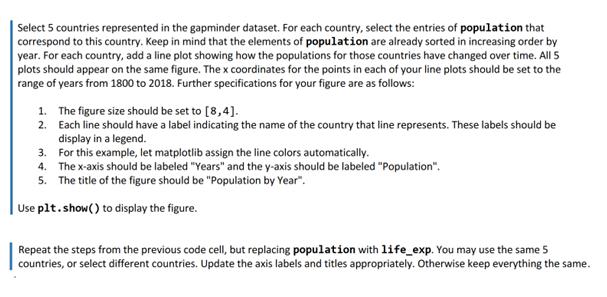
Select 5 countries represented in the gapminder dataset. For each country, select the entries of population that correspond to this country. Keep in mind that the elements of population are already sorted in increasing order by year. For each country, add a line plot showing how the populations for those countries have changed over time. All 5 plots should appear on the same figure. The x coordinates for the points in each of your line plots should be set to the range of years from 1800 to 2018. Further specifications for your figure are as follows: 1. The figure size should be set to [8,4]. 2. Each line should have a label indicating the name of the country that line represents. These labels should be display in a legend. 3. For this example, let matplotlib assign the line colors automatically. 4. The x-axis should be labeled "Years" and the y-axis should be labeled "Population". 5. The title of the figure should be "Population by Year". Use plt.show() to display the figure. Repeat the steps from the previous code cell, but replacing population with life_exp. You may use the same 5 countries, or select different countries. Update the axis labels and titles appropriately. Otherwise keep everything the same.
Step by Step Solution
There are 3 Steps involved in it
Assuming you have a DataFrame named gapminderdf heres how you can create the line plots for populati... View full answer

Get step-by-step solutions from verified subject matter experts
 Study Help