







Question: Select cell C 1 0 and enter a data validation rule to look up the department name from the cell range named Departments on the
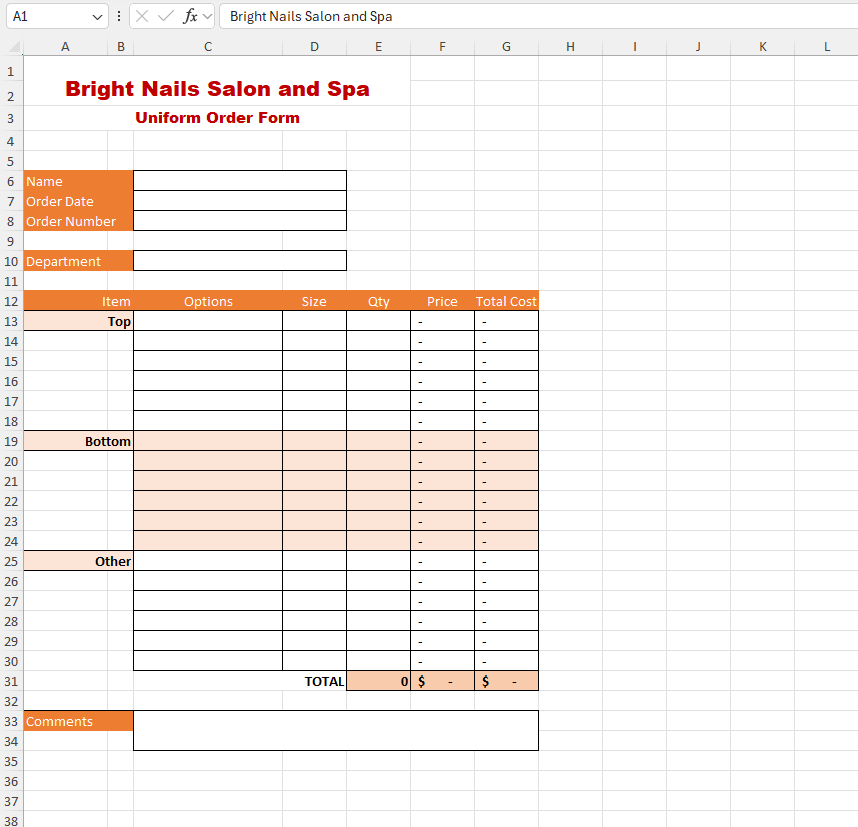
Select cell C and enter a data validation rule to look up the department name from the cell range named Departments on the Options worksheet. Enter the Input Message title Department Enter the input message Select a department from the list. Enter an Error Alert title Error Enter the error message Invalid department. In cell C select Front Desk.
I need help on these homework questions. It's not giving me the right input.
On the OrderForm worksheet, select cell range C:C and enter a data validation rule to look up the top options from the cell range named TopOptions on the Options worksheet. Leave the input message and error message blank.
Select cell C and select Vest.
On the OrderForm worksheet, select cell range C:C and enter a data validation rule to look up the bottom options from the cell range named BottomOptions. Leave the input message and error message blank.
On the OrderForm worksheet, select cell range C:C and enter a data validation rule to look up the other options from the cell range named OtherOptions. Leave the input message and error message blank.
On the OrderForm worksheet, select cell range D:D and enter a data validation rule to look up the size options from the cell range named Sizes. The input message and error message can be left blank. Select cell D and select Large. Select cell E and type
Select cell A and insert a hyperlink to the defined name Tops. Add a ScreenTip Go to Top Options Select cell A and insert a hyperlink to the defined name Bottoms. Add a ScreenTip Go to Bottom Options Select cell A and insert a hyperlink to the defined name Other. Add a ScreenTip Go to Other Options
If necessary, add the Developer tab to the ribbon. Record a macro named ClearForm with the shortcut key F in This Workbook. Add the description To clear the form for another order. Clear cell range C:C cell C cell range C:E and cell C Select cell C as the last step in your macro, and stop the recording. Undo the changes you made while recording the macro.
Insert a macro button in cell range F:G to run the ClearForm macro. Change the button text to Clear Form Test the macro button.
In cell C enter the name Kyle Humphrey In cell C enter todays date In cell C select Front Desk. In cell C select Vest. In cell D select Large. In E type
Step by Step Solution
There are 3 Steps involved in it
1 Expert Approved Answer
Step: 1 Unlock

Question Has Been Solved by an Expert!
Get step-by-step solutions from verified subject matter experts
Step: 2 Unlock
Step: 3 Unlock
 Study Help