







Question: : SELECT statements Q1. Draw from the gymnast data model to prepare a statement showing university name and the gymnasts first and last names. Include
: SELECT statements Q1. Draw from the gymnast data model to prepare a statement showing university name and the
gymnasts first and last names. Include only the records for gymnasts who are NOT team captains. (The
gymnastCaptain field contains only two values: Y and N.) Sort by university name (ascending order)
and then by gymnast last name (ascending order).
Q2. Draw from the project data model to prepare a statement showing employee first name, employee
last name, employee title, and department name. Include only the records for employees who have
been assigned to a project (i.e.,
employees who do
not
appear in the proj2emp table
). To include only
such employees, your SELECT statement should use the NOT EXISTS command and an inner query. Hint
#1: This statement is very, very similar to the NOT EXISTS statement in the SQL Code Part 3 file. Hint #2:
Recall that when a statement contains a second WHERE clause (as this statement does), the second
clause must begin with the AND command.
Q3. Draw from the project data model to prepare a statement showing employee first name, employee
last name, employee title, and a calculated column based on the
product
of the empHourlyWage and
proj2empEstHours columns. Each field in the SELECT clause should have an alias: Employee Name;
Employee Title; and Labor Cost for Employee. Include only the records for the project ERP System.
(ERP System is a value in the projectName field; it has its own record in the project table.) Sort by the
calculated column in descending order.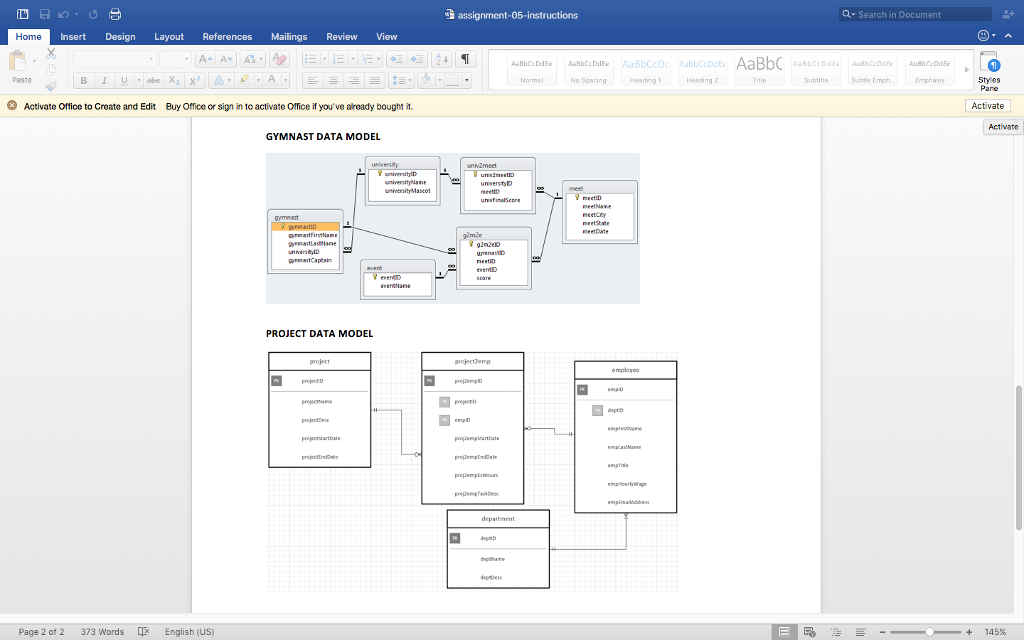
Q Search in Document Home Insert Design Layout References Mailings Review View AaBb ubtle Emo Sty es Pare No Specing Activate Office to Create and Edit Buy Office or sign in to activate Office if you' ve aiready bought t. Activate Activate GYMNAST DATA MODEL meetiD coana PROJECT DATA MODEL project emplayee propemp Page 2 of 2 373 Words English (US) 145% Q Search in Document Home Insert Design Layout References Mailings Review View AaBb ubtle Emo Sty es Pare No Specing Activate Office to Create and Edit Buy Office or sign in to activate Office if you' ve aiready bought t. Activate Activate GYMNAST DATA MODEL meetiD coana PROJECT DATA MODEL project emplayee propemp Page 2 of 2 373 Words English (US) 145%
Step by Step Solution
There are 3 Steps involved in it

Get step-by-step solutions from verified subject matter experts
 Study Help