







Question: Select the Data sheet tab and copy cells A 1 :A 2 to cell A 1 on the PivotTable sheet. Left align cells A 1
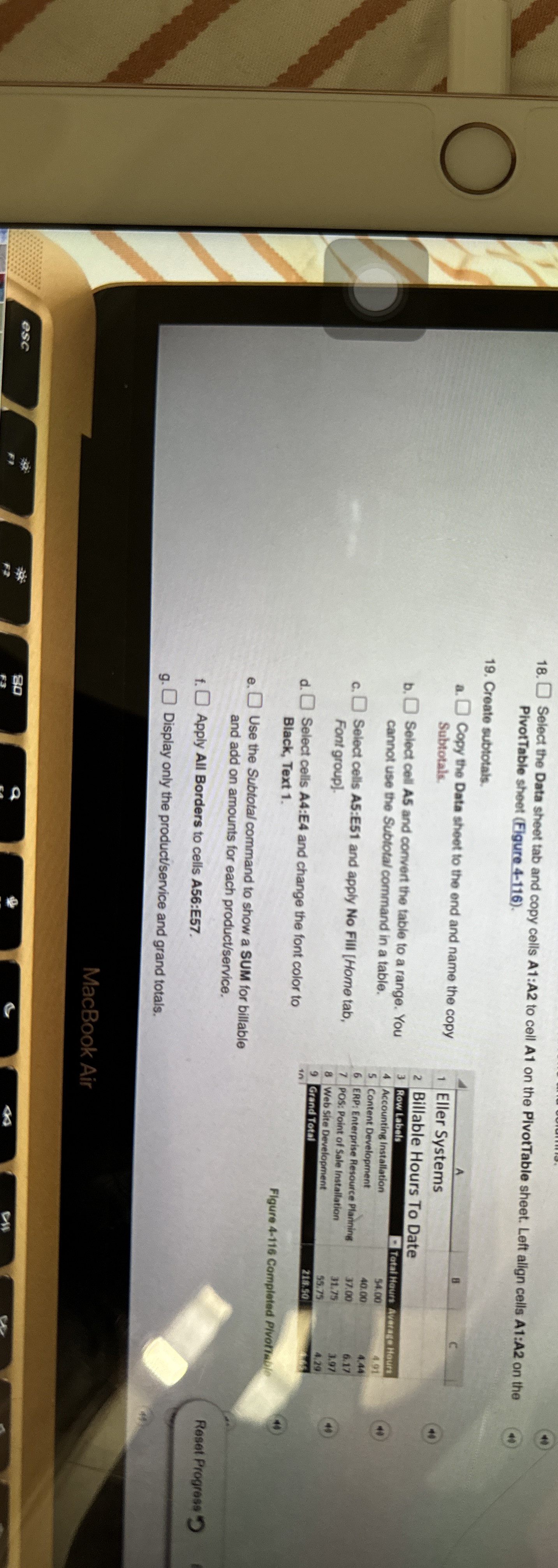
Select the Data sheet tab and copy cells A:A to cell A on the PivotTable sheet. Left align cells A:A on the PivotTable sheet Figure
Create subtotals.
a
a Copy the Data sheet to the end and name the copy Subtotale.
b Select coll A and convert the table to a range. You cannot use the Subtotal command in a table.
c Select cells A:E and apply No Fill Home tab, Font group.
d Select cells A:E and change the font color to Black, Text
e Use the Subtotal command to show a SUM for billable and add on amounts for each productservice Apply All Borders to cells A:E g Display only the productservice and grand totals.
tableABcEller Systems,,Billable Hours To Dat,,Row Labals Houns,CHautsAccounting Installation,Content Development,ERP; Enterprise Resource Plaining, int,POS: Point of Sale Installation,Web site Development,Grand Total,,
Figure Completed Pivotrai
Step by Step Solution
There are 3 Steps involved in it
1 Expert Approved Answer
Step: 1 Unlock

Question Has Been Solved by an Expert!
Get step-by-step solutions from verified subject matter experts
Step: 2 Unlock
Step: 3 Unlock
 Study Help