







Question: Set up a wireless network by using Packet Tracer simulation software. Select generic laptops and access points from the list of available devices and configure
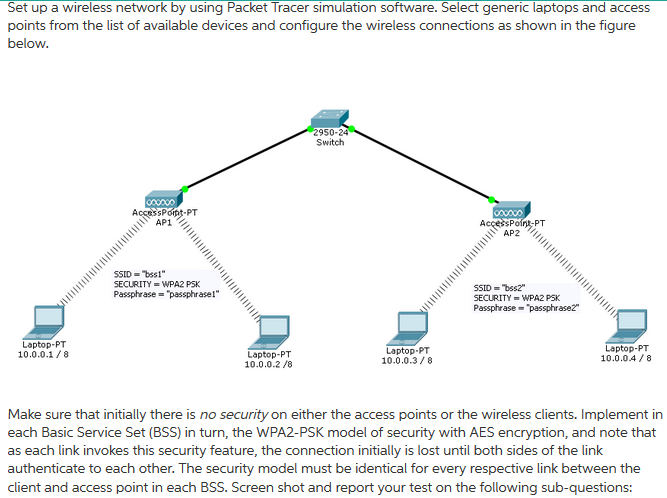
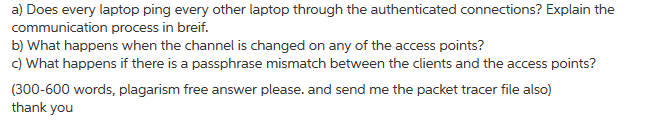
Set up a wireless network by using Packet Tracer simulation software. Select generic laptops and access points from the list of available devices and configure the wireless connections as shown in the figure below 950 Switch AccessPopt-PT AP1 Poin PT AP2 SSID-bssl SECURITY = WPA2 PSK Passphrase "pessphrase SECURITY = WPA2 PSK Passphrase passphrase" Laptop-PT 10.0.0.1/8 Laptop-PT 10.0.0.2 /8 Laptop-PT 10.0.0.38 Laptop-PT 10.0.04/8 Make sure that initially there is no security on either the access points or the wireless clients. Implement in each Basic Service Set (BSS) in turn, the WPA2-PSK model of security with AES encryption, and note that as each link invokes this security feature, the connection initially is lost until both sides of the link authenticate to each other. The security model must be identical for every respective link between the client and access point in each BSS. Screen shot and report your test on the following sub-questions
Step by Step Solution
There are 3 Steps involved in it

Get step-by-step solutions from verified subject matter experts
 Study Help