







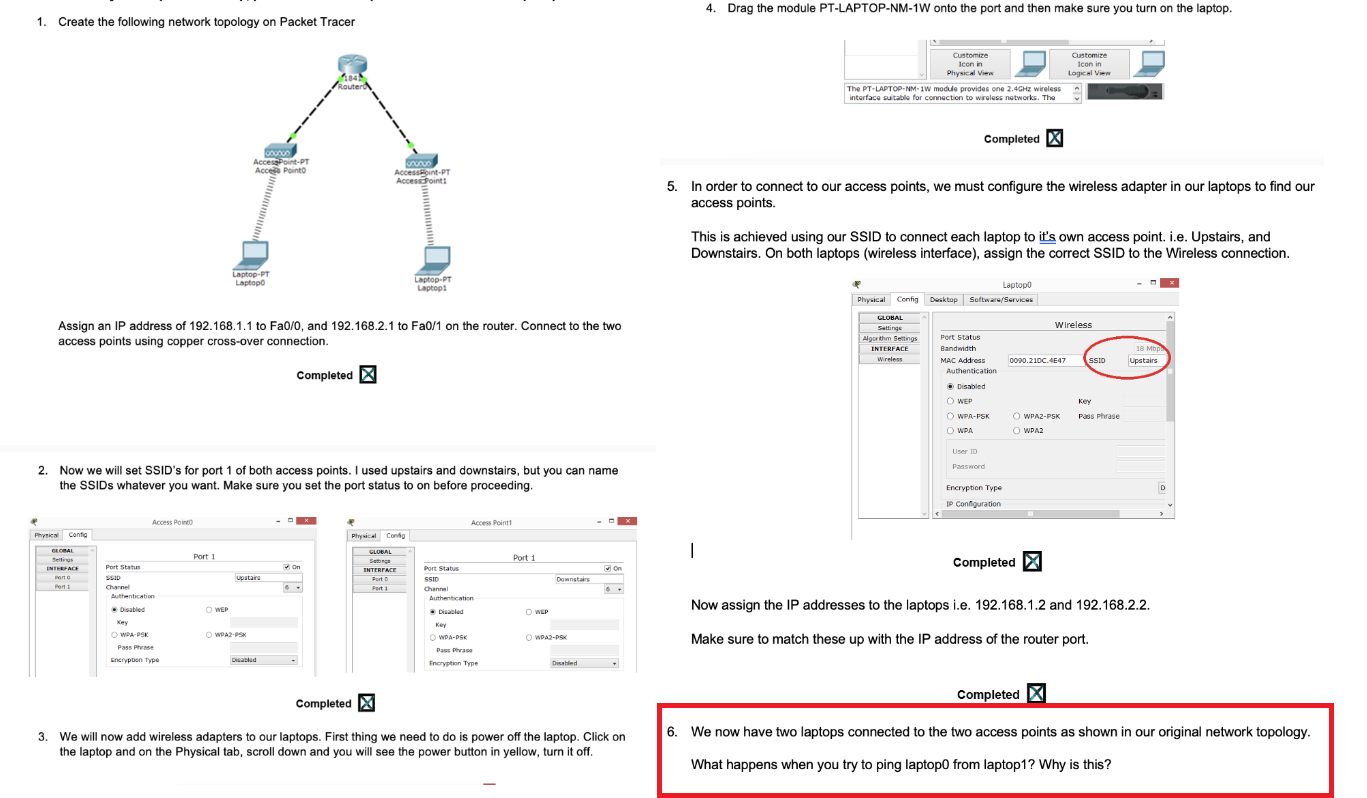
Question: * * PLEASE ANSWER # 6 * * ! ! Create the following network topology on Packet Tracer Drag the module PT - LAPTOP -
PLEASE ANSWER #
Create the following network topology on Packet Tracer
Drag the module PTLAPTOPNMW onto the port and then make sure you turn on the laptop.
Assign an IP address of to Fa and to Fa on the router. Connect to the two
access points using copper crossover connection.
Now we will set SSID's for port of both access points. I used upstairs and downstairs, but you can name
the SSIDs whatever you want. Make sure you set the port status to on before proceeding.
We will now add wireless adapters to our laptops. First thing we need to do is power off the laptop. Click on
the laptop and on the Physical tab, scroll down and you will see the power button in yellow, turn it off.
In order to connect to our access points, we must configure the wireless adapter in our laptops to find our
access points.
This is achieved using our SSID to connect each laptop to it's own access point. ie Upstairs, and
Downstairs. On both laptops wireless interface assign the correct SSID to the Wireless connection.
Now assign the IP addresses to the laptops ie and
Make sure to match these up with the IP address of the router port.
We now have two laptops connected to the two access points as shown in our original network topology.
#: What happens when you try to ping laptop from laptop Why is this? PLEASE ANSWER
Step by Step Solution
There are 3 Steps involved in it
1 Expert Approved Answer
Step: 1 Unlock

Question Has Been Solved by an Expert!
Get step-by-step solutions from verified subject matter experts
Step: 2 Unlock
Step: 3 Unlock
 Study Help