







Question: Set up an Excel spreadsheet as shown below. Note that the input for the cell range B3-D4, as well as cells B6, B9, and B10
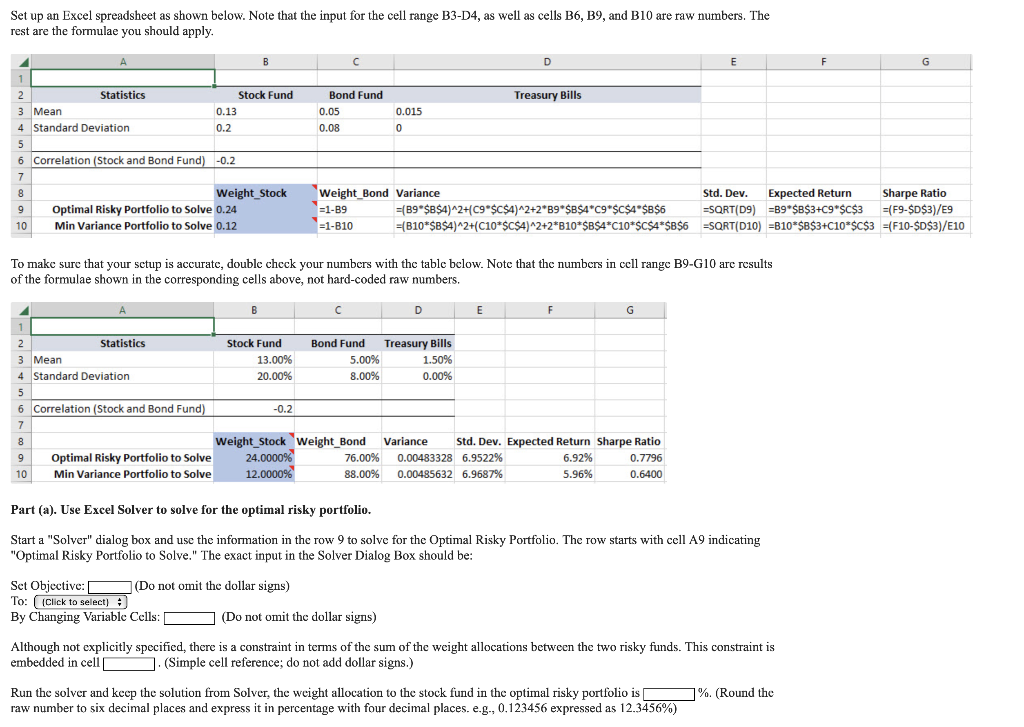
Set up an Excel spreadsheet as shown below. Note that the input for the cell range B3-D4, as well as cells B6, B9, and B10 are raw numbers. The rest are the formulae you should apply. To make sure that your setup is accurate, double check your numbers with the table below. Note that the numbers in cell range B9-G10 are results of the formulae shown in the corresponding cells above, not hard-coded raw numbers. Part (a). Use Excel Solver to solve for the optimal risky portfolio. Start a "Solver" dialog box and use the information in the row 9 to solve for the Optimal Risky Portfolio. The row starts with cell A9 indicating "Optimal Risky Portfolio to Solve." The exact input in the Solver Dialog Box should be: Set Objective: (Do not omit the dollar signs) To: I By Changing Variable Cells: (Do not omit the dollar signs) Although not explicitly specified, there is a constraint in terms of the sum of the weight allocations between the two risky funds. This constraint is embedded in cell . (Simple cell reference; do not add dollar signs.) Run the solver and keep the solution from Solver, the weight allocation to the stock fund in the optimal risky portfolio is \%. (Round the raw number to six decimal places and express it in percentage with four decimal places. e.g., 0.123456 expressed as 12.3456% ) Set up an Excel spreadsheet as shown below. Note that the input for the cell range B3-D4, as well as cells B6, B9, and B10 are raw numbers. The rest are the formulae you should apply. To make sure that your setup is accurate, double check your numbers with the table below. Note that the numbers in cell range B9-G10 are results of the formulae shown in the corresponding cells above, not hard-coded raw numbers. Part (a). Use Excel Solver to solve for the optimal risky portfolio. Start a "Solver" dialog box and use the information in the row 9 to solve for the Optimal Risky Portfolio. The row starts with cell A9 indicating "Optimal Risky Portfolio to Solve." The exact input in the Solver Dialog Box should be: Set Objective: (Do not omit the dollar signs) To: I By Changing Variable Cells: (Do not omit the dollar signs) Although not explicitly specified, there is a constraint in terms of the sum of the weight allocations between the two risky funds. This constraint is embedded in cell . (Simple cell reference; do not add dollar signs.) Run the solver and keep the solution from Solver, the weight allocation to the stock fund in the optimal risky portfolio is \%. (Round the raw number to six decimal places and express it in percentage with four decimal places. e.g., 0.123456 expressed as 12.3456% )
Step by Step Solution
There are 3 Steps involved in it

Get step-by-step solutions from verified subject matter experts
 Study Help