







Question: please help! this is due tomorrow for me Styles Problem 2 (5 pts) IMPORTANT NOTE: To receive full credit in Problem 2. you MUST use
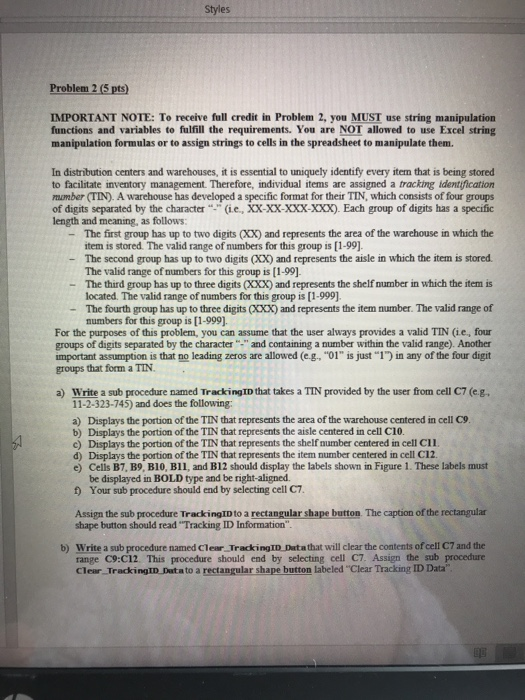
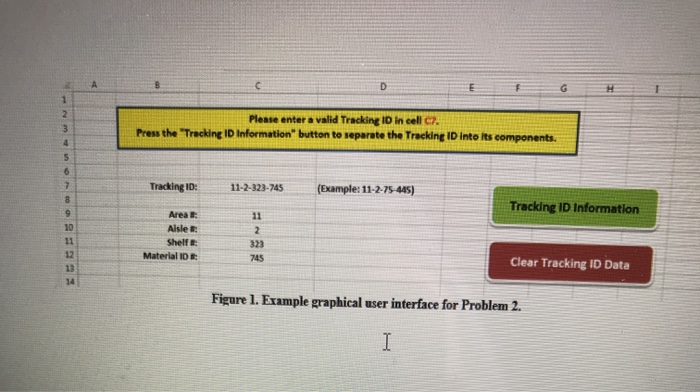
Styles Problem 2 (5 pts) IMPORTANT NOTE: To receive full credit in Problem 2. you MUST use string manipulation functions and variables to fulfill the requirements. You are NOT allowed to use Excel string manipulation formulas or to assign strings to cells in the spreadsheet to manipulate them. In distribution centers and warehouses, it is essential to uniquely identify every item that is being stored to facilitate inventory management. Therefore, individual items are assigned a tracking identification mumber (TIN). A warehouse has developed a specific format for their TIN, which consists of four groups of digits separated by the character i.e., XX-XX-XXX-XXX). Each group of digits has a specific length and meaning, as follows: The first group has up to two digits (XX) and represents the area of the warehouse in which the item is stored. The valid range of numbers for this group is [1-99). - The second group has up to two digits (XX) and represents the aisle in which the item is stored The valid range of numbers for this group is [1-99]. - The third group has up to three digits (XXX) and represents the shelf number in which the item is located. The valid range of numbers for this group is [1-999). The fourth group has up to three digits (XXX) and represents the item number. The valid range of numbers for this group is [1-999). For the purposes of this problem, you can assume that the user always provides a valid TIN (ie, four groups of digits separated by the character and containing a number within the valid range). Another important assumption is that no leading zeros are allowed (e.g.. "01" is just "1") in any of the four digit groups that form a TIN. a) Write a sub procedure named Tracking ID that takes a TIN provided by the user from cell C7(e. 11-2-323-745) and does the following: a) Displays the portion of the TIN that represents the area of the warehouse centered in cell C. b) Displays the portion of the TIN that represents the aisle centered in cell C10. c) Displays the portion of the TIN that represents the shelf number centered in cell CIL d) Displays the portion of the TIN that represents the item number centered in cell C12 e) Cells B7, B9, B10, B11, and B12 should display the labels shown in Figure 1. These labels must be displayed in BOLD type and be right-aligned 1) Your sub procedure should end by selecting cell C7 Assign the sub procedure Tracking into a rectangular shape button. The caption of the rectangular shape button should read "Tracking ID Information". b) Write a sub procedure named Clear Tracking ID Data that will clear the contents of cell C7 and the range C9:C12 This procedure should end by selecting cell C7. Assign the sub procedure Clear Tracking ID Data to a rectangular shape button labeled "Clear Tracking ID Data" Please enter a valid Tracking ID in cell 07 Press the Tracking ID Information" button to separate the Tracking ID into its components. Tracking ID: 11-2-323-745 (Example: 11-2-75-445) Tracking ID Information Area Alslet Shell Material DE Clear Tracking ID Data Figure 1. Example graphical user interface for Problem 2. Styles Problem 2 (5 pts) IMPORTANT NOTE: To receive full credit in Problem 2. you MUST use string manipulation functions and variables to fulfill the requirements. You are NOT allowed to use Excel string manipulation formulas or to assign strings to cells in the spreadsheet to manipulate them. In distribution centers and warehouses, it is essential to uniquely identify every item that is being stored to facilitate inventory management. Therefore, individual items are assigned a tracking identification mumber (TIN). A warehouse has developed a specific format for their TIN, which consists of four groups of digits separated by the character i.e., XX-XX-XXX-XXX). Each group of digits has a specific length and meaning, as follows: The first group has up to two digits (XX) and represents the area of the warehouse in which the item is stored. The valid range of numbers for this group is [1-99). - The second group has up to two digits (XX) and represents the aisle in which the item is stored The valid range of numbers for this group is [1-99]. - The third group has up to three digits (XXX) and represents the shelf number in which the item is located. The valid range of numbers for this group is [1-999). The fourth group has up to three digits (XXX) and represents the item number. The valid range of numbers for this group is [1-999). For the purposes of this problem, you can assume that the user always provides a valid TIN (ie, four groups of digits separated by the character and containing a number within the valid range). Another important assumption is that no leading zeros are allowed (e.g.. "01" is just "1") in any of the four digit groups that form a TIN. a) Write a sub procedure named Tracking ID that takes a TIN provided by the user from cell C7(e. 11-2-323-745) and does the following: a) Displays the portion of the TIN that represents the area of the warehouse centered in cell C. b) Displays the portion of the TIN that represents the aisle centered in cell C10. c) Displays the portion of the TIN that represents the shelf number centered in cell CIL d) Displays the portion of the TIN that represents the item number centered in cell C12 e) Cells B7, B9, B10, B11, and B12 should display the labels shown in Figure 1. These labels must be displayed in BOLD type and be right-aligned 1) Your sub procedure should end by selecting cell C7 Assign the sub procedure Tracking into a rectangular shape button. The caption of the rectangular shape button should read "Tracking ID Information". b) Write a sub procedure named Clear Tracking ID Data that will clear the contents of cell C7 and the range C9:C12 This procedure should end by selecting cell C7. Assign the sub procedure Clear Tracking ID Data to a rectangular shape button labeled "Clear Tracking ID Data" Please enter a valid Tracking ID in cell 07 Press the Tracking ID Information" button to separate the Tracking ID into its components. Tracking ID: 11-2-323-745 (Example: 11-2-75-445) Tracking ID Information Area Alslet Shell Material DE Clear Tracking ID Data Figure 1. Example graphical user interface for Problem 2
Step by Step Solution
There are 3 Steps involved in it

Get step-by-step solutions from verified subject matter experts
 Study Help