







Question: . setPos ( turta , x , y ) : the function should accept a turtle object turta and the coordinates x and y (
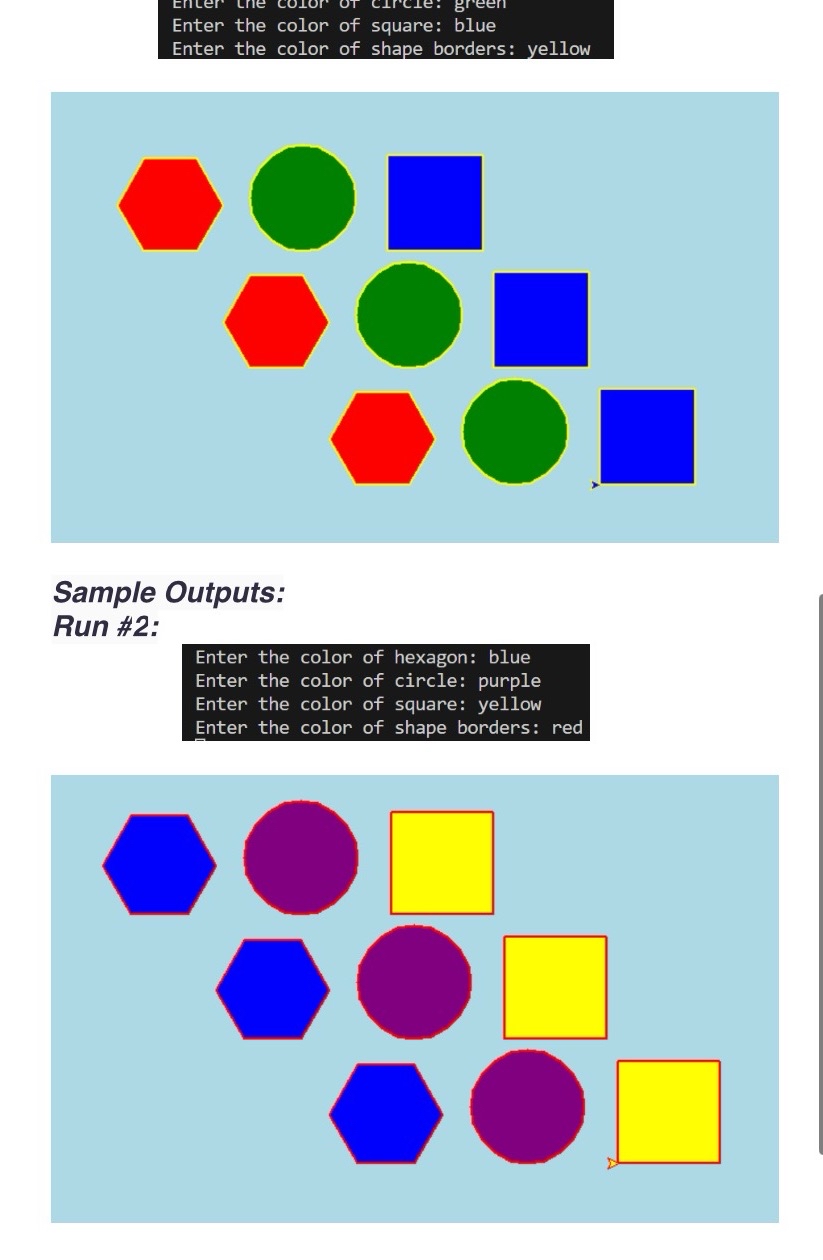
setPosturta x y: the function should accept a turtle object turta and the coordinates x and y variables This function sets the position of the turtle to the coordinates x and y without leaving any trace. hexagonturta hexacolor, bordercolor: the function should accept a turtle object turta that draws a hexagon filled with hexacolor color and with a border of bordercolor color. Each side is of units. squareturta squarecolor, bordercolor: the function should accept a turtle object turta that draws a square filled with squarecolor color and with a bordercolor border. Each side is of units. circleturta circlecolor, bordercolor: the function should accept a turtle object turta that draws a circle filled with circlecolor color and with a bordercolor border. patternturta hexacolor, circlecolor, squarecolor, bordercolor: the function should accept a turtle object turta that draws a hexagon filled with hexacolor color first followed by a circle filled with circlecolor then followed by a square filled with squarecolor. Based on what you have learned in this course and using the appropriate functions defined in above, you are asked to implement a python program ie main that draws the below diagram see Run# and Run # Please be aware that your program should commence by prompting the user to input the colors for the shapes and subsequently, the drawing window canvas will open, initiating the turtle'sDrawing process. not allowed to use forwhile,ect contrastEnter the color of square: blue
Enter the color of shape borders: yellow
Sample Outputs:
Run #:
Enter the color of hexagon: blue
Enter the color of circle: purple
Enter the color of square: yellow
Enter the color of shape borders: red
Step by Step Solution
There are 3 Steps involved in it
1 Expert Approved Answer
Step: 1 Unlock

Question Has Been Solved by an Expert!
Get step-by-step solutions from verified subject matter experts
Step: 2 Unlock
Step: 3 Unlock
 Study Help