





Question: [Setting up the Google Analytics 4 Property with Google Tag Manager] Do you need to use GTM or can you use any third party tag
[Setting up the Google Analytics 4 Property with

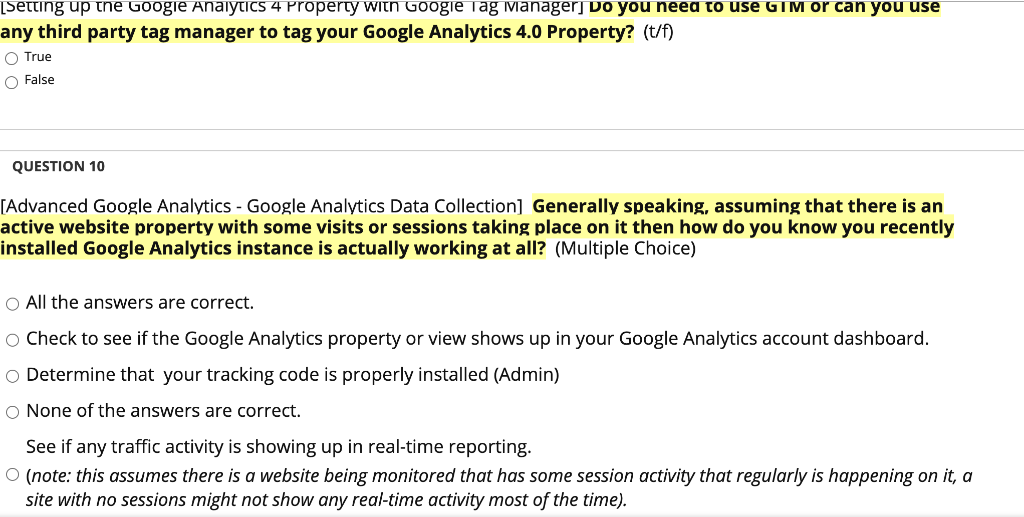
[Setting up the Google Analytics 4 Property with Google Tag Manager] Do you need to use GTM or can you use any third party tag manager to tag your Google Analytics 4.0 Property? (t/f) True False QUESTION 10 [Advanced Google Analytics - Google Analytics Data Collection] Generally speaking, assuming that there is an active website property with some visits or sessions taking place on it then how do you know you recently installed Google Analytics instance is actually working at all? (Multiple Choice) O All the answers are correct. Check to see if the Google Analytics property or view shows up in your Google Analytics account dashboard. Determine that your tracking code is properly installed (Admin) O None of the answers are correct. See if any traffic activity is showing up in real-time reporting. (note: this assumes there is a website being monitored that has some session activity that regularly is happening on it, a site with no sessions might not show any real-time activity most of the time)

Step by Step Solution

There are 3 Steps involved in it

1 Expert Approved Answer
Step: 1 Unlock blur-text-image

Question Has Been Solved by an Expert!

Get step-by-step solutions from verified subject matter experts

Step: 2 Unlock
Step: 3 Unlock

Students Have Also Explored These Related General Management Questions!