







Question: Setup 1. Be sure Java and Eclipse are installed. In Eclipse go to File/New/Java Project. 2. Name it (with no spaces): HW1Yourlastname Yourfirstname 3. Go
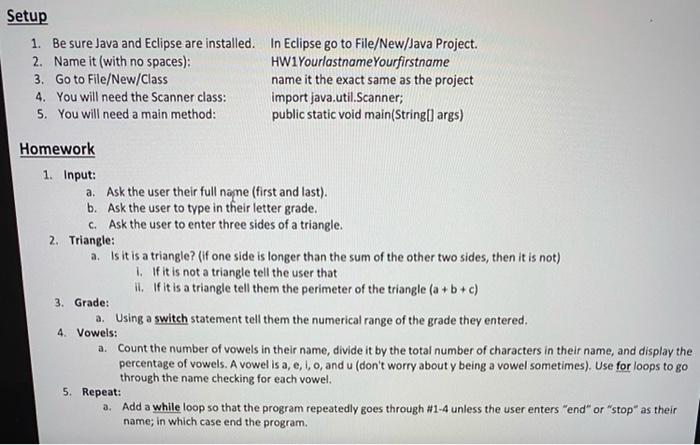
Setup 1. Be sure Java and Eclipse are installed. In Eclipse go to File/New/Java Project. 2. Name it (with no spaces): HW1Yourlastname Yourfirstname 3. Go to File/New/Class name it the exact same as the project 4. You will need the Scanner class: import java.util.Scanner; 5. You will need a main method: public static void main(String[args) Homework 1. Input: a. Ask the user their full name (first and last). b. Ask the user to type in their letter grade. c. Ask the user to enter three sides of a triangle. 2. Triangle: a. Is it is a triangle? (If one side is longer than the sum of the other two sides, then it is not) 1. If it is not a triangle tell the user that If it is a triangle tell them the perimeter of the triangle (a + b + c) 3. Grade: a. Using a switch statement tell them the numerical range of the grade they entered. a. Count the number of vowels in their name, divide it by the total number of characters in their name, and display the percentage of vowels. A vowel is a, e, i, o, and u (don't worry about y being a vowel sometimes). Use for loops to go through the name checking for each vowel. 5. Repeat: a. Add a while loop so that the program repeatedly goes through #1-4 unless the user enters "end" or "stop" as their name; in which case end the program. 4. Vowels
Step by Step Solution
There are 3 Steps involved in it

Get step-by-step solutions from verified subject matter experts
 Study Help