







Question: Setup Internet Setup Internet Connection Typa Optional Settings (required by some internet Service Providers) Network Setup Router IP DHCP Server Setting Setup Basic Setup
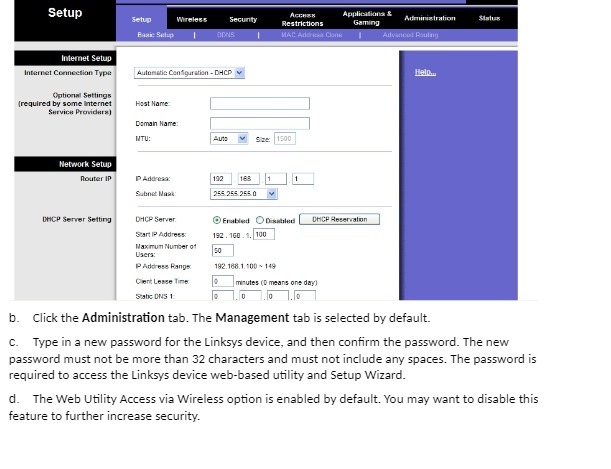
Setup Internet Setup Internet Connection Typa Optional Settings (required by some internet Service Providers) Network Setup Router IP DHCP Server Setting Setup Basic Setup Host Name: Wireless Automatic Configuration - DHCP Domain Name: ITU: P Address: Subnet Mask DHCP Server Start IP Address: Maximum Number of Users: P Address Range Client Lease Time Static DNS 1 DONS Security Auto V Size: 1500 192 168 255.255.255.0 V so 192.168.1.100 149 |0 |0 Access Restrictions MAC Add Clone Enabled Disabled DHCP Reservation 192.160.1.100 1 Applications & Gaming minutes (0 means one day) 0 0 7.10 Administration Advanced Routing Helo... Status b. Click the Administration tab. The Management tab is selected by default. c. Type in a new password for the Linksys device, and then confirm the password. The new password must not be more than 32 characters and must not include any spaces. The password is required to access the Linksys device web-based utility and Setup Wizard. d. The Web Utility Access via Wireless option is enabled by default. You may want to disable this feature to further increase security.
Step by Step Solution
3.48 Rating (151 Votes )
There are 3 Steps involved in it
Based on the provided information it seems like you are accessing the setup menu of a Linksys router ... View full answer

Get step-by-step solutions from verified subject matter experts
 Study Help