







Question: SETUP Please use MATLAB and add comments. THANK YOU!!!!!! Load Graphics Data: load Battleship % Loads the player (Player_Board) and computer (Opponent_Board) boards (10x10 cell
![Display Gameboards: subplot(2,1,1); imshow([Opponent_Board{1,:};Opponent_Board{2,:};Opponent_Board{3,:}; Opponent_Board{4,:};Opponent_Board{5,:};Opponent_Board{6,:}; Opponent_Board{7,:};Opponent_Board{8,:};Opponent_Board{9,:}; Opponent_Board{10,:}]); subplot(2,1,2); imshow([Player_Board{1,:};Player_Board{2,:};Player_Board{3,:}; Player_Board{4,:};Player_Board{5,:};Player_Board{6,:};Player_Board{7,:}; Player_Board{8,:};Player_Board{9,:};Player_Board{10,:}]); Displaying](https://dsd5zvtm8ll6.cloudfront.net/si.experts.images/questions/2024/09/66f086c681239_17366f086c5ee447.jpg)
SETUP
Please use MATLAB and add comments. THANK YOU!!!!!!
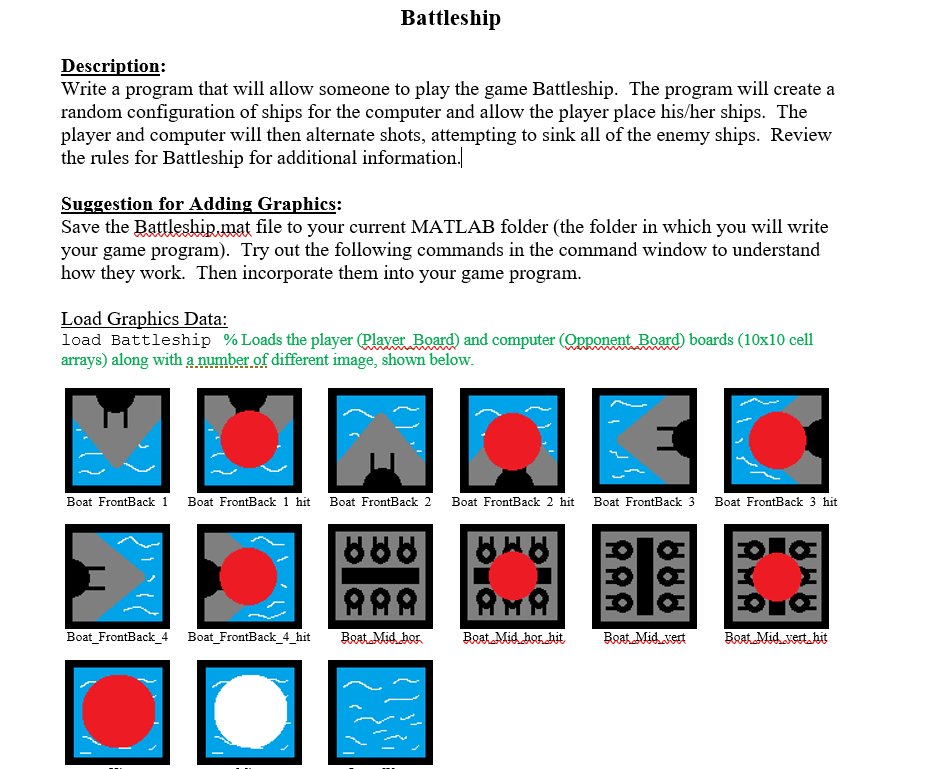
Load Graphics Data:
load Battleship % Loads the player (Player_Board) and computer (Opponent_Board) boards (10x10 cell arrays) along with a number of different image, shown below.
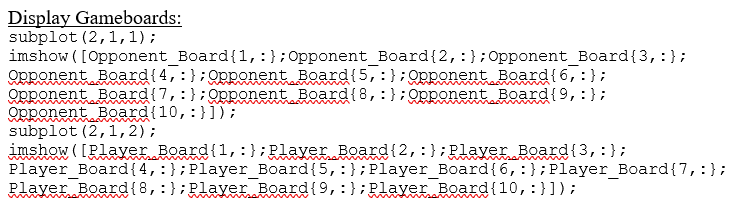
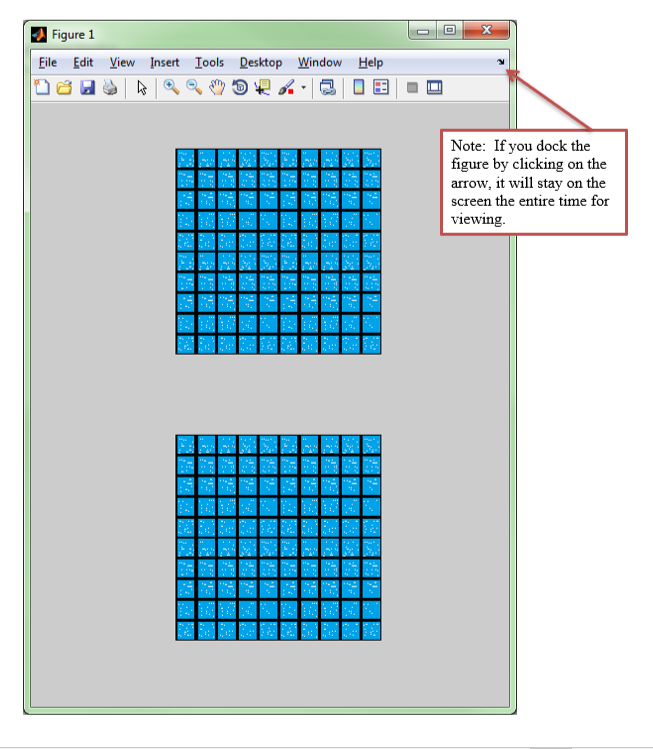
Display Gameboards:
subplot(2,1,1); imshow([Opponent_Board{1,:};Opponent_Board{2,:};Opponent_Board{3,:};
Opponent_Board{4,:};Opponent_Board{5,:};Opponent_Board{6,:}; Opponent_Board{7,:};Opponent_Board{8,:};Opponent_Board{9,:}; Opponent_Board{10,:}]);
subplot(2,1,2); imshow([Player_Board{1,:};Player_Board{2,:};Player_Board{3,:}; Player_Board{4,:};Player_Board{5,:};Player_Board{6,:};Player_Board{7,:}; Player_Board{8,:};Player_Board{9,:};Player_Board{10,:}]);
Displaying Boat Images on the Game Board:
% Place the left pointing end of the boat at position (2,3)
Player_Board{2,3} = Boat_FrontBack_3;
% Place the middle sections of the boat at positions (2,4-6)
Player_Board{2,4} = Boat_Mid_hor;
Player_Board{2,5} = Boat_Mid_hor;
Player_Board{2,6} = Boat_Mid_hor;
% Place the right pointing end of the boat at position (2,3)
Player_Board{2,7} = Boat_FrontBack_4;
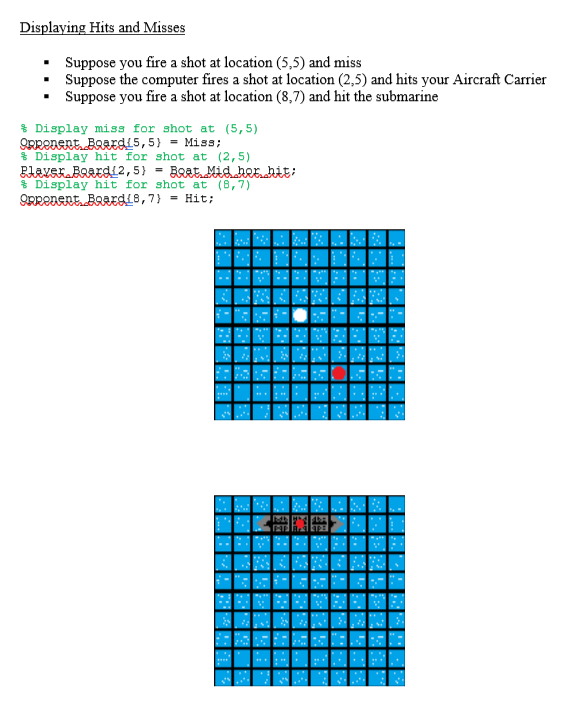
Displaying Hits and Misses
% Display miss for shot at (5,5)
Opponent_Board{5,5} = Miss;
% Display hit for shot at (2,5)
Player_Board{2,5} = Boat_Mid_hor_hit;
% Display hit for shot at (8,7)
Opponent_Board{8,7} = Hit;
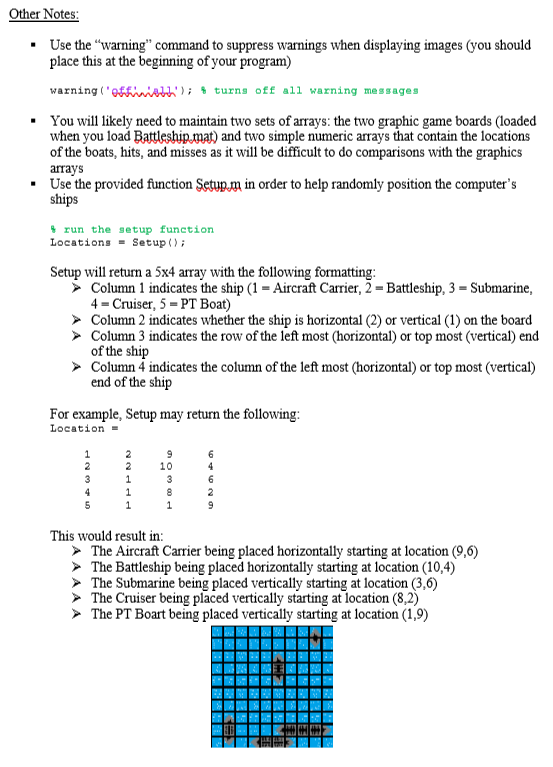
Other Notes:
warning('off','all'); % turns off all warning messages
% run the setup function Locations = Setup();
Location =
1 2 9 6
2 2 10 4
3 1 3 6
4 1 8 2
5 1 1 9
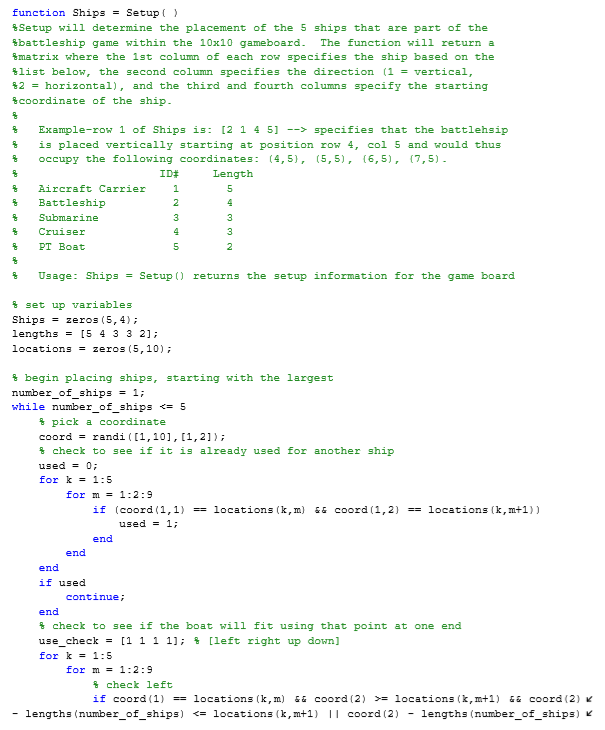
SETUP TEXT
function Ships = Setup( )
%Setup will determine the placement of the 5 ships that are part of the
%battleship game within the 10x10 gameboard. The function will return a
%matrix where the 1st column of each row specifies the ship based on the
%list below, the second column specifies the direction (1 = vertical,
%2 = horizontal), and the third and fourth columns specify the starting
%coordinate of the ship.
%
% Example-row 1 of Ships is: [2 1 4 5] --> specifies that the battlehsip
% is placed vertically starting at position row 4, col 5 and would thus
% occupy the following coordinates: (4,5), (5,5), (6,5), (7,5).
% ID# Length
% Aircraft Carrier 1 5
% Battleship 2 4
% Submarine 3 3
% Cruiser 4 3
% PT Boat 5 2
%
% Usage: Ships = Setup() returns the setup information for the game board
% set up variables
Ships = zeros(5,4);
lengths = [5 4 3 3 2];
locations = zeros(5,10);
% begin placing ships, starting with the largest
number_of_ships = 1;
while number_of_ships
% pick a coordinate
coord = randi([1,10],[1,2]);
% check to see if it is already used for another ship
used = 0;
for k = 1:5
for m = 1:2:9
if (coord(1,1) == locations(k,m) && coord(1,2) == locations(k,m+1))
used = 1;
end
end
end
if used
continue;
end
% check to see if the boat will fit using that point at one end
use_check = [1 1 1 1]; % [left right up down]
for k = 1:5
for m = 1:2:9
% check left
if coord(1) == locations(k,m) && coord(2) >= locations(k,m+1) && coord(2) - lengths(number_of_ships)
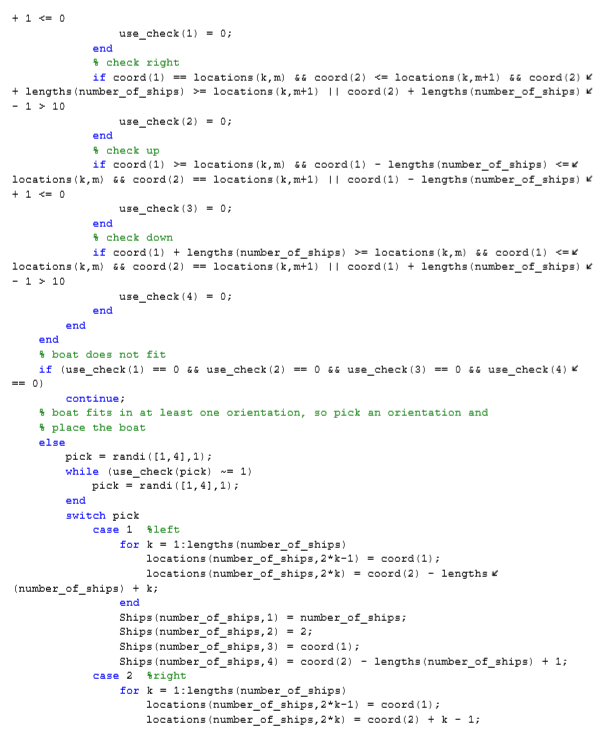
use_check(1) = 0;
end
% check right
if coord(1) == locations(k,m) && coord(2) = locations(k,m+1) || coord(2) + lengths(number_of_ships) - 1 > 10
use_check(2) = 0;
end
% check up
if coord(1) >= locations(k,m) && coord(1) - lengths(number_of_ships)
use_check(3) = 0;
end
% check down
if coord(1) + lengths(number_of_ships) >= locations(k,m) && coord(1) 10
use_check(4) = 0;
end
end
end
% boat does not fit
if (use_check(1) == 0 && use_check(2) == 0 && use_check(3) == 0 && use_check(4) == 0)
continue;
% boat fits in at least one orientation, so pick an orientation and
% place the boat
else
pick = randi([1,4],1);
while (use_check(pick) ~= 1)
pick = randi([1,4],1);
end
switch pick
case 1 %left
for k = 1:lengths(number_of_ships)
locations(number_of_ships,2*k-1) = coord(1);
locations(number_of_ships,2*k) = coord(2) - lengths(number_of_ships) + k;
end
Ships(number_of_ships,1) = number_of_ships;
Ships(number_of_ships,2) = 2;
Ships(number_of_ships,3) = coord(1);
Ships(number_of_ships,4) = coord(2) - lengths(number_of_ships) + 1;
case 2 %right
for k = 1:lengths(number_of_ships)
locations(number_of_ships,2*k-1) = coord(1);
locations(number_of_ships,2*k) = coord(2) + k - 1;
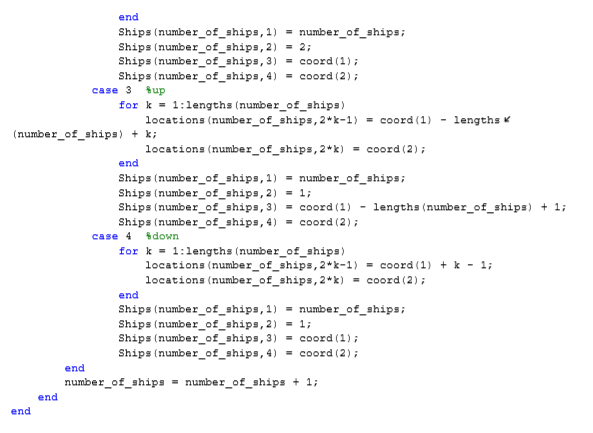
end
Ships(number_of_ships,1) = number_of_ships;
Ships(number_of_ships,2) = 2;
Ships(number_of_ships,3) = coord(1);
Ships(number_of_ships,4) = coord(2);
case 3 %up
for k = 1:lengths(number_of_ships)
locations(number_of_ships,2*k-1) = coord(1) - lengths(number_of_ships) + k;
locations(number_of_ships,2*k) = coord(2);
end
Ships(number_of_ships,1) = number_of_ships;
Ships(number_of_ships,2) = 1;
Ships(number_of_ships,3) = coord(1) - lengths(number_of_ships) + 1;
Ships(number_of_ships,4) = coord(2);
case 4 %down
for k = 1:lengths(number_of_ships)
locations(number_of_ships,2*k-1) = coord(1) + k - 1;
locations(number_of_ships,2*k) = coord(2);
end
Ships(number_of_ships,1) = number_of_ships;
Ships(number_of_ships,2) = 1;
Ships(number_of_ships,3) = coord(1);
Ships(number_of_ships,4) = coord(2);
end
number_of_ships = number_of_ships + 1;
end
end
THANK YOU!!!!
Battleship Description: Write a program that will allow someone to play the game Battleship. The program will create a random configuration of ships for the computer and allow the player place his/her ships. The player and computer will then alternate shots, attempting to sink all of the enemy ships. Review the rules for Battleship for additional information. Suggestion for Adding Graphics: Save the Battleship.mat file to your current MATLAB folder (the folder in which you will write your game program). Try out the following commands in the command window to understand how they work. Then incorporate them into your game program Load Graphics Data: load Battleship % Loads the player(Plaver Board) and computer (Opponent Board) boards (10x10 cell arrays) along with anumber.of different image, shown below Boat FrontBack Boat FrontBack 1 hit Boat FrontBack 2 Boat FrontBack 2 hit Boat FrontBack 3Boat FrontBack 3 hit Boat _FrontBack 4Boat FrontBack_4 hitBoatMid hot Battleship Description: Write a program that will allow someone to play the game Battleship. The program will create a random configuration of ships for the computer and allow the player place his/her ships. The player and computer will then alternate shots, attempting to sink all of the enemy ships. Review the rules for Battleship for additional information. Suggestion for Adding Graphics: Save the Battleship.mat file to your current MATLAB folder (the folder in which you will write your game program). Try out the following commands in the command window to understand how they work. Then incorporate them into your game program Load Graphics Data: load Battleship % Loads the player(Plaver Board) and computer (Opponent Board) boards (10x10 cell arrays) along with anumber.of different image, shown below Boat FrontBack Boat FrontBack 1 hit Boat FrontBack 2 Boat FrontBack 2 hit Boat FrontBack 3Boat FrontBack 3 hit Boat _FrontBack 4Boat FrontBack_4 hitBoatMid hot
Step by Step Solution
There are 3 Steps involved in it

Get step-by-step solutions from verified subject matter experts
 Study Help