







Question: Setup step 3. Go to the LAB tab. Set the pedestal height to Om. Zoom out until you can set the bullseye distance to 100.0
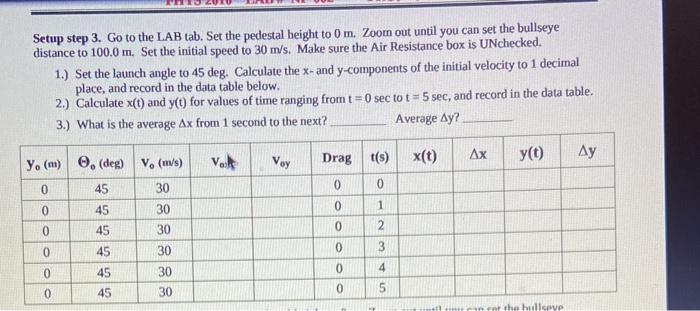
Setup step 3. Go to the LAB tab. Set the pedestal height to Om. Zoom out until you can set the bullseye distance to 100.0 m. Set the initial speed to 30 m/s. Make sure the Air Resistance box is UNchecked. 1.) Set the launch angle to 45 deg. Calculate the x- and y-components of the initial velocity to 1 decimal place, and record in the data table below. 2.) Calculate x(t) and y(t) for values of time ranging from t=0 sec tot = 5 sec, and record in the data table. 3.) What is the average Ax from 1 second to the next? Average Ay? Ax VaR x(t) Drag t(s) y(t) Ay Voy 0 0 y (m) (de 0 45 0 45 0 45 0 45 V. (m/s) 30 30 30 30 0 1 0 2 0 0 3 0 45 30 0 4 0 45 30 5 0 in rn the hulle Setup step 3. Go to the LAB tab. Set the pedestal height to Om. Zoom out until you can set the bullseye distance to 100.0 m. Set the initial speed to 30 m/s. Make sure the Air Resistance box is UNchecked. 1.) Set the launch angle to 45 deg. Calculate the x- and y-components of the initial velocity to 1 decimal place, and record in the data table below. 2.) Calculate x(t) and y(t) for values of time ranging from t=0 sec tot = 5 sec, and record in the data table. 3.) What is the average Ax from 1 second to the next? Average Ay? Ax VaR x(t) Drag t(s) y(t) Ay Voy 0 0 y (m) (de 0 45 0 45 0 45 0 45 V. (m/s) 30 30 30 30 0 1 0 2 0 0 3 0 45 30 0 4 0 45 30 5 0 in rn the hulle
Step by Step Solution
There are 3 Steps involved in it

Get step-by-step solutions from verified subject matter experts
 Study Help