







Question: SharedPreferences allows activities and applications to keep preferences, in the form of key-value pairs similar to a Map that will persist even when the user
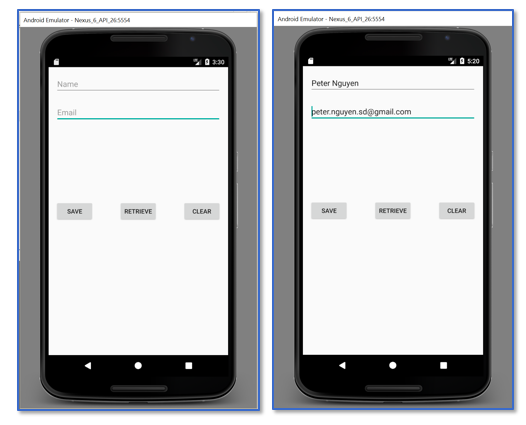 SharedPreferences allows activities and applications to keep preferences, in the form of key-value pairs similar to a Map that will persist even when the user closes the application. Write an Android application the uses SharedPrefences to persist and to retrieve data to/from SharedPreferences respectively as described below:
There are two EditTexts, one for name and another for email address.
There are three buttons: SAVE, RETRIEVE, and CLEAR.
The SAVE button will save the name and the email address in the SharedPreferences.
The RETRIEVE button will retrieve the name and the email address from the SharedPreferences.
The CLEAR button will clear the EditTexts.
Upon startup, the App will retrieve the name and the email address from the SharedPreferences if exist.
See the screen shots below.
SAVE RETREVE CLEAR Android Emulator News 6 API 20s554 Peter Nguyen er nguyen.sd@gmail.com SAVE PETREVE GEAR
Step by Step Solution
There are 3 Steps involved in it

Get step-by-step solutions from verified subject matter experts
 Study Help