







Question: SHOW ALL STEPS PLEASE Project 01 Cone Calculations Program Behavior Each time your program is run, it will prompt the user to enter the radius
SHOW ALL STEPS PLEASE
Project 01
Cone Calculations
Program Behavior
Each time your program is run, it will prompt the user to enter the radius and height of a cone. It will then print the lateral surface area, total surface area, and volume of the cone. The lateral surface area is the surface of the cone without the base and the total surface area includes the base.
Here is a sample run of the program. User input is shown in red.
Welcome to Cone Calculator! Enter the radius: 7.31 Enter the height: 34.6 Lateral surface area: 812.1304 Total surface area: 980.005 Volume: 1936.15
Note that the input are floating-point values. Here is another sample run:
Welcome to Cone Calculator! Enter the radius: 4.72 Enter the height: 15.5 Lateral surface area: 240.2592 Total surface area: 310.249 Volume: 361.61
Make sure your prompts and output conform to the examples above. Use printf statements to output the lateral surface area to 4 places past the decimal point, the total surface area to 3 places, and the volume to 2 places.
If either input value is 0 or less, print an error message as shown here:
Welcome to Cone Calculator! Enter the radius: -5.1 Enter the height: 12.4 Error: The radius and height must both be greater than 0.
Again, make the output appear exactly as shown in these examples.
Program Design
Create a new BlueJ project called Project1 and inside that create a class called ConeCalculator. Add a static method called coneCalc, which will contain all code for this program.
Use the formulas below to calculate the values needed. However, use meaningful variables names in your program, not the abbreviated symbols shown in the formulas.
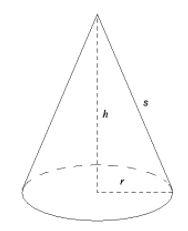
For a cone with radius r and height h, the slant height (s) is the length along the edge from the tip of the cone to the base:
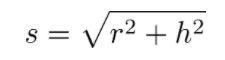
The slant height can be calculated as follows:
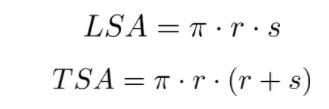
Then the lateral surface area (LSA) and total surface area (TSA) are calculated as follows:
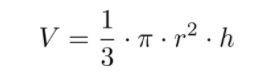
The volume of the cone (V) is calculated using this formula:
Developing the Program
As with almost all programs: work on it in stages. Don't try to get the whole thing written before compiling and testing it. For example, you could:
- Get the infrastructure of the program set up, printing just the intro line and the first prompt. Compile and run the program.
- Set up the Scanner object for reading input. Read the input values and print it back out temporarily. Compile and test.
- Check to see if the input values are invalid and print the error message if so. Test some invalid values.
- If the input is valid, compute the lateral surface area and print it out. Test with the values used in the sample output above. Don't do the calculations if the input is invalid!
- Compute the other values and print them out. Test.
- Test the program with multiple other input values, verifying the output with hand calculations.
Submission
When you're confident in your solution, you're ready to submit the program through Web-CAT. Web-CAT will run its own tests on the program and provide feedback. You can submit your solution to Web-CAT as often as you'd like before the due date.
Since the BlueJ folks have not yet released a fix for the bug in their submission setup, you will submit your program directly through the Web-CAT web site (web-cat.cs.vt.eduLinks to an external site.).
In the feedback from Web-CAT, your score is made up of three parts: a correctness score (50%), a style score (30%), and an evaluation by the TA (20%). The correctness score comes from the tests that Web-CAT ran on your program. If your correctness score isn't 50/50, then there is something wrong with the behavior (output) of your program. Under the Estimate of Problem Coverage section of the grade report, you will see a list of hints that identify problems in the behavior of the program. Use these hints to correct any errors.
Now for the style portion of your score. Web-CAT is very picky about how you write your code because we are trying to teach good coding habits. Web-CAT will flag problems with comments, indentation, lines that are too long, and several other issues. These problems won't keep your program from running, but are considered to be bad practice.
To look at the style problems that Web-CAT flagged, scroll down to the File Details section of the result report and click on the file name (ConeCalculator.java in this case). Clicking the file name will take you to an annotated display of your source code, with problems highlighted in red.
One thing that Web-CAT will complain about is having proper Javadoc comment above each class and method. Examples of these are discussed in the Comments topic of the textbook (from Week 1).
S= V p2 + h2 LSA=.s.s TSA = a.s. (r + s) 1 V= 3 - 22.h
Step by Step Solution
There are 3 Steps involved in it

Get step-by-step solutions from verified subject matter experts
 Study Help