







Question: show excel functions please (2) You were given a list of employee names (see worksheet named Q2EmployeeNames). (12 points) a. You were asked to write
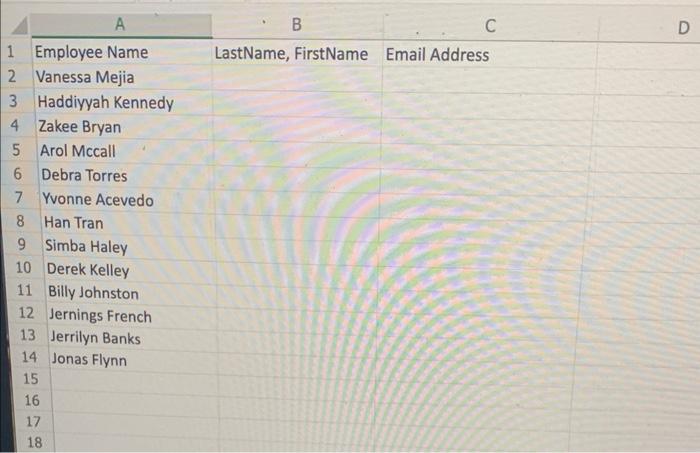
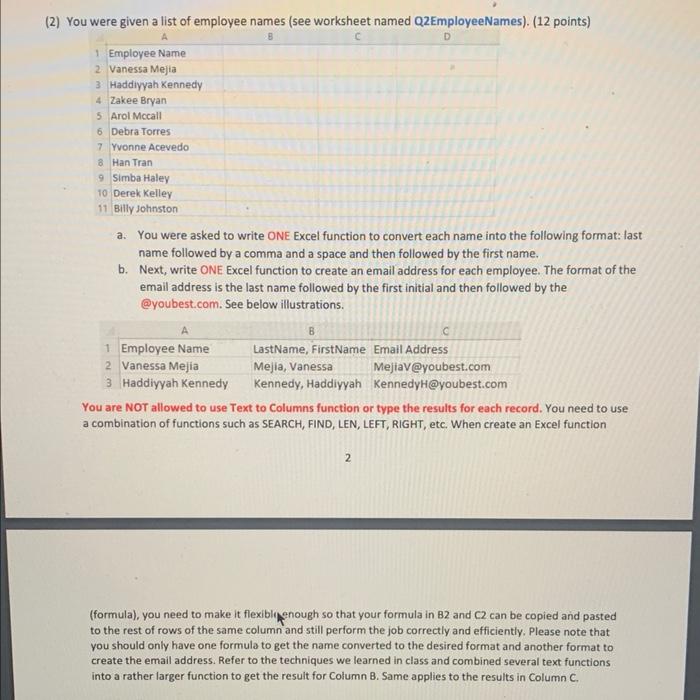
(2) You were given a list of employee names (see worksheet named Q2EmployeeNames). (12 points) a. You were asked to write ONE Excel function to convert each name into the following format: last name followed by a comma and a space and then followed by the first name. b. Next, write ONE Excel function to create an email address for each employee. The format of the email address is the last name followed by the first initial and then followed by the @youbest.com. See below illustrations. You are NOT allowed to use Text to Columns function or type the results for each record. You need to use a combination of functions such as SEARCH, FIND, LEN, LEFT, RIGHT, etc. When create an Excel function 2 (formula), you need to make it flexiblyenough so that your formula in B2 and C2 can be copied and pasted to the rest of rows of the same column and still perform the job correctly and efficiently. Please note that you should only have one formula to get the name converted to the desired format and another format to create the email address. Refer to the techniques we learned in class and combined several text functions into a rather larger function to get the result for Column B. Same applies to the results in Column C
Step by Step Solution
There are 3 Steps involved in it

Get step-by-step solutions from verified subject matter experts
 Study Help