







Question: show me the codes for flask application. 1. Create a form in forms.py called AddUserForm to input the account information (username, password). Table User contains
show me the codes for flask application.
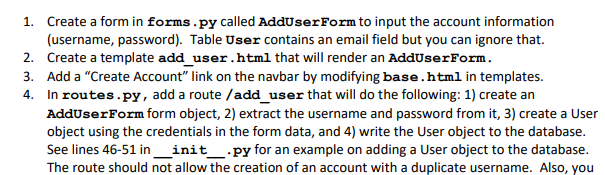
1. Create a form in forms.py called AddUserForm to input the account information (username, password). Table User contains an email field but you can ignore that. 2. Create a template add_user.html that will render an AddUserForm. 3. Add a "Create Account" link on the navbar by modifying base.html in templates. 4. In routes.py, add a route /add_user that will do the following: 1) create an AddUserForm form object, 2) extract the username and password from it, 3) create a User object using the credentials in the form data, and 4) write the User object to the database. See lines 46-51 in __init__.py for an example on adding a User object to the database. The route should not allow the creation of an account with a duplicate username. Also, you 1. Create a form in forms.py called AddUserForm to input the account information (username, password). Table User contains an email field but you can ignore that. 2. Create a template add_user.html that will render an AddUserForm. 3. Add a "Create Account" link on the navbar by modifying base.html in templates. 4. In routes.py, add a route /add_user that will do the following: 1) create an AddUserForm form object, 2) extract the username and password from it, 3) create a User object using the credentials in the form data, and 4) write the User object to the database. See lines 46-51 in __init__.py for an example on adding a User object to the database. The route should not allow the creation of an account with a duplicate username. Also, you
Step by Step Solution
There are 3 Steps involved in it

Get step-by-step solutions from verified subject matter experts
 Study Help