







Question: show steps on jow to solve with microsoft access. 1. Description 1). Customers table. Rose's existing customers and their account balances at the beginning of
show steps on jow to solve with microsoft access.
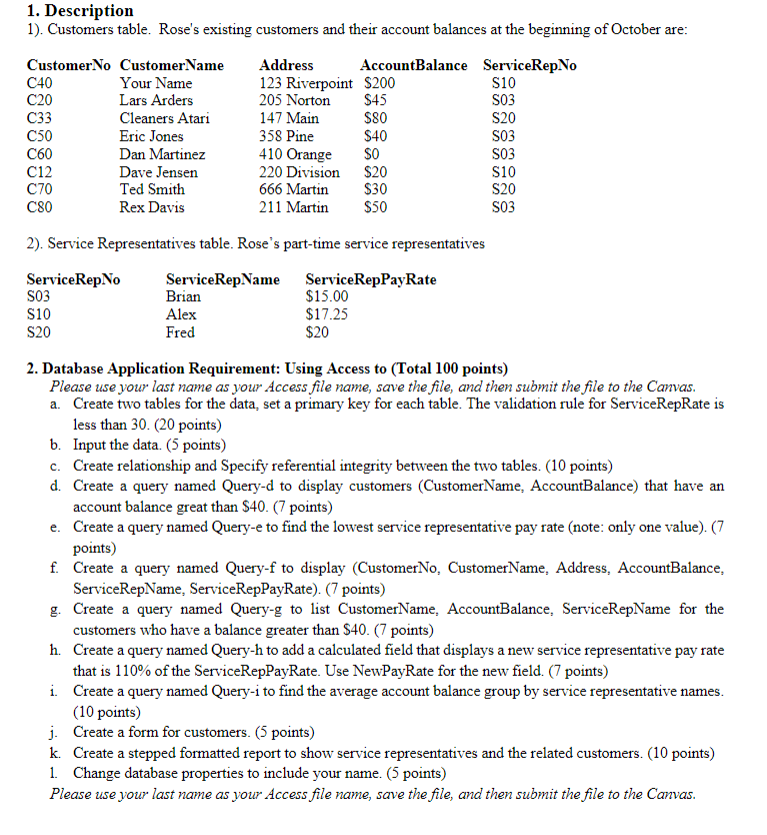
1. Description 1). Customers table. Rose's existing customers and their account balances at the beginning of October are: Customer No Customer Name Address AccountBalance ServiceRep.No C40 Your Name 123 Riverpoint $200 S10 C20 Lars Arders 205 Norton $45 S03 C33 Cleaners Atari 147 Main $80 S20 C50 Eric Jones 358 Pine $40 S03 C60 Dan Martinez 410 Orange SO S03 C12 Dave Jensen 220 Division $20 S10 C70 Ted Smith 666 Martin $30 S20 C80 Rex Davis 211 Martin $50 S03 2). Service Representatives table. Rose's part-time service representatives Service RepNo ServiceRepName ServiceRepPayRate SO3 Brian $15.00 S10 Alex $17.25 S20 Fred $20 2. Database Application Requirement: Using Access to (Total 100 points) Please use your last name as your Access file name, save the file, and then submit the file to the Canvas. a. Create two tables for the data, set a primary key for each table. The validation rule for ServiceRepRate is less than 30. (20 points) b. Input the data. (5 points) c. Create relationship and Specify referential integrity between the two tables. (10 points) d. Create a query named Query-d to display customers (CustomerName, AccountBalance) that have an account balance great than $40. (7 points) e. Create a query named Query-e to find the lowest service representative pay rate (note: only one value). (7 points) f. Create a query named Query-f to display (CustomerNo, CustomerName, Address, AccountBalance, ServiceRepName, ServiceRepPayRate) (7 points) g. Create a query named Query-g to list CustomerName, AccountBalance. ServiceRepName for the customers who have a balance greater than $40. (7 points) h. Create a query named Query-h to add a calculated field that displays a new service representative pay rate that is 110% of the ServiceRepPayRate. Use NewPayRate for the new field. (7 points) i Create a query named Query-i to find the average account balance group by service representative names. (10 points) j. Create a form for customers. (5 points) k. Create a stepped formatted report to show service representatives and the related customers. (10 points) 1. Change database properties to include your name. (5 points) Please use your last name as your Access file name, save the file, and then submit the file to the Canvas
Step by Step Solution
There are 3 Steps involved in it
1 Expert Approved Answer
Step: 1 Unlock

Question Has Been Solved by an Expert!
Get step-by-step solutions from verified subject matter experts
Step: 2 Unlock
Step: 3 Unlock
 Study Help