







Question: **Show your code and results from sniffing (Task 1.1A, Task 1.1B)** **Show your results and code from spoofing (Task 1.2)** **Show your code and results
**Show your code and results from sniffing (Task 1.1A, Task 1.1B)**
**Show your results and code from spoofing (Task 1.2)**
**Show your code and results from sniffing (Task 1.1A, Task 1.1B)**
Show your results and code from spoofing (Task 1.2)
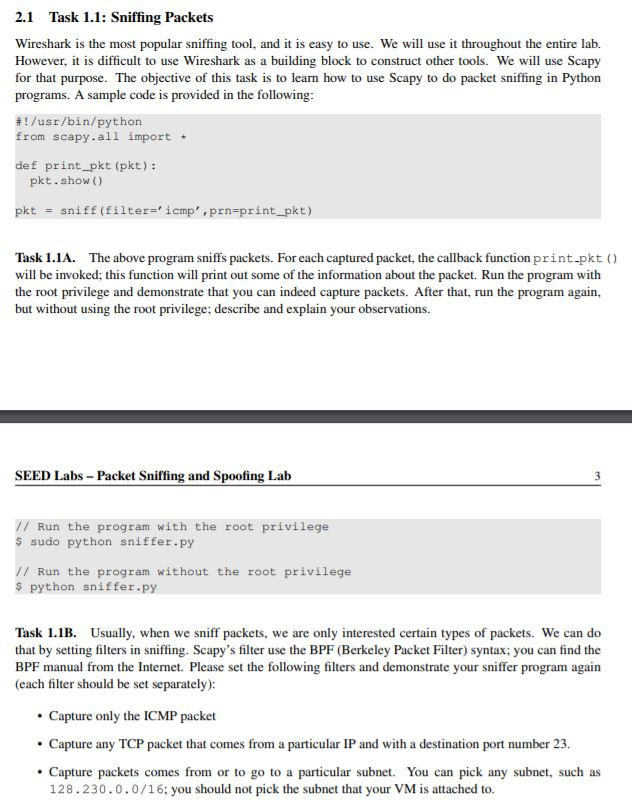
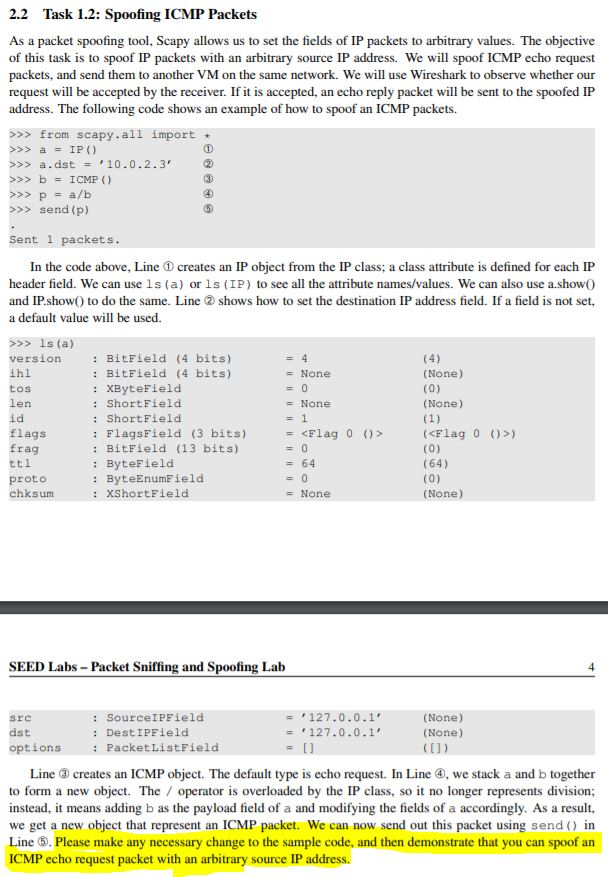
2.1 Task 1.1: Sniffing Packets Wireshark is the most popular sniffing tool, and it is easy to use. We will use it throughout the entire lab. However, it is difficult to use Wireshark as a building block to construct other tools. We will use Scapy for that purpose. The objective of this task is to learn how to use Scapy to do packet sniffing in Python programs. A sample code is provided in the following # ! /usr/bin/python from scapy.all import def print_pkt (pkt): pkt.show ) pkt sniff (filter- icmp , prn-print pkt) Task 1.1A. The above program sniffs packets. For each captured packet, the callback function print-pkt () will be invoked; this function will print out some of the information about the packet. Run the program with the root privilege and demonstrate that you can indeed capture packets. After that, run the program again, but without using the root privilege; describe and explain your observations. SEED Labs- Packet Sniffing and Spoofing Lalb // Run the program with the root privilege s sudo python sniffer.py // Run the program without the root privilege s python sniffer.py Task 1.1B. Usually, when we sniff packets, we are only interested certain types of packets. We can do that by setting filters in sniffing. Scapy's filter use the BPF (Berkeley Packet Filter) syntax; you can find the BPF manual from the Internet. Please set the following filters and demonstrate your sniffer program again (each filter should be set separately): Capture only the ICMP packet Capture any TCP packet that comes from a particular IP and with a destination port number 23. Capture packets comes from or to go to a particular subnet. You can pick any subnet, such as 128.230.0.0/16; you should not pick the subnet that your VM is attached to. 2.2 Task 1.2: Spoofing ICMP Packets As a packet spoofing tool, Scapy allows us to set the fields of IP packets to arbitrary values. The objective of this task is to spoof IP packets with an arbitrary source IP address. We will spoof ICMP echo request packets, and send them to another VM on the same network. We will use Wireshark to observe whether our request will be accepted by the receiver. If it is accepted, an echo reply packet will be sent to the spoofed IP address. The following code shows an example of how to spoof an ICMP packets. >>>from scapy.all import >> a.dst 10.0.2.3 >>> bICMP () >>> send (p) Sent 1 packets In the code above, Line creates an IP object from the IP class; a class attribute is defined for each IP header field. We can use ls (a) or ls (IP) to see all the attribute names/values. We can also use a.showO and IP.show) to do the same. Line shows how to set the destination IP address field. If a field is not set, a default value will be used. version ihl tos len id flags frag : BitField (4 bits) : BitField (4 bits) : XByteField : ShortField : ShortFielcd : FlagsField (3 bits) : BitField (13 bits) : ByteField : ByteEnumField : XShortField (None) (None) (
Step by Step Solution
There are 3 Steps involved in it

Get step-by-step solutions from verified subject matter experts
 Study Help