







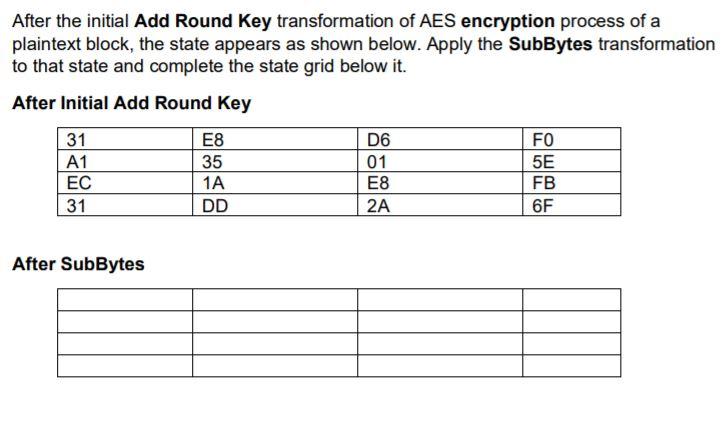
Question: Show your work. After the initial Add Round Key transformation of AES encryption process of a plaintext block, the state appears as shown below. Apply
Show your work.
After the initial Add Round Key transformation of AES encryption process of a plaintext block, the state appears as shown below. Apply the SubBytes transformation to that state and complete the state grid below it. After Initial Add Round Key D6 31 A1 EC 31 E8 35 1A DD 01 E8 2A FO 5E FB 6F After SubBytes
Step by Step Solution
There are 3 Steps involved in it
1 Expert Approved Answer
Step: 1 Unlock

Question Has Been Solved by an Expert!
Get step-by-step solutions from verified subject matter experts
Step: 2 Unlock
Step: 3 Unlock
 Study Help