







Question: SILI game. You will use thegraphics::Imageclass to create objects that draw your game elements and save them to a bitmap file (.bmp). All your code
SILI game. You will use thegraphics::Imageclass to create objects that draw your game elements and save them to a bitmap file (.bmp).
All your code will be written inmain.cc.
User input
You program starts by asking the user to provide the file names for your three game elements. We assume that users will provide valid filenames so you do not need to implement any error handling. We also assume that the user will use a .bmp extension for the filename. Kindly follow the program output exactly shown below. Take note that the bold text refers to user input.
Please provide player image filename: player.bmpPlease provide opponent image filename: opponent.bmpPlease provide player projectile image filename: p_projectile.bmpPlease provide opponent projectile image filename: o_projectile.bmp
Player
Graphics::Imageobject that you will use to draw the player's character. It is highly encouraged that you use a 50 x 50 pixel image so that it will fit well on the game screen when we start building the game.
Opponent
Graphics::Imageobject that you will use to draw the opponent's character. It is highly encouraged that you use a 50 x 50 pixel image so that it will fit well on the game screen when we start building the game. Take note that when you build the game, there will be multiple opponents drawn on the screen.
Player Projectile
Graphics::Imageobject that you will use to draw the player's projectile. It is highly encouraged that you use a 5 x 5 pixel image so that it will fit well on the game screen when we start building the game. The projectile is launched by the player that will defeat the opponent when they collide.
Opponent Projectile
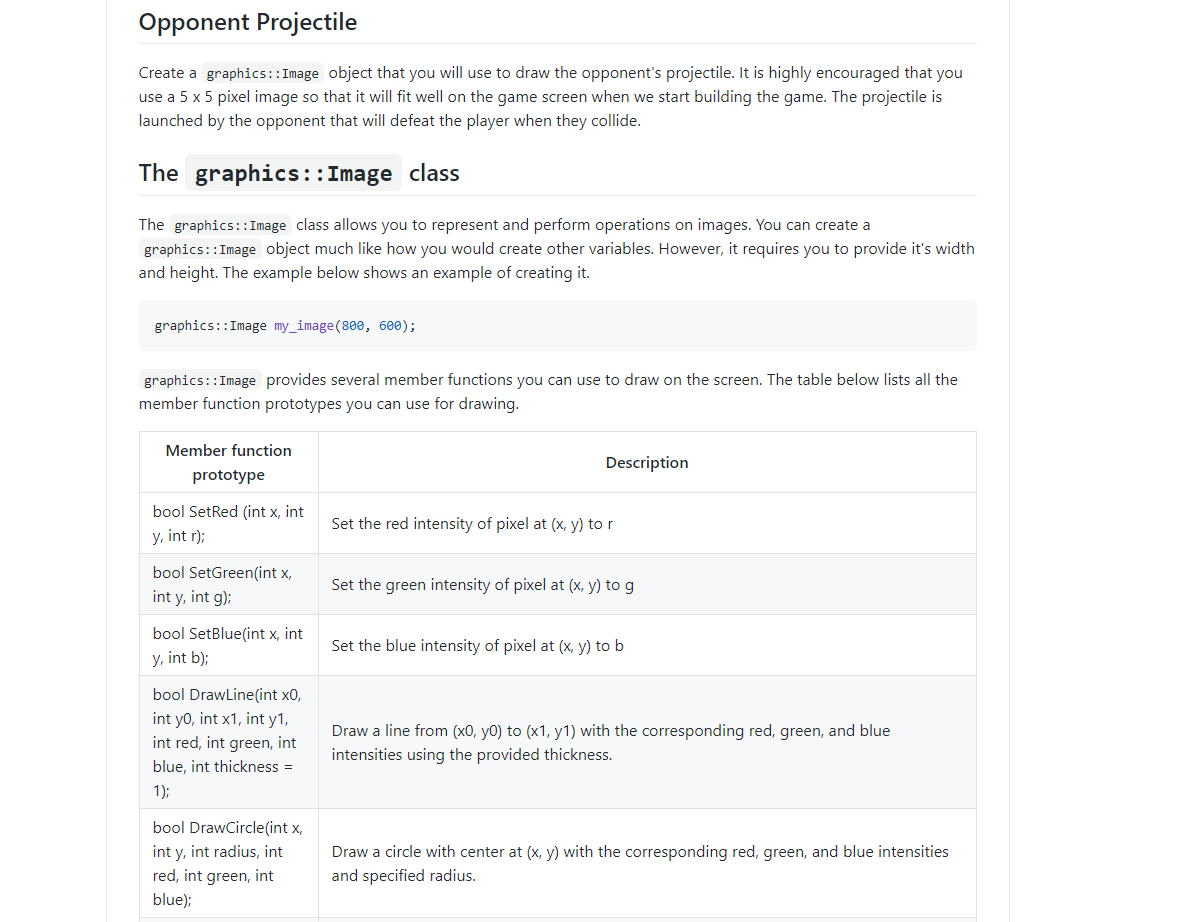
Graphics::Imageobject that you will use to draw the opponent's projectile. It is highly encouraged that you use a 5 x 5 pixel image so that it will fit well on the game screen when we start building the game. The projectile is launched by the opponent that will defeat the player when they collide.
Thegraphics::Imageclass
Thegraphics::Imageclass allows you to represent and perform operations on images.graphics::Imageobject much like how you would create other variables. However, it requires you to provide it's width and height. The example below shows an example of creating it.
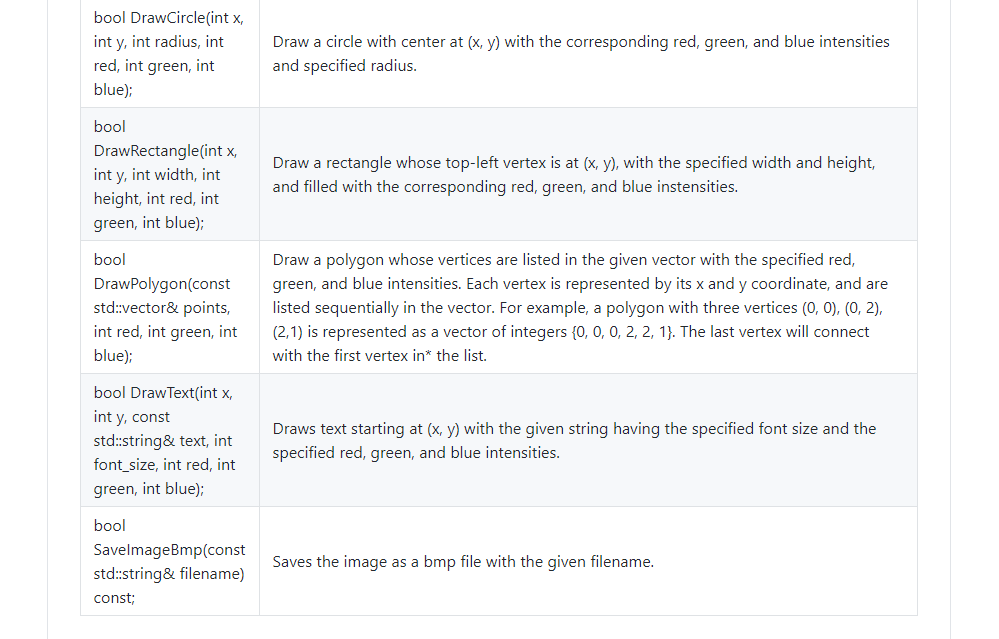
graphics::Image my_image(800, 600);graphics::Imageprovides several member functions you can use to draw on the screen.
The table below lists all the member function prototypes you can use for drawing.
Opponent Projectile Create a graphics: : Image object that you will use to draw the opponent's projectile. It is highly encouraged that you use a 5 x 5 pixel image so that it will fit well on the game screen when we start building the game. The projectile is launched by the opponent that will defeat the player when they collide. The graphics: : Image class The graphics: : Image class allows you to represent and perform operations on images. You can create a graphics: : Image object much like how you would create other variables. However, it requires you to provide it's width and height. The example below shows an example of creating it. graphics: : Image my_image(800, 600); graphics: : Image provides several member functions you can use to draw on the screen. The table below lists all the member function prototypes you can use for drawing. Member function Description prototype bool SetRed (int x, int Set the red intensity of pixel at (x, y) to r y, int r); bool SetGreen(int x, int y, int g); Set the green intensity of pixel at (x, y) to g bool SetBlue(int x, int Set the blue intensity of pixel at (x, y) to b y, int b); bool DrawLine(int x0, int y0, int x1, int y1, int red, int green, int Draw a line from (x0, y0) to (x1, y1) with the corresponding red, green, and blue blue, int thickness = intensities using the provided thickness. 1); bool DrawCircle(int x, int y, int radius, int Draw a circle with center at (x, y) with the corresponding red, green, and blue intensities red, int green, int and specified radius. blue);bool DrawCirclelint x, int 5!, int radius, int red, int green, int blue]; bool DrawRectangle{int x, int 5!, int width, int height, int red, int green, int blue]: bool DrawPolygon{const std::vector& points, int red, int green, int blue]; bool DrawTextUnt x, int 3!, const std::string& text, int font_size, int red, int green, int blue]: bool SavelmageBmplconst std::string& filename} const; Draw a circle with center at (x, y) with the corresponding red, green, and blue intensities and specified radius. Draw a rectangle whose topleft vertex is at (x, v], with the specied width and height, and filled with the corresponding red, green, and blue instensities. Draw a polygon whose vertices are listed in the given vector with the specified red, green, and blue intensities. Each vertex is represented by its x and y coordinate, and are listed sequentially in the vector. For example, a polygon with three vertices (D, 0), [0, 2], [2,1] is represented as a vector of integers {0, O, 0, 2, 2, 1}. The last vertex will connect with the rst vertex in" the list. Draws text starting at (x, v] with the given string having the specified font size and the specified red, green, and blue intensities. Saves the image as a bmp file with the given filename
Step by Step Solution
There are 3 Steps involved in it

Get step-by-step solutions from verified subject matter experts
 Study Help