







Question: Simple Solids Architectural Project - Facade Puzzle Practice Objective . Create a composite solid using solid primitives and Boolean commands. In this practice, you will
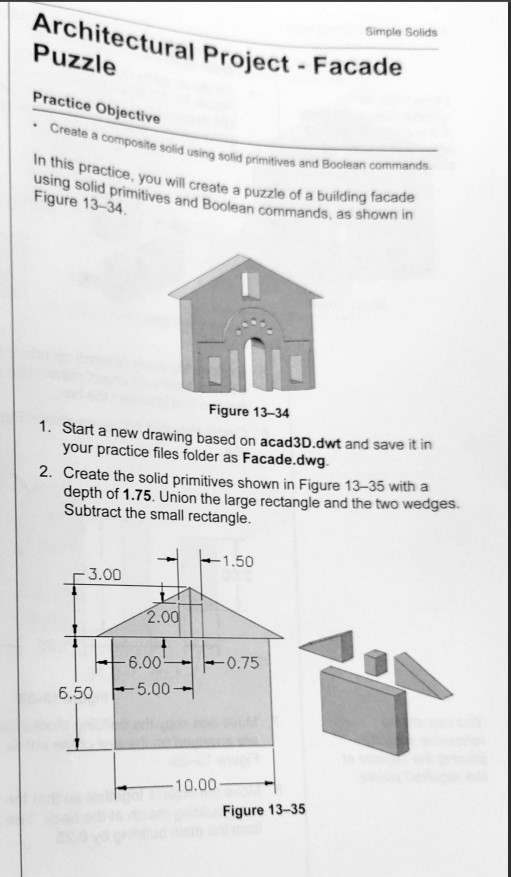
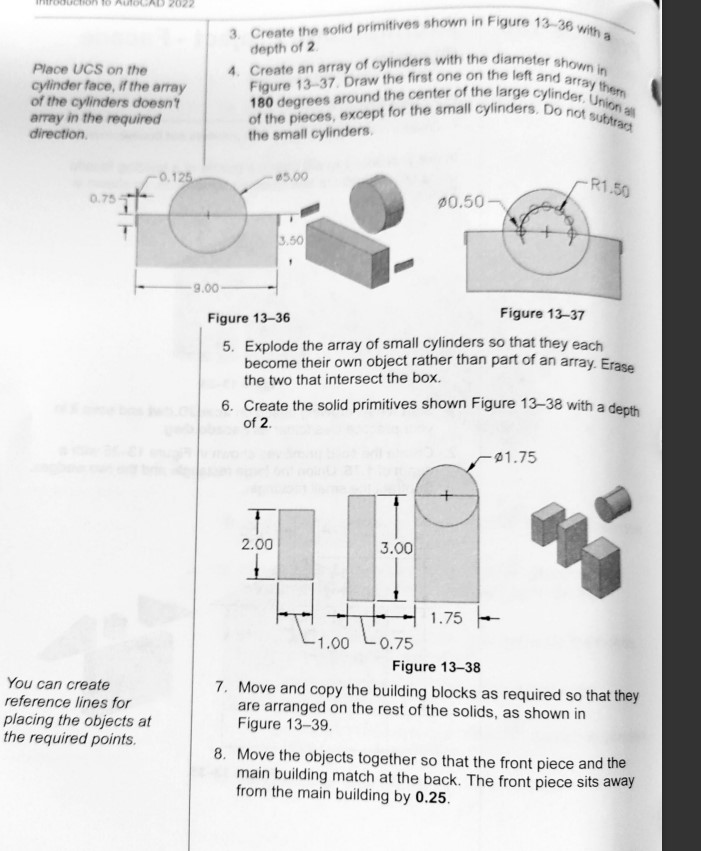
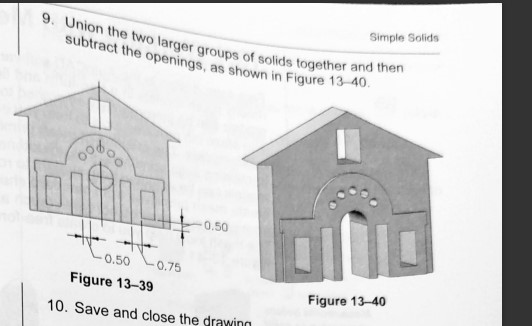
Simple Solids Architectural Project - Facade Puzzle Practice Objective . Create a composite solid using solid primitives and Boolean commands. In this practice, you will create a puzzle of a building facade using solid primitives and Boolean commands, as shown in Figure 13-34. Figure 13-34 1. Start a new drawing based on acad3D.dwt and save it in your practice files folder as Facade.dwg. 2. Create the solid primitives shown in Figure 13-35 with a depth of 1.75. Union the large rectangle and the two wedges. Subtract the small rectangle. -1.50 3.00 2.00 6.00 -- - 0.75 6.50 -5.00 10.00 Figure 13-353. Create the solid primitives shown in Figure 13-36 with a depth of 2 Place UCS on the 4. Create an array of cylinders with the diameter shown cylinder face, if the array Figure 13-37. Draw the first one on the left and array then of the cylinders doesn't 180 degrees around the center of the large cylinder. Union array in the required Of the pieces, except for the small cylinders. Do not subtract direction. the small cylinders. -0.125 $5.00 -R1.50 0.75 5-K- $0.50 3.50 -9.00 Figure 13-36 Figure 13-37 5. Explode the array of small cylinders so that they each become their own object rather than part of an array. Erase the two that intersect the box. 6. Create the solid primitives shown Figure 13-38 with a depth of 2. 01.75 2.00 3.00 - 1.75 1.00 - 0.75 Figure 13-38 You can create 7. Move and copy the building blocks as required so that they reference lines for are arranged on the rest of the solids, as shown in placing the objects at Figure 13-39. the required points. 8. Move the objects together so that the front piece and the main building match at the back. The front piece sits away from the main building by 0.25Simple Solids 9. Union the two larger groups of solids together and then subtract the openings, as shown in Figure 13-40. 0.50 0.50 0.75 Figure 13-39 Figure 13-40 10. Save and close the drawing
Step by Step Solution
There are 3 Steps involved in it

Get step-by-step solutions from verified subject matter experts
 Study Help