







Question: Simulation Project 1 Excel Worksheet for Long - Term Savings Name _ _ _ _ _ _ _ _ _ _ _ _ _ _
Simulation Project
Excel Worksheet for LongTerm Savings
Name
What you need to do in this project:
Develop an Excel spreadsheet for calculating personal longterm savings,
Do calculations by using your spreadsheet, and record the results in the Table of Results on the next page.
Save the Excel Template to your computer:
In Blackboard, Open the template of the Excel spreadsheet, TemplateProject ; and then save it Save as in your computer as an Excel file xls or xlsx with the following new name:
your nameProject for example, JohnSmithProject
Develop your spreadsheet based on this template in your computer.
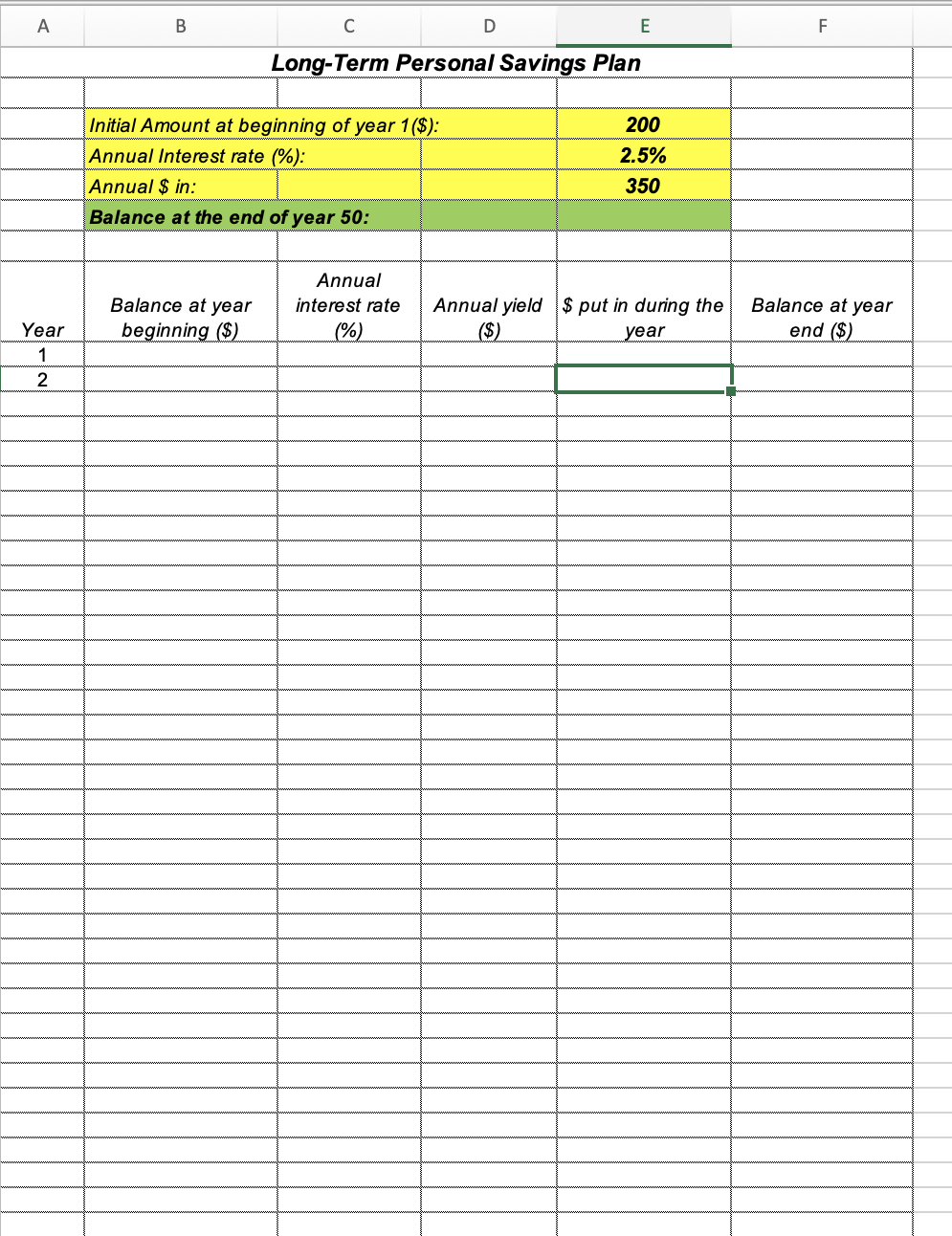
The Template for Project :
Guidelines and Notes:
Your worksheet should do the calculations up to year
Make sure of understanding meanings of the columns in the Template, as well as the relationship among the columns.
In the finished worksheet, you enter values in cells Einitial amount Einterest rate and Eannual $ in the balance at the end of year will show in cell E
In the template, the numbers in cells E E and E are just arbitrary examples.
Use Excel formulas or Excel functions to let Excel do all calculations, rather than doing calculations by hand or your calculators.
Use relative or absolute cell addresses as far as possible, rather than specific numbers, in a formula or a function to facilitate the Excel worksheet generation.
Start each formula with an equality sign For example, F; BC
Use CopyPaste in Excel as far as possible.
The key F is used for recalculating
Do Calculations by using your Excel worksheet and type the results in the blanks in the table below.
Table of the Results: Assume in each case $ amount taken out during the year
Balance at beginning of year Annual interest rate $ amount put in annually every year Balance at the end of year
$
$
$
$
$ $ie $ per month
$
$
$
$
$ $ie $ per month
$
$
$
$
$ $ie $ per month
Submit your works:
You need to submit two files of your works.
Submit this Word file, Project Instruction and Results in class, with your answers filled in the table above.
Email your Excel spreadsheet to me as an attachment of the email.
a The email title: ProjYourName, exProjJohnSmith.
b Put your Excel spreadsheet as the attachment.
c Your Excel files name: Your Name Project ex JohnSmithProject with extension xls or xlsx
d Your Excel file must be readable on Windows PC and run in MS Excel. If you use Apple computer, you need to convert your file to xlsx Excel file which can be opened on Windows.
For your reference:
Detailed Guidelines for doing the project Personal LongTerm Saving
In cell B enter $E$ which is the initial amount.
In cell C enter $E$ which is the annual interest rate. $signs are for fixing the cell address in lateron copying.
In cell D enter BC which calculates the annual yield of year
In cell E enter $E$ which is annual $ in$signs are for fixing the cell address in lateron copying.
In cell F enter BDE which is the balance at the end of year
In B enter Fie beginning balance of year ending balance of year
Copy C:F to C:F
Copy Row A:F all the way down to Row A:F which is for year
In E enter FTo bring ending balance of year up to this cell.
Carefully check the resulted worksheet, to avoid demonstrable or weird errors.
Now, you can change initial amount in E annual interest rate in E annual dollar in in E to see the result of year savings in E in various scenarios and plans.
Step by Step Solution
There are 3 Steps involved in it
1 Expert Approved Answer
Step: 1 Unlock

Question Has Been Solved by an Expert!
Get step-by-step solutions from verified subject matter experts
Step: 2 Unlock
Step: 3 Unlock
 Study Help