







Question: ***SingleyLinkedList class posted below question. Use the Testing and SingleyLinkedList class. (Testing class has the main method) Hint: Use the Testing class to start you
***SingleyLinkedList class posted below question. Use the Testing and SingleyLinkedList class. (Testing class has the main method)
Hint: Use the Testing class to start you off
Testing.java
import java.util.Iterator;
public class Testing { public static void main (String[] args){ SinglyLinkedList
SinglyLinkedList.java
import java.util.Collection; import java.util.Iterator; import java.util.List; import java.util.ListIterator;
public class SinglyLinkedList
protected class SinglyLinkedListIterator implements Iterator
@Override public boolean hasNext() { return (returnElementAndMove != null); }//hasNext
@Override public E next() { E theElement = returnElementAndMove.element; returnElementAndMove = returnElementAndMove.next; return theElement; } } @Override public boolean add(E e) { throw new UnsupportedOperationException();
}
@Override public void add(int index, E element) { throw new UnsupportedOperationException(); }
@Override public boolean addAll(Collection extends E> c) { throw new UnsupportedOperationException(); }
@Override public boolean addAll(int index, Collection extends E> c) { throw new UnsupportedOperationException(); }
@Override public void clear() { throw new UnsupportedOperationException(); }
@Override public boolean containsAll(Collection> c) { throw new UnsupportedOperationException(); }
@Override public int indexOf(Object o) { throw new UnsupportedOperationException(); }
//@Override //public Iterator
@Override public int lastIndexOf(Object o) { throw new UnsupportedOperationException(); }
@Override public ListIterator
@Override public ListIterator
@Override public boolean remove(Object o) { throw new UnsupportedOperationException(); }
@Override public E remove(int index) { throw new UnsupportedOperationException(); }
@Override public boolean removeAll(Collection> c) { throw new UnsupportedOperationException(); }
@Override public boolean retainAll(Collection> c) { throw new UnsupportedOperationException(); }
@Override public E set(int index, E element) { throw new UnsupportedOperationException(); }
@Override public List
@Override public Object[] toArray() { throw new UnsupportedOperationException(); }
@Override public
Thank you!
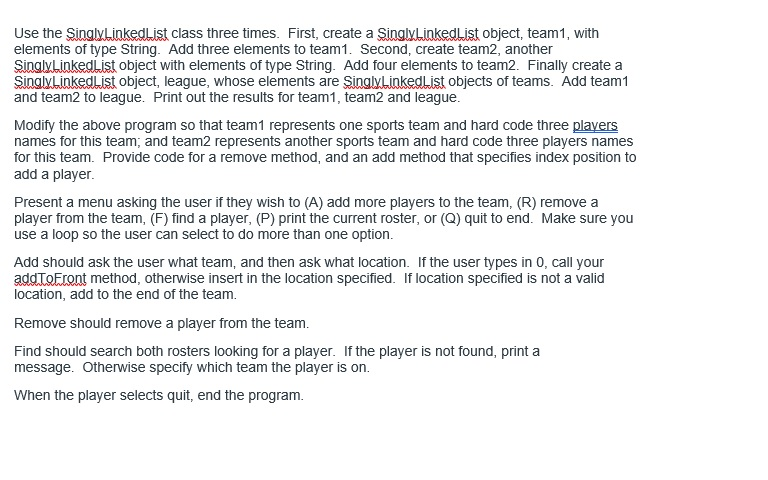
Use the Singly inkedList class three times. First, create a Singly inkedList object, team1, with elements of type String. Add three elements to team1. Second, create team2, another Singly LinkedList object with elements of type String. Add four elements to team2. Finally create a SinglyLinkedList object, league, whose elements are SinglyLinkedkist objects of teams. Add team1 and team2 to league. Print out the results for team1, team2 and league. Modify the above program so that team1 represents one sports team and hard code three players names for this team, and team2 represents another sports team and hard code three players names for this team. Provide code for a remove method, and an add method that specifies index position to add a player. Present a menu asking the user if they wish to (A) add more players to the team, (R) remove a player from the team, (F)find a player, (P) print the current roster, or (Q) quit to end. Make sure you use a loop so the user can select to do more than one option. Add should ask the user what team, and then ask what location. If the user types in 0, call your add U Front method, otherwise insert in the location specified. If location specified is not a valid location, add to the end of the team Remove should remove a player from the team Find should search both rosters looking for a player. If the player is not found, print a message. Otherwise specify which team the player is on When the player selects quit, end the program
Step by Step Solution
There are 3 Steps involved in it

Get step-by-step solutions from verified subject matter experts
 Study Help