







Question: slide_functions.py: I am gonna attach a table where it shows how to do the functions, the first two have to be completed while the other
slide_functions.py:
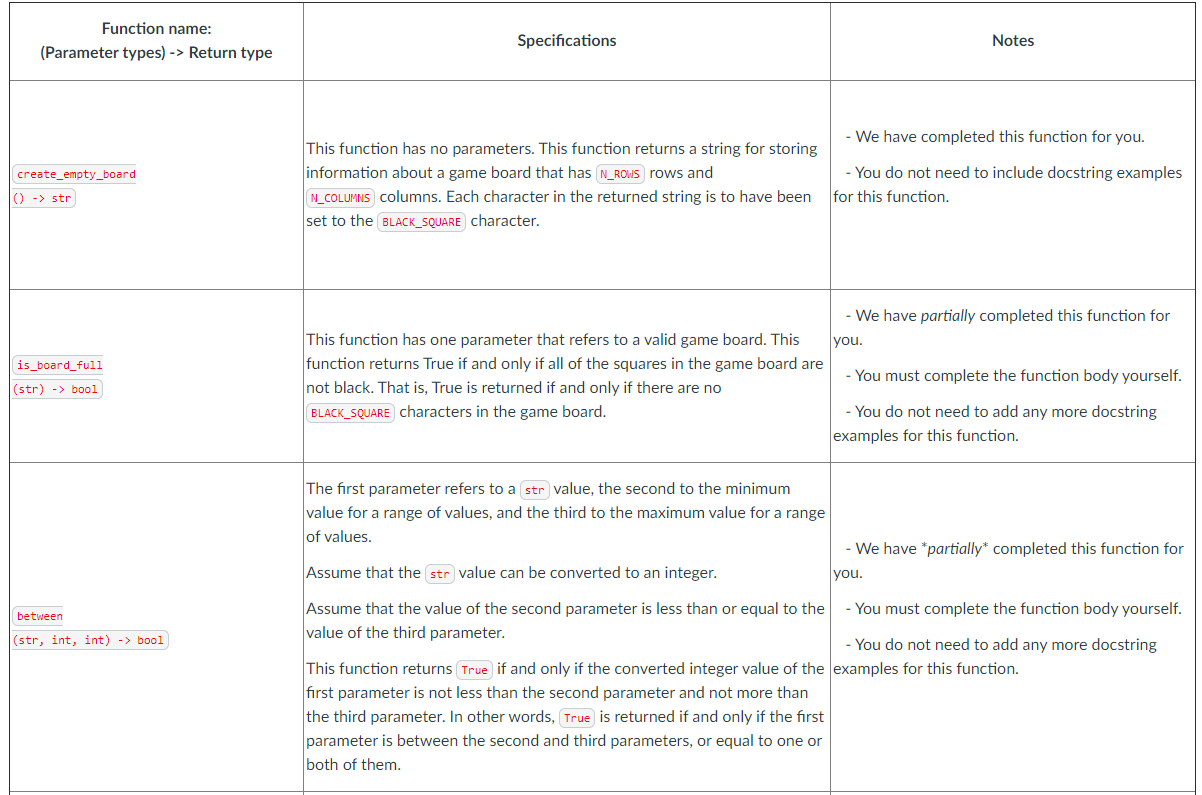
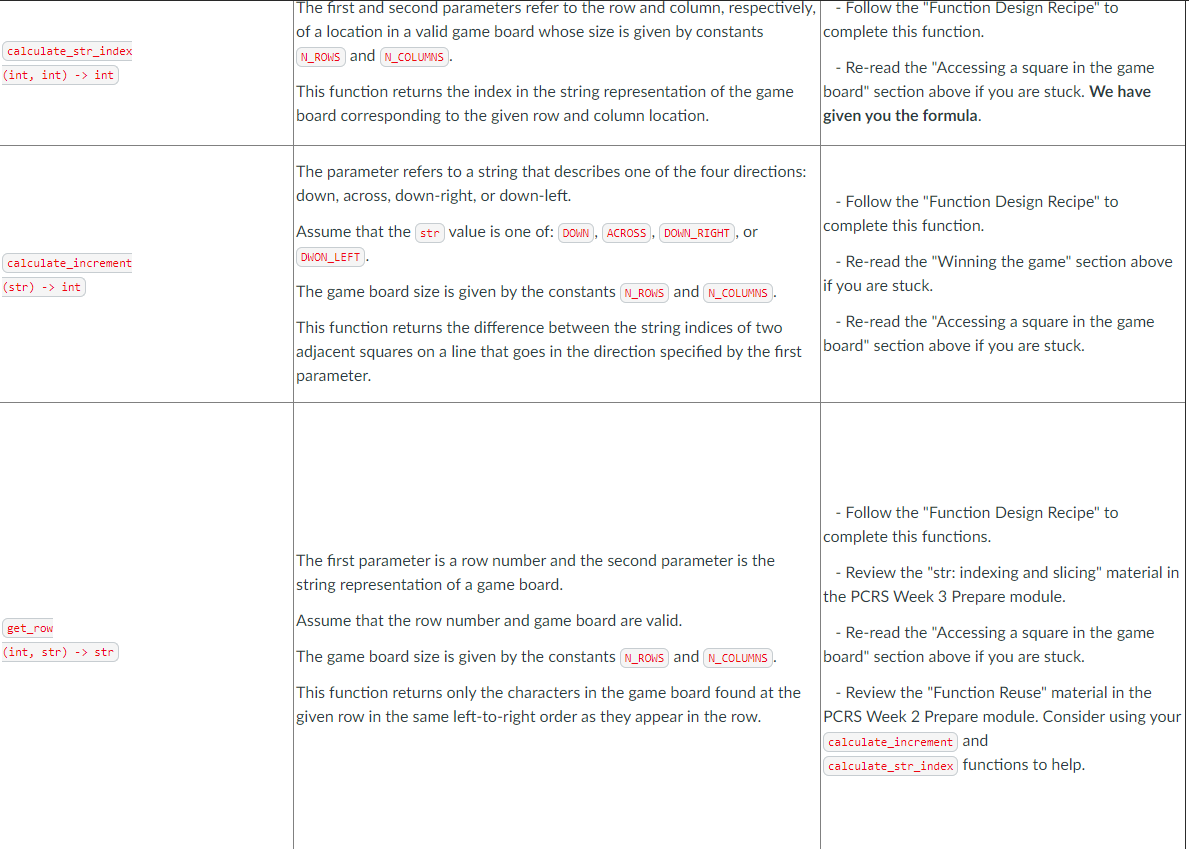
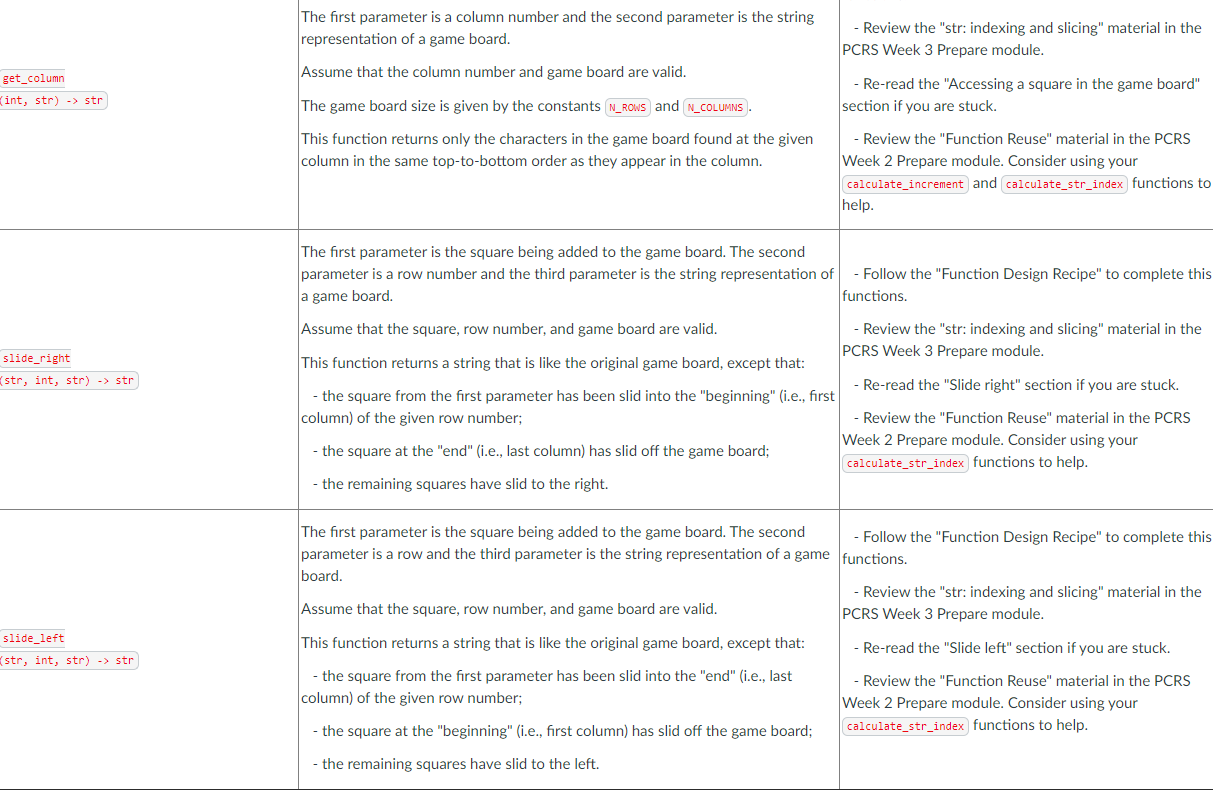
I am gonna attach a table where it shows how to do the functions, the first two have to be completed while the other functions must be done according to the instructions on the table (that means that from the "between" function it has to be done from scratch at the end:
Only write the functions where it says to do so. Thank you !
 """
"""
# The next several lines contain constants for you to use in your code. # You must use these constants instead of the values they refer to. # For example, use BLACK_SQUARE instead of '#'. # You may not need to use all of the constants provided. # Do not change the values these constants refer to.
N_COLUMNS = 5 # Number of columns in the game board N_ROWS = 4 # Number of rows in the game board
BLACK_SQUARE = '#' # The character that represents a black square RED_SQUARE = 'R' # The character that represents a red square YELLOW_SQUARE = 'Y' # The character that represents a blue square
ACROSS = 'across' # The horizontal direction DOWN = 'down' # The vertical direction DOWN_RIGHT = 'dright' # The diagonal direction: downward and rightward DOWN_LEFT = 'dleft' # The diagonal direction: downward and leftward
# This function is completed for you as an example and you must not change it. def create_empty_board() -> str: """Return a string representation of a game board of all empty symbols with N_ROWS rows and N_COLUMNS columns. """ return BLACK_SQUARE * N_ROWS * N_COLUMNS
def is_board_full(game_board: str) -> bool: """Return True if and only if the game_board is full.
A game_board is full when it does not contain any BLACK_SQUARE characters.
>>> is_board_full('R########YR####Y####') False >>> is_board_full('RYYRYYRYYRYYRYYRYYRY') True """ # Write your code for the is_board_full function here
def between(value: str, min_value: int, max_value: int) -> bool: """Return True if and only if value is between min_value and max_value, inclusive.
Preconditions: - value can be converted to an integer without error - min_value
>>> between('2', 0, 2) True >>> between('0', 2, 3) False """ # Write your code for the between function here.
# Write the rest of your functions here.
Function name: (Parameter types) -> Return type Specifications Notes We have completed this function for you. create_empty_board This function has no parameters. This function returns a string for storing information about a game board that has N_ROWS rows and N_COLUMNS columns. Each character in the returned string is to have been set to the BLACK_SQUARE character. - You do not need to include docstring examples for this function. () -> str is_board_full (str) -> bool - We have partially completed this function for This function has one parameter that refers to a valid game board. This you. function returns True if and only if all of the squares in the game board are not black. That is, True is returned if and only if there are no - You must complete the function body yourself. BLACK_SQUARE characters in the game board. - You do not need to add any more docstring examples for this function. The first parameter refers to a str value, the second to the minimum value for a range of values, and the third to the maximum value for a range of values. We have partially* completed this function for Assume that the str value can be converted to an integer. you. between (str, int, int) -> bool Assume that the value of the second parameter is less than or equal to the - You must complete the function body yourself. value of the third parameter. - You do not need to add any more docstring This function returns True if and only if the converted integer value of the examples for this function. first parameter is not less than the second parameter and not more than the third parameter. In other words, True is returned if and only if the first parameter is between the second and third parameters, or equal to one or both of them. calculate_str_index (int, int) -> int The first and second parameters refer to the row and column, respectively, - Follow the "Function Design Recipe" to of a location in a valid game board whose size is given by constants complete this function. N_ROWS and N_COLUMNS - Re-read the "Accessing a square in the game This function returns the index in the string representation of the game board" section above if you are stuck. We have board corresponding to the given row and column location. given you the formula. The parameter refers to a string that describes one of the four directions: down, across, down-right, or down-left. - Follow the "Function Design Recipe" to complete this function. Assume that the str value is one of: DOWN, ACROSS, DOWN_RIGHT, or DWON_LEFT. calculate_increment - Re-read the "Winning the game" section above if you are stuck. (str) -> int The game board size is given by the constants N_ROWS and N_COLUMNS This function returns the difference between the string indices of two adjacent squares on a line that goes in the direction specified by the first parameter. - Re-read the "Accessing a square in the game board" section above if you are stuck. - Follow the "Function Design Recipe" to complete this functions. The first parameter is a row number and the second parameter is the string representation of a game board. - Review the "str: indexing and slicing" material in the PCRS Week 3 Prepare module. Assume that the row number and game board are valid. get_row (int, str) -> str - Re-read the "Accessing a square in the game board" section above if you are stuck. The game board size is given by the constants N_ROWS and N_COLUMNS This function returns only the characters in the game board found at the given row in the same left-to-right order as they appear in the row. - Review the "Function Reuse" material in the PCRS Week 2 Prepare module. Consider using your calculate_increment and calculate_str_index functions to help. The first parameter is a column number and the second parameter is the string representation of a game board. - Review the "str: indexing and slicing" material in the PCRS Week 3 Prepare module. Assume that the column number and game board are valid. get_column (int, str) -> str - Re-read the "Accessing a square in the game board" section if you are stuck. The game board size is given by the constants N_ROWS and N_COLUMNS This function returns only the characters in the game board found at the given column in the same top-to-bottom order as they appear in the column. - Review the "Function Reuse" material in the PCRS Week 2 Prepare module. Consider using your calculate_increment and calculate_str_index functions to help. The first parameter is the square being added to the game board. The second parameter is a row number and the third parameter is the string representation of - Follow the "Function Design Recipe" to complete this a game board. functions. slide_right (str, int, str) -> str Assume that the square, row number, and game board are valid. Review the "str: indexing and slicing" material in the PCRS Week 3 Prepare module. This function returns a string that is like the original game board, except that: - Re-read the "Slide right" section if you are stuck. - the square from the first parameter has been slid into the "beginning" (i.e., first column) of the given row number; - Review the "Function Reuse" material in the PCRS Week 2 Prepare module. Consider using your - the square at the "end" (i.e., last column) has slid off the game board; calculate_str_index functions to help. - the remaining squares have slid to the right. slide_left (str, int, str) -> str The first parameter is the square being added to the game board. The second - Follow the "Function Design Recipe" to complete this parameter is a row and the third parameter is the string representation of a game functions. board. - Review the "str: indexing and slicing" material in the Assume that the square, row number, and game board are valid. PCRS Week 3 Prepare module. This function returns a string that is like the original game board, except that: - Re-read the "Slide left" section if you are stuck. - the square from the first parameter has been slid into the "end" (i.e., last - Review the "Function Reuse" material in the PCRS column) of the given row number; Week 2 Prepare module. Consider using your - the square at the "beginning" (i.e., first column) has slid off the game board; calculate_str_index functions to help. - the remaining squares have slid to the left. Function name: (Parameter types) -> Return type Specifications Notes We have completed this function for you. create_empty_board This function has no parameters. This function returns a string for storing information about a game board that has N_ROWS rows and N_COLUMNS columns. Each character in the returned string is to have been set to the BLACK_SQUARE character. - You do not need to include docstring examples for this function. () -> str is_board_full (str) -> bool - We have partially completed this function for This function has one parameter that refers to a valid game board. This you. function returns True if and only if all of the squares in the game board are not black. That is, True is returned if and only if there are no - You must complete the function body yourself. BLACK_SQUARE characters in the game board. - You do not need to add any more docstring examples for this function. The first parameter refers to a str value, the second to the minimum value for a range of values, and the third to the maximum value for a range of values. We have partially* completed this function for Assume that the str value can be converted to an integer. you. between (str, int, int) -> bool Assume that the value of the second parameter is less than or equal to the - You must complete the function body yourself. value of the third parameter. - You do not need to add any more docstring This function returns True if and only if the converted integer value of the examples for this function. first parameter is not less than the second parameter and not more than the third parameter. In other words, True is returned if and only if the first parameter is between the second and third parameters, or equal to one or both of them. calculate_str_index (int, int) -> int The first and second parameters refer to the row and column, respectively, - Follow the "Function Design Recipe" to of a location in a valid game board whose size is given by constants complete this function. N_ROWS and N_COLUMNS - Re-read the "Accessing a square in the game This function returns the index in the string representation of the game board" section above if you are stuck. We have board corresponding to the given row and column location. given you the formula. The parameter refers to a string that describes one of the four directions: down, across, down-right, or down-left. - Follow the "Function Design Recipe" to complete this function. Assume that the str value is one of: DOWN, ACROSS, DOWN_RIGHT, or DWON_LEFT. calculate_increment - Re-read the "Winning the game" section above if you are stuck. (str) -> int The game board size is given by the constants N_ROWS and N_COLUMNS This function returns the difference between the string indices of two adjacent squares on a line that goes in the direction specified by the first parameter. - Re-read the "Accessing a square in the game board" section above if you are stuck. - Follow the "Function Design Recipe" to complete this functions. The first parameter is a row number and the second parameter is the string representation of a game board. - Review the "str: indexing and slicing" material in the PCRS Week 3 Prepare module. Assume that the row number and game board are valid. get_row (int, str) -> str - Re-read the "Accessing a square in the game board" section above if you are stuck. The game board size is given by the constants N_ROWS and N_COLUMNS This function returns only the characters in the game board found at the given row in the same left-to-right order as they appear in the row. - Review the "Function Reuse" material in the PCRS Week 2 Prepare module. Consider using your calculate_increment and calculate_str_index functions to help. The first parameter is a column number and the second parameter is the string representation of a game board. - Review the "str: indexing and slicing" material in the PCRS Week 3 Prepare module. Assume that the column number and game board are valid. get_column (int, str) -> str - Re-read the "Accessing a square in the game board" section if you are stuck. The game board size is given by the constants N_ROWS and N_COLUMNS This function returns only the characters in the game board found at the given column in the same top-to-bottom order as they appear in the column. - Review the "Function Reuse" material in the PCRS Week 2 Prepare module. Consider using your calculate_increment and calculate_str_index functions to help. The first parameter is the square being added to the game board. The second parameter is a row number and the third parameter is the string representation of - Follow the "Function Design Recipe" to complete this a game board. functions. slide_right (str, int, str) -> str Assume that the square, row number, and game board are valid. Review the "str: indexing and slicing" material in the PCRS Week 3 Prepare module. This function returns a string that is like the original game board, except that: - Re-read the "Slide right" section if you are stuck. - the square from the first parameter has been slid into the "beginning" (i.e., first column) of the given row number; - Review the "Function Reuse" material in the PCRS Week 2 Prepare module. Consider using your - the square at the "end" (i.e., last column) has slid off the game board; calculate_str_index functions to help. - the remaining squares have slid to the right. slide_left (str, int, str) -> str The first parameter is the square being added to the game board. The second - Follow the "Function Design Recipe" to complete this parameter is a row and the third parameter is the string representation of a game functions. board. - Review the "str: indexing and slicing" material in the Assume that the square, row number, and game board are valid. PCRS Week 3 Prepare module. This function returns a string that is like the original game board, except that: - Re-read the "Slide left" section if you are stuck. - the square from the first parameter has been slid into the "end" (i.e., last - Review the "Function Reuse" material in the PCRS column) of the given row number; Week 2 Prepare module. Consider using your - the square at the "beginning" (i.e., first column) has slid off the game board; calculate_str_index functions to help. - the remaining squares have slid to the left
Step by Step Solution
There are 3 Steps involved in it

Get step-by-step solutions from verified subject matter experts
 Study Help