







Question: So I am coding a recursive drawing with arcs that looks some what like a yin yang kind of thing. It almost comes out the
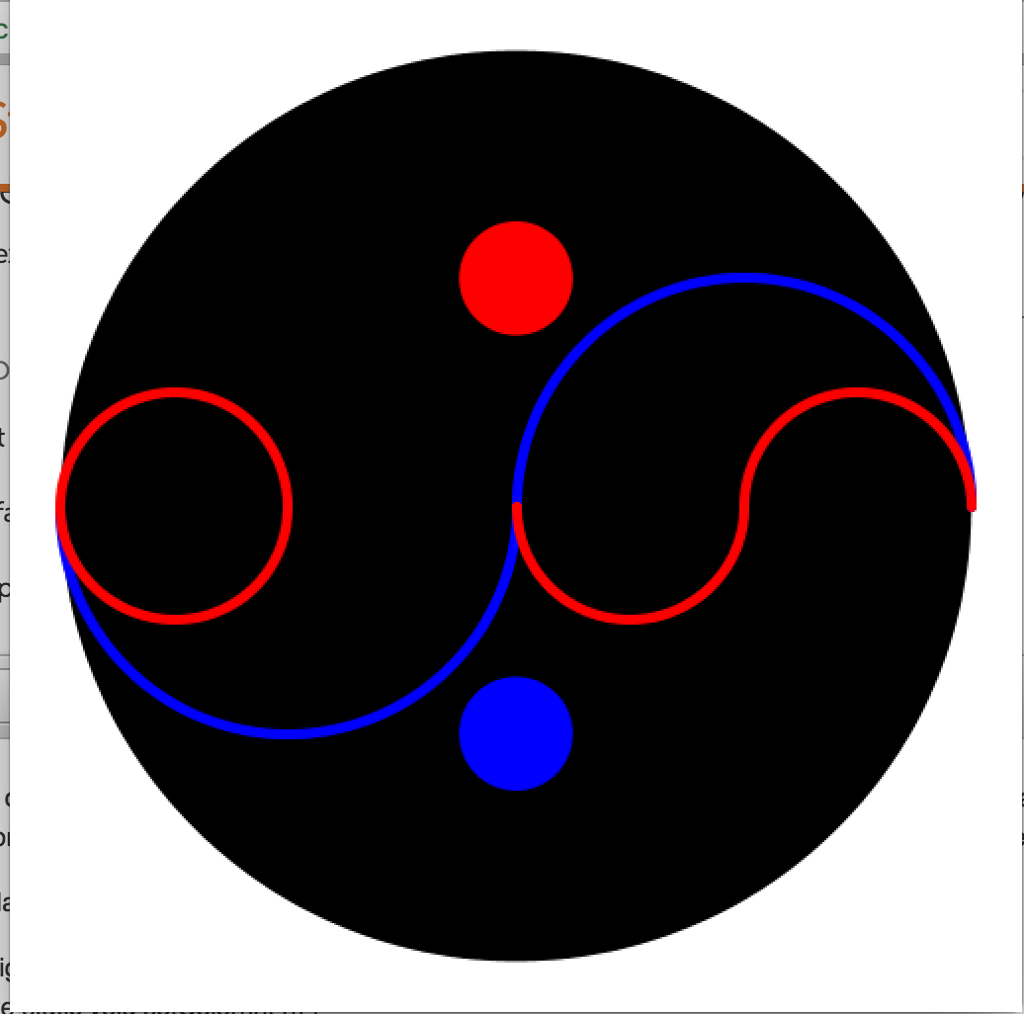
So I am coding a recursive drawing with arcs that looks some what like a yin yang kind of thing. It almost comes out the way I want it to look, except one of the arcs on the left keeps overlapping with the flipped arc to make it look like a circle. How do I fix this? Thank you.
public class Art {
// Height of an equilateral triangle whose sides are of the specified length. private static void setColor(int n) { if (n
// Draws an arc (half circle) that is half the circle's radius private static void drawArc(double x, double y, double radius, double angle1, double angle2) { StdDraw.arc(x, y, radius / 2, angle1, angle2); }
// Draws fractal arcs of order n // uses recursive level for color private static void fractal(int n, double x, double y, double radius, double angle1, double angle2) { if (n == 0) return; setColor(n - 1); drawArc(x + radius / 2, y, radius, angle1, angle2 / 2);
setColor(n - 1); drawArc(x - radius / 2, y, radius, angle2 / 2, angle1); fractal(n - 1, x + radius / 2, y, radius / 2, angle1, angle2); fractal(n - 1, x - radius / 2, y, radius / 2, angle2, angle1); }
// Takes an integer command-line argument n; // draws the outline of an circle of radius 0.45; // whose center is at (0.5, 0.5) // draws a fractal set of arcs of order n that fits inside the circle. public static void main(String[] args) { int n = Integer.parseInt(args[0]); double radius = 0.45; // center of circle double x = 0.5; double y = 0.5; double angle1 = 0; double angle2 = 360; StdDraw.setPenRadius(0.01); StdDraw.setPenColor(StdDraw.BLACK); StdDraw.filledCircle(x, y, radius); StdDraw.setPenColor(StdDraw.RED); StdDraw.filledCircle(x, y + radius / 2, radius / 8); StdDraw.setPenColor(StdDraw.BLUE); StdDraw.filledCircle(x, y - radius / 2, radius / 8); Art.fractal(n, x, y, radius, angle1, angle2); } }
Step by Step Solution
There are 3 Steps involved in it

Get step-by-step solutions from verified subject matter experts
 Study Help