







Question: So the problem Im having is I don't know how to make the user input answer equal to the picture thats being displayed and that
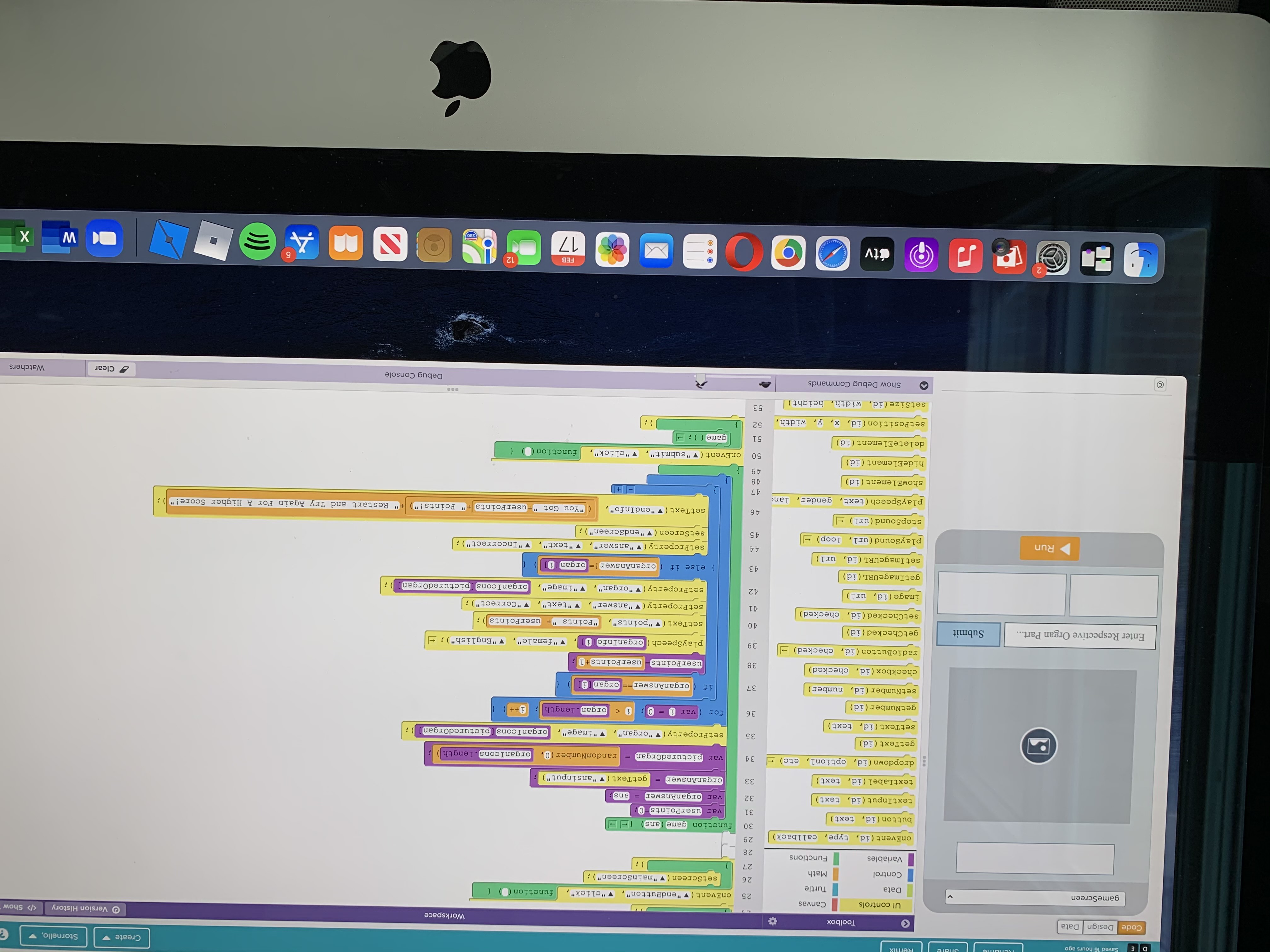
So the problem Im having is I don't know how to make the user input answer equal to the picture thats being displayed and that makes the whole app not work
And I basically need is a way to make the user input equal the respective image and Ill be good, for example, an image of the hippocampus shows if the user types in hippocampus they get it right if not the game ends as they got it wrong
D E Saved 16 hours ago Remix Create Stornello, Code Design Data Toolbox Workspace UI controls Version History Canvas > Show gameScreen 25 onEvent ("endButton", "click", Data Turtle function 26 set Screen ( v "mainScreen"); Control Math 27 Variables Functions 28 onEvent (id, type, callback) 29 30 function game (ans button (id, text) 31 var userPoints 0; textInput (id, text) 32 var organAnswer ans: textLabel (id, text) 33 organAnswer getText "ansinput") dropdown (id, optioni, etc) 34 var picturedOrgan = randomNumber (0, organIcons.length) getText (id) 35 set Property("organ", "image", organIcons [picturedOrgani setText (id, text) i 36 for var 0 getNumber(id) organ.length; i++ setNumber(id, number) 37 if ( organAnswer organ (1) checkbox (id, checked) 38. user Points user Points +1; radioButton (id, checked) || 39 playSpeech ( organInfo i "female", Enter Respective Organ Part... "English"); - Submit getChecked (id) 40 setText ( "points", "Points "+ userPoints i setChecked (id, checked) 41 set Property( "answer". "text" V "Correct"); image (id, url) 42 setProperty("organ", "image", organIcons [picturedOrgan] i getImageURL (id) 43 else if (organAnswer != organi setImageURL (id, url) Run 44 "text", playSound (url, loop) = set Property (V "answer", setScreen ( "endScreen"); "Incorrect"); 45 stopSound (url) - 46 setText ("endInfo", "You Got "+user Points + Points!") playSpeech (text, gender, lan Restart and Try Again For A Higher Score!" ); 47 + showElement(id) 48 49 hideElement(id) 50 onEvent("submit", "click", function deleteElement(id) 51 game (); set Position (id, x, y, width, 52 i setSize (id, width, height) 53 Show Debug Commands Debug Console 0 Clear Watchers FEB 12 tv DO 5 TIL 17 S WWW (CI 280 W X D E Saved 16 hours ago Remix Create Stornello, Code Design Data Toolbox Workspace UI controls Version History Canvas > Show gameScreen 25 onEvent ("endButton", "click", Data Turtle function 26 set Screen ( v "mainScreen"); Control Math 27 Variables Functions 28 onEvent (id, type, callback) 29 30 function game (ans button (id, text) 31 var userPoints 0; textInput (id, text) 32 var organAnswer ans: textLabel (id, text) 33 organAnswer getText "ansinput") dropdown (id, optioni, etc) 34 var picturedOrgan = randomNumber (0, organIcons.length) getText (id) 35 set Property("organ", "image", organIcons [picturedOrgani setText (id, text) i 36 for var 0 getNumber(id) organ.length; i++ setNumber(id, number) 37 if ( organAnswer organ (1) checkbox (id, checked) 38. user Points user Points +1; radioButton (id, checked) || 39 playSpeech ( organInfo i "female", Enter Respective Organ Part... "English"); - Submit getChecked (id) 40 setText ( "points", "Points "+ userPoints i setChecked (id, checked) 41 set Property( "answer". "text" V "Correct"); image (id, url) 42 setProperty("organ", "image", organIcons [picturedOrgan] i getImageURL (id) 43 else if (organAnswer != organi setImageURL (id, url) Run 44 "text", playSound (url, loop) = set Property (V "answer", setScreen ( "endScreen"); "Incorrect"); 45 stopSound (url) - 46 setText ("endInfo", "You Got "+user Points + Points!") playSpeech (text, gender, lan Restart and Try Again For A Higher Score!" ); 47 + showElement(id) 48 49 hideElement(id) 50 onEvent("submit", "click", function deleteElement(id) 51 game (); set Position (id, x, y, width, 52 i setSize (id, width, height) 53 Show Debug Commands Debug Console 0 Clear Watchers FEB 12 tv DO 5 TIL 17 S WWW (CI 280 W X
Step by Step Solution
There are 3 Steps involved in it

Get step-by-step solutions from verified subject matter experts
 Study Help