







Question: Solve it by Excel. A) Create the following table in a sheet. B) Set the background color of the corresponding cell to red if the
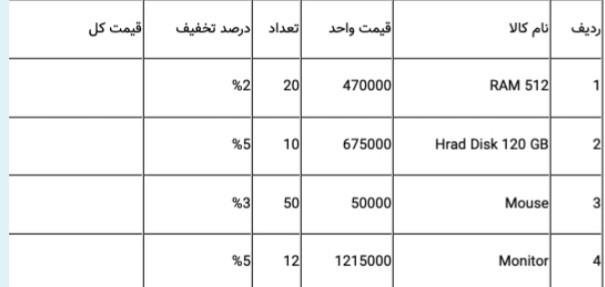
Solve it by Excel. A) Create the following table in a sheet.
B) Set the background color of the corresponding cell to red if the number in the field is less than 15.
C) Create a new column called the date between the row column and the product name.
D) Adjust the date data type and discount percentage correctly. first row of the table respectively:(Row, Product name, Price, Quantity, Discount percentage, Total price)
Please solve it in an Excel file that I could download.
%21 20 470000 RAM 512 1 %5 10 675000 Hrad Disk 120 GB N %3 50 50000 Mouse 31 %5 5 121 1215000 Monitor 4
Step by Step Solution
There are 3 Steps involved in it
1 Expert Approved Answer
Step: 1 Unlock

Question Has Been Solved by an Expert!
Get step-by-step solutions from verified subject matter experts
Step: 2 Unlock
Step: 3 Unlock
 Study Help