







Question: solve it by java please. 8:15 1 of 3 BENZEIT UNIVERSITY Final Project - Phase II Be Ready for the second phase. It depends on
solve it by java please.
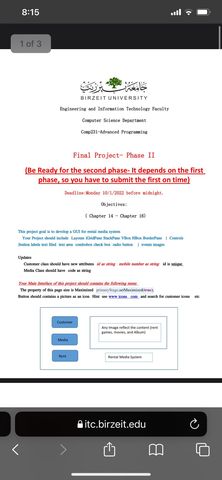
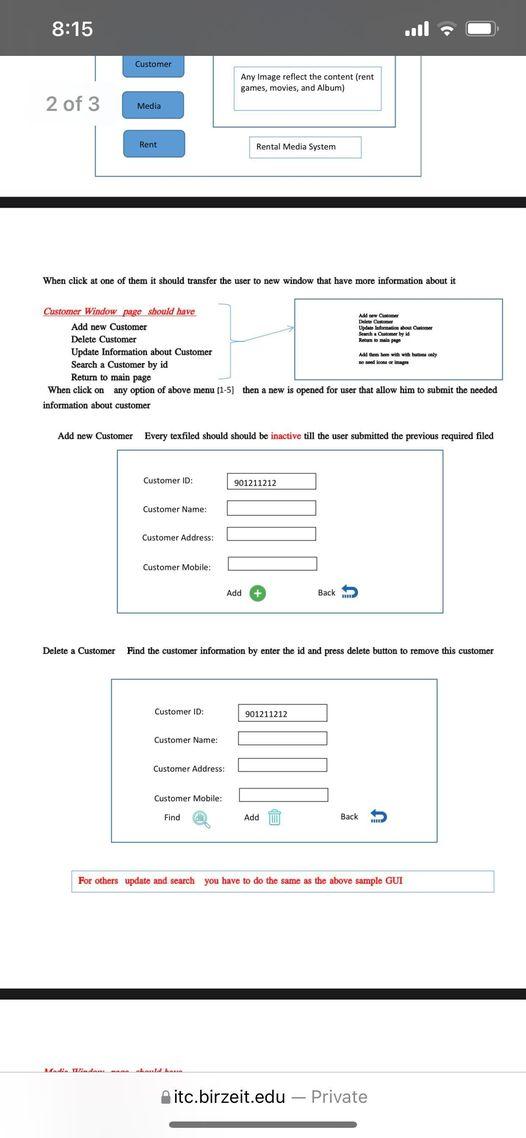
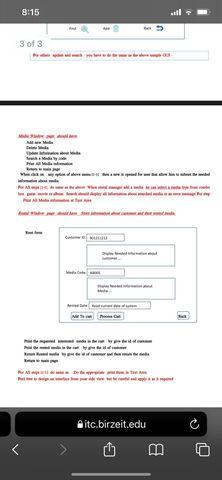
8:15 1 of 3 BENZEIT UNIVERSITY Final Project - Phase II Be Ready for the second phase. It depends on the first phase, so you have to submit the first on time) seite | (Barrer 14 - Then itc.birzeit.edu 8:15 ..11 Customer Any Image reflect the content (rent games, movies, and Album) 2 of 3 Media Rent Rental Media System When click at one of them it should transfer the user to new window that have more information about it Customer Window page should have A www De Add new Customer pe Swiaty Delete Customer Rompeye Update Information about Customer Search a Customer by id Return to main page When click on any option of above menu 1-5 then a new is opened for user that allow him to submit the needed information about customer Add new Customer Every texfiled should should be inactive till the user submitted the previous required filed Customer ID: 901211212 Customer Name: Customer Address: Customer Mobile: Add + Back Delete a Customer Find the customer information by enter the id and press delete button to remove this customer Customer ID: 901211212 Customer Name: Customer Address: Customer Mobile Find Add Back For others update and search you have to do the same as the above sample GUI itc.birzeit.edu - Private 8:15 ull 3 of 3 ce SMS Sitc.birzeit.edu o 8:15 1 of 3 BENZEIT UNIVERSITY Final Project - Phase II Be Ready for the second phase. It depends on the first phase, so you have to submit the first on time) seite | (Barrer 14 - Then itc.birzeit.edu 8:15 ..11 Customer Any Image reflect the content (rent games, movies, and Album) 2 of 3 Media Rent Rental Media System When click at one of them it should transfer the user to new window that have more information about it Customer Window page should have A www De Add new Customer pe Swiaty Delete Customer Rompeye Update Information about Customer Search a Customer by id Return to main page When click on any option of above menu 1-5 then a new is opened for user that allow him to submit the needed information about customer Add new Customer Every texfiled should should be inactive till the user submitted the previous required filed Customer ID: 901211212 Customer Name: Customer Address: Customer Mobile: Add + Back Delete a Customer Find the customer information by enter the id and press delete button to remove this customer Customer ID: 901211212 Customer Name: Customer Address: Customer Mobile Find Add Back For others update and search you have to do the same as the above sample GUI itc.birzeit.edu - Private 8:15 ull 3 of 3 ce SMS Sitc.birzeit.edu o
Step by Step Solution
There are 3 Steps involved in it

Get step-by-step solutions from verified subject matter experts
 Study Help