







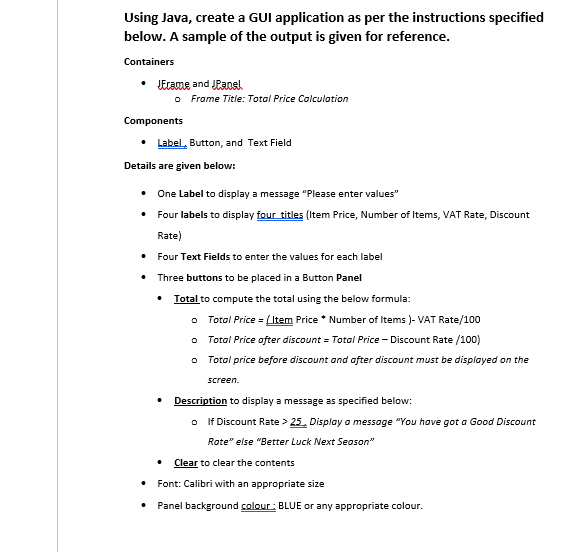
Question: solve THE GUI Qustion in java Using Java, create a GUI application as per the instructions specified below. A sample of the output is given
solve THE GUI Qustion in java
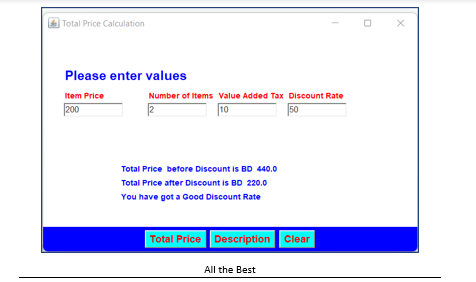
Using Java, create a GUI application as per the instructions specified below. A sample of the output is given for reference. Containers - Jrrame and JParesh - Frame Titie: Total Price Colculation Components - Label, Button, and Text Field Details are given below: - One Label to display a message "Please enter values" - Four labels to display four titles (Item Price, Number of Items, VAT Rate, Discount Rate) - Four Text Fields to enter the values for each label - Three buttons to be placed in a Button Panel - Total to compute the total using the below formula: - Total Price = (Item Price * Number of Items ) - VAT Rate /100 - Total Price after discount = Total Price Discount Rate /100 ) - Total price before discount and after discount must be displayed on the screen. - Description to display a message as specified below: - If Discount Rate >25. Display o messoge "You have got a Good Discount Rote" else "Better Luck Next Seoson" - Clear to clear the contents - Font: Calibri with an appropriate size - Panel background colour: BLUE or any appropriate colour. Total Price Calculation Please enter values Item Price Number of Items Value Added Tax Total Price before Discount is BD 440.0 Total Price after Discount is BD 220.0 You have got a Good Discount Rate
Step by Step Solution
There are 3 Steps involved in it

Get step-by-step solutions from verified subject matter experts
 Study Help