







Question: can you solvie quick please Using Java, create a GUI application as per the instructions specified below. A sample of the output is given for
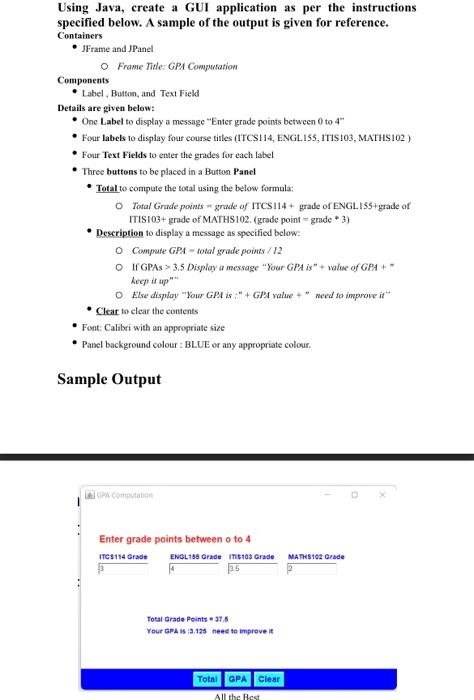
Using Java, create a GUI application as per the instructions specified below. A sample of the output is given for reference. Containers - JFrame and JPanel Frame Tide: GPA Computation Components - Label, Button, and Text Field Details are given below: - One Label to display a message "Enter grade points between 0 to 4 - Four labels to desplay four course titles (ITCS114, ENGL.155, ITIS103, MNTHS102) - Four Test Fields to enter the grades for each label - Three buttons to be placed in a Button Panel - Total to compute the total using the beloss formula: O Total Grade points = grade of ITCS 114+ grade of ENGLIS5+grade of ITIS103+ grade of MATHS102. (grade point = grade +3 ) Deccription to display a message as specified below: Compate GPA = total gnade points /12 If GPAs >3,5 Display a message "Your GPA is" + value of GPA+ " keep it app" Else display "Your GPA is +" + GPA value + " need to improve it" - Clear to clear the conients - Font: Calibri with an appropriate size - Panel background colour : BLUE or any appropriate colour. Sample Output Lit cipar Compotanting Enter grade points between o to 4
Step by Step Solution
There are 3 Steps involved in it

Get step-by-step solutions from verified subject matter experts
 Study Help