







Question: Solve using Excel! Please Show all screenshots and Formulas for this! 19. Use the six approaches from Example 2.10 to determine to the nearest year
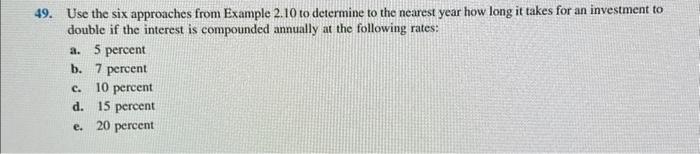
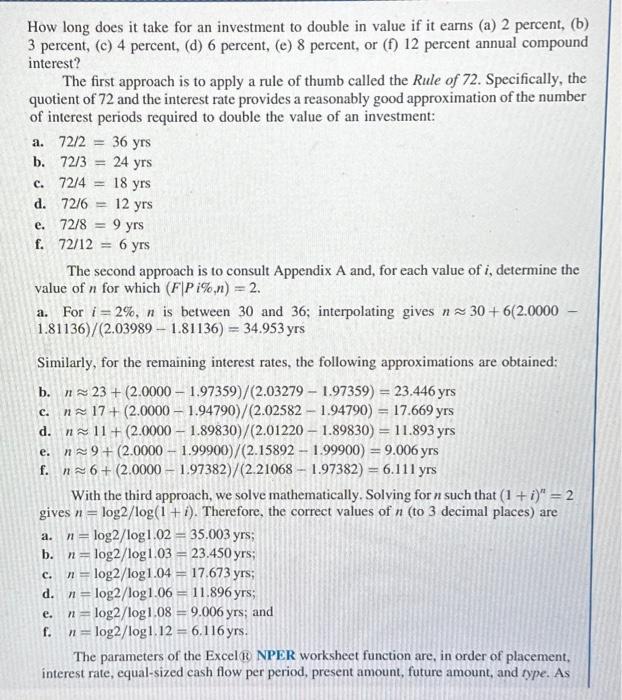
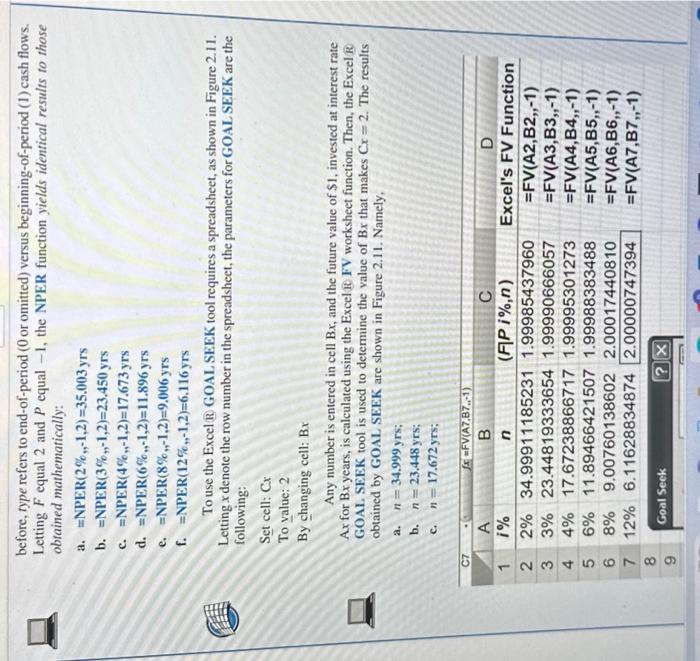
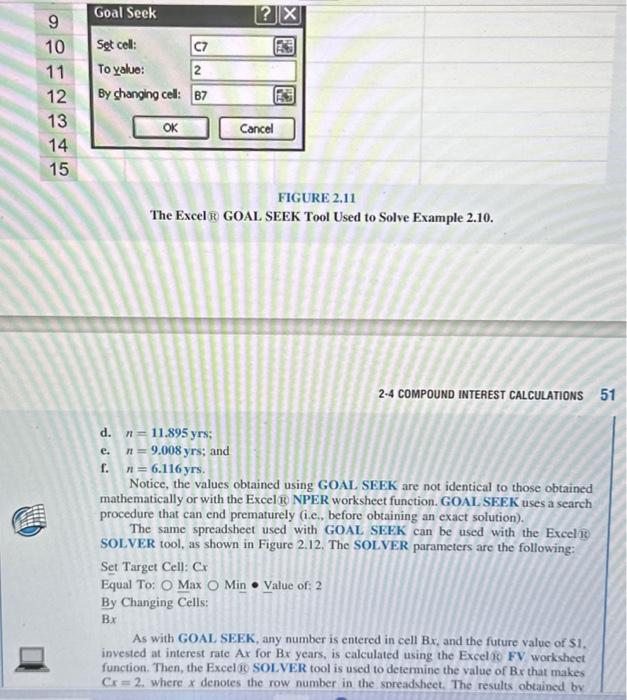
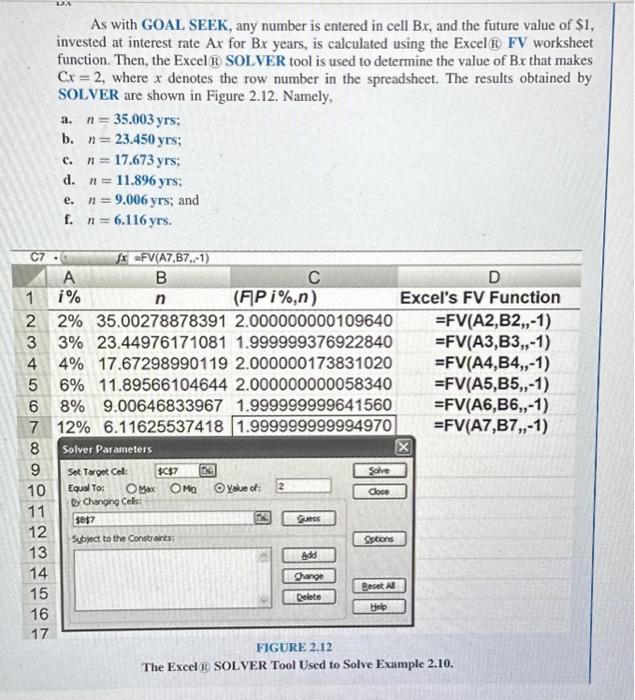
19. Use the six approaches from Example 2.10 to determine to the nearest year how long it takes for an investment to double if the interest is compounded annually at the following rates: a. 5 percent b. 7 percent c. 10 percent d. 15 percent e. 20 percent As with GOAL SEEK, any number is entered in cell Bx, and the future value of $1, invested at interest rate Ax for Bx years, is calculated using the Excel R FV worksheet function. Then, the Excel B SOLVER tool is used to determine the value of Bx that makes Cx=2, where x denotes the row number in the spreadsheet. The results obtained by SOLVER are shown in Figure 2.12. Namely, a. n=35.003yrs; b. n=23.450yrs; c. n=17.673yrs; d. n=11.896yrs; e. n=9.006yrs; and f. n=6.116yrs. The Excel R GOAL SEEK Tool Used to Solve Example 2.10. 2-4 COMPOUND INTEREST CALCULATIONS d. n=11.895yrs; e. n=9.008yrs; and f. n=6.116 yrs. Notice, the values obtained using GOAL SEEK are not identical to those obtained mathematically or with the Excel 18 NPER worksheet function. GOAL SEEK uses a search procedure that can end prematurely (i.c., before obtaining an exact solution). The same spreadsheet used with GOAL SEFK can be used with the Exceliti SOLVER tool, as shown in Figure 2.12. The SOLVER parameters are the following: Set Target Cell: Cx Equal To: Max Min Value of: 2 By Changing Cells: Bx As with GOAL SEEK, any number is entered in cell Bx, and the future value of SI, invested at interest rate Ax for Bx years, is calculated using the Excelof FV worksheet function. Then, the Excel 16 SOLVER tool is used to determine the value of Bx that makes Cx=2, where x denotes the row number in the spreadsheet. The results obtained by How long does it take for an investment to double in value if it earns (a) 2 percent, (b) 3 percent, (c) 4 percent, (d) 6 percent, (e) 8 percent, or (f) 12 percent annual compound interest? The first approach is to apply a rule of thumb called the Rule of 72. Specifically, the quotient of 72 and the interest rate provides a reasonably good approximation of the number of interest periods required to double the value of an investment: a. 72/2=36yrs b. 72/3=24yrs c. 72/4=18yrs d. 72/6=12 yrs e. 72/8=9yrs f. 72/12=6yrs The second approach is to consult Appendix A and, for each value of i, determine the value of n for which (FPi%,n)=2. a. For i=2%,n is between 30 and 36 ; interpolating gives n30+6(2.0000 1.81136)/(2.039891.81136)=34.953yrs Similarly, for the remaining interest rates, the following approximations are obtained: b. n23+(2.00001.97359)/(2.032791.97359)=23.446yrs c. n17+(2.00001.94790)/(2.025821.94790)=17.669yrs d. n11+(2.00001.89830)/(2.012201.89830)=11.893yrs e. n9+(2.00001.99900)/(2.158921.99900)=9.006yrs f. n6+(2.00001.97382)/(2.210681.97382)=6.111yrs With the third approach, we solve mathematically. Solving for n such that (1+i)n=2 gives n=log2/log(1+i). Therefore, the correct values of n (to 3 decimal places) are a. n=log2/log1.02=35.003yrs; b. n=log2/log1.03=23.450yrs; c. n=log2/log1.04=17.673yrs; d. n=log2/log1.06=11.896yrs; e. n=log2/log1.08=9.006yrs; and f. n=log2/log1.12=6.116yrs. The parameters of the Excel NPER worksheet function are, in order of placement, interest rate, equal-sized cash flow per period, present amount, future amount, and type. As before, type refers to end-of-period ( 0 or omitted) versus beginning-of-period ( 1 ) cash flows. Letting F equal 2 and P equal -1 , the NPER function yields identical results to those obtained mathematically: a. =NPER(2%,1,2)=35.003yrs b. =NPER(3%,1,2)=23.450yrs c. =NPER(4%,1,2)=17.673yrs d. =NPER(6%,1,2)=11.896yrs e. =NPER(8%,1,2)=9.006yrs f. =NPER(12%,1,2)=6,116yrs To use the Excel R GOAL SEEK tool requires a spreadsheet, as shown in Figure 2.11. Letting x denote the row number in the spreadsheet, the parameters for GOAL SEEK are the following: Set cell: Cx To value: 2 By changing cell: Bx Any number is entered in cell Bx, and the future value of $1, invested at interest rate Ax for Bx years, is calculated using the Excel 18 FV worksheet function. Then, the Excel R GOAL SEEK tool is used to determine the value of Bx that makes Cx=2. The results obtained by GOAL SEEK are shown in Figure 2.11. Namely, a. n=34.999yrs; b. n=23.448yrs
Step by Step Solution
There are 3 Steps involved in it

Get step-by-step solutions from verified subject matter experts
 Study Help