







Question: Sort a table on multiple ranges. Filter a Pivot Table. Go to the Project Budgets worksheet. The PivotTable on this worksheet lists the final cost
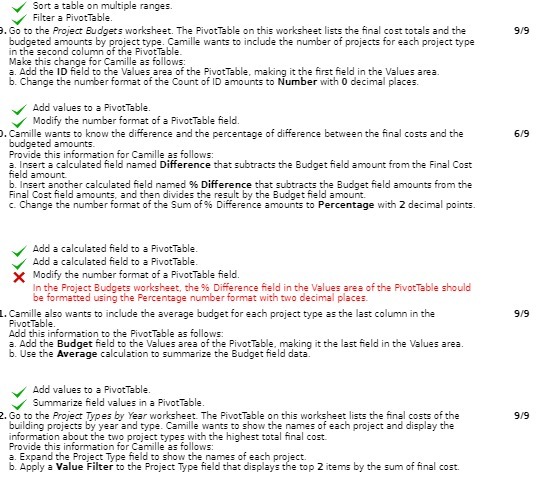
Sort a table on multiple ranges. Filter a Pivot Table. Go to the Project Budgets worksheet. The PivotTable on this worksheet lists the final cost totals and the 9/9 budgeted amounts by project type. Camille wants to include the number of projects for each project type in the second column of the PivotTable Make this change for Camille as follows: a. Add the ID field to the Values ares of the PivotTable, making it the first field in the Values area. b. Change the number format of the Count of ID amounts to Number with 0 decimal places. Add values to = PivotTable. `Modify the number formet of a Pivot Table field. Camille wants to know the difference and the percentage of difference between the final costs and the 6/9 budgeted amounts. Provide this information for Camille as follows: a. Insert a calculated field named Difference that subtracts the Budget field amount from the Final Cost field amount b. Insert another calculated field named % Difference that subtracts the Budget field amounts from the Final Cost field amounts, and then divides the result by the Budget field amount. c. Change the number format of the Sum of % Difference amounts to Percentage with 2 decimal points. Add a calculated field to a Pivot Table. Add a calculated field to a PivotTable. >
Step by Step Solution
There are 3 Steps involved in it

Get step-by-step solutions from verified subject matter experts
 Study Help