







Question: S&P Enterprises has provided data from the first three months of the year. The Controller has asked you to prepare the Cash Budget and the
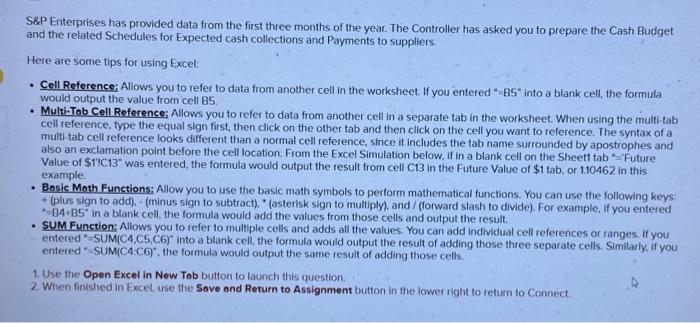
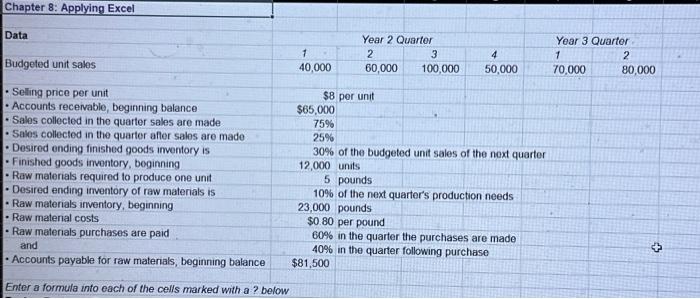
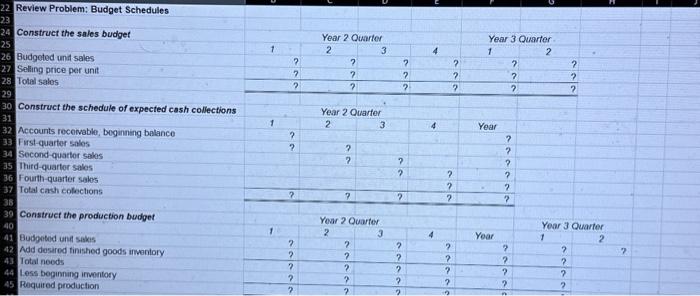
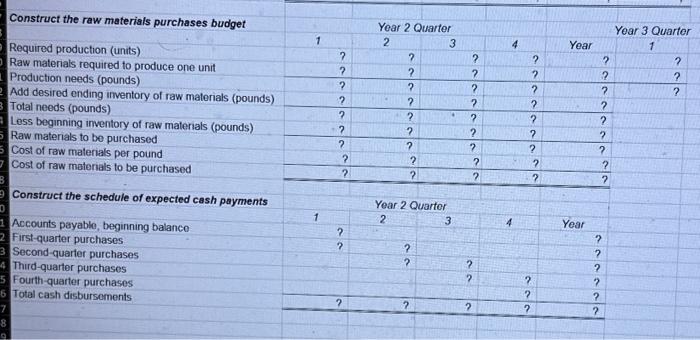
S\&P Enterprises has provided data from the first three months of the year. The Controller has asked you to prepare the Cash Budget and the related Schedules for Expected cash collections and Payments to suppliers. Here are some tips for using Excel: - Cell Reference; Allows you to refer to data from another cell in the worksheet. If you entered " B5 into a blank cell, the formula would output the value from cell B5. - Multi-Tab Cell Reference: Allows you to refer to data from another cell in a separate tab in the worksheet. When using the multi-tab cell reference, type the equal sign first, then click on the other tab and then click on the cell you want to reference. The syntax of a muiti-tab cell reference looks different than a normal cell reference, since it includes the tab name surrounded by apostrophes and also an exclamation point before the cell location. From the Excel Simulation below, if in a blank cell on the Sheet1 tab " -1 . Future Value of \$1'IC13* was entered, the formula would output the result from cell C13 in the Future Value of \$1 tab, or 1.10462 in this example. - Bosic Moth Functions; Allow you to use the basic math symbols to perform mathematical functions. You can use the following keys + (plus sign to add), - (minus sign to subtract), " (asterisk sign to multiply), and / (forward slash to divide). For example, If you entered - 84,B5 in a blank cell, the formula would add the values from those cells and output the result. - SUM Function: Allows you to refer to multiple cells and adds all the values, You can add individual cell references or ranges. If you entered "=SUM(C4,C5,C6)" into a blank cell, the formula would output the result of adding those three separate cells. Similarly, if you entered "-SUM(CA:C6)" the formula would output the same result of adding those cells. 1. Use the Open Excel in New Tab button to launch this question. 2 When finished in Excel, use the Save and Return to Assignment button in the lower right to return to Connect Chapter 8: Applying Excel Data Budgeted unit sales - Seling price per unit - Accounts recervable, begirning balance - Sales collected in the quarter sales are made - Sales collected in the quarter afler sales are made - Desired ending finished goods imventory is - Finished goods imvontory, beginning - Raw materials required to produce one unit - Desired ending irventory of raw materials is - Raw materials inventory, beginning - Raw material costs - Raw materials purchases are paid and - Accounts payable for raw materials, beginning balance \begin{tabular}{|c|c|c|c|} \hline \multicolumn{4}{|c|}{ Year 2 Quartor } \\ \hline 1 & 2 & 3 & 4 \\ \hline 40,000 & 60,000 & 100,000 & 50,000 \\ \hline \end{tabular} $8 per unit $65,000 75% 25% 30% of the budgeted unit sales of the noxt quarter 12,000 units 5 pounds 10% of the next quarter's production needs 23,000 pounds $0.80 per pound 60% in the quarter the purchases are made 40% in the quarter following purchase $81,500 Year 3 Quarter \begin{tabular}{ll} 1 & 2 \\ 70,000 & 80,000 \end{tabular} Enter a formula into each of the cells marked with a ? below Review Problem: Budget Schedules Construct the sales budget Budgoted und sales Selling price per unit Total sales Construct the schedule of expected cash collections Accounts receivable, beginning belance First-quarter solos Second-quartor sales Inird-quarter salos Fourth-quarter salos Total cach coloctions Construct the production budget Budgeted unif sakes Add desired tinished goods inventory Total noods Less beginning irmentory Required production \begin{tabular}{|c|c|c|c|c|c|c|} \hline \multirow{3}{*}{ Construct the raw materials purchases budget } & \multirow{2}{*}{\multicolumn{3}{|c|}{ Year 2 Quarter }} & \multirow[b]{3}{*}{4} & \multirow{2}{*}{\multicolumn{2}{|c|}{ Year 3 Quarter }} \\ \hline & & & & & & \\ \hline & 1 & 2 & 3 & & Year & 1 \\ \hline Required production (units) & ? & ? & ? & ? & ? & ? \\ \hline Raw materials required to produce one unit & ? & ? & ? & ? & ? & ? \\ \hline Production needs (pounds) & ? & ? & ? & ? & ? & ? \\ \hline Add desired ending inventory of raw materials (pounds) & ? & ? & ? & ? & ? & \\ \hline Total needs (pounds) & ? & ? & . ? & ? & ? & \\ \hline Less beginning inventory of raw materials (pounds) & ? & ? & ? & ? & ? & \\ \hline Raw materials to be purchased & ? & ? & ? & ? & ? & t. \\ \hline Cost of raw materials per pound & ? & ? & ? & ? & ? & \\ \hline \multirow{2}{*}{ Cost of raw materials to be purchased } & ? & ? & ? & ? & ? & \\ \hline & & & & & & \\ \hline \multirow{2}{*}{ Construct the schedule of expected cash payments } & \multicolumn{4}{|c|}{ Year 2 Quartor } & & \\ \hline & 1 & 2 & 3 & 4 & Year & \\ \hline Accounts payable, beginning balance & ? & & & 54 & ? & \\ \hline First-quarter purchases & ? & ? & & & ? & \\ \hline Second-quarter purchases & & ? & ? & & ? & \\ \hline Third-quarter purchases & & & ? & ? & ? & \\ \hline Fourth-quarter purchases & & & & ? & ? & \\ \hline Total cash disbursoments & ? & ? & ? & ? & ? & \\ \hline & & & & & & \\ \hline \end{tabular}
Step by Step Solution
There are 3 Steps involved in it

Get step-by-step solutions from verified subject matter experts
 Study Help