 Specifically part C.
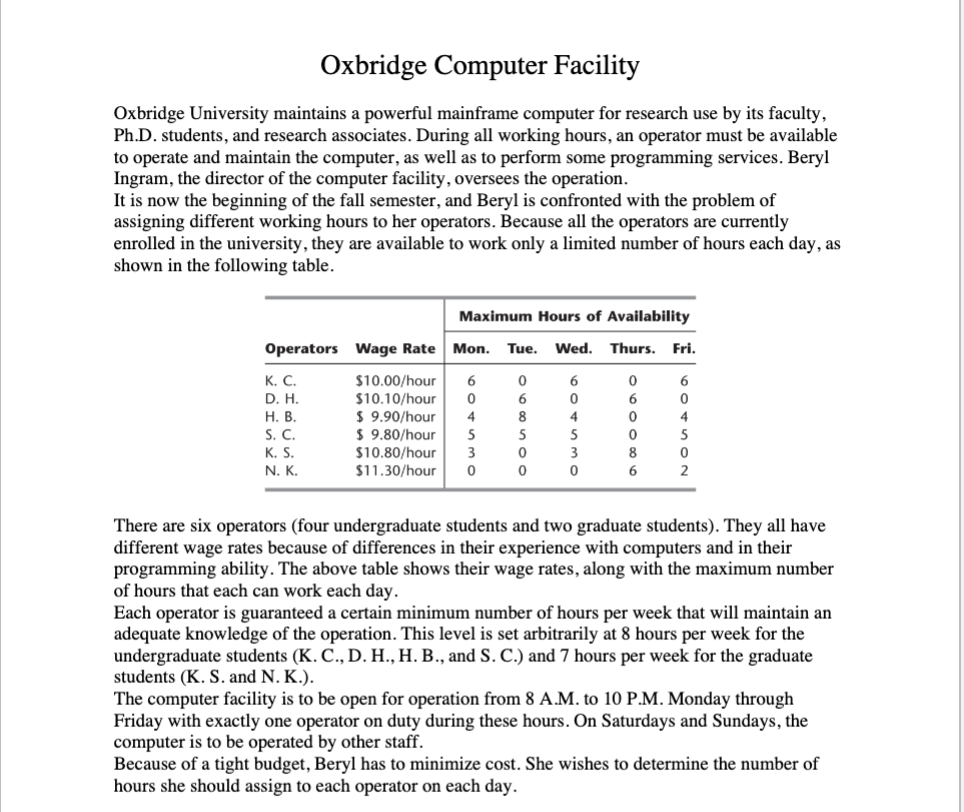
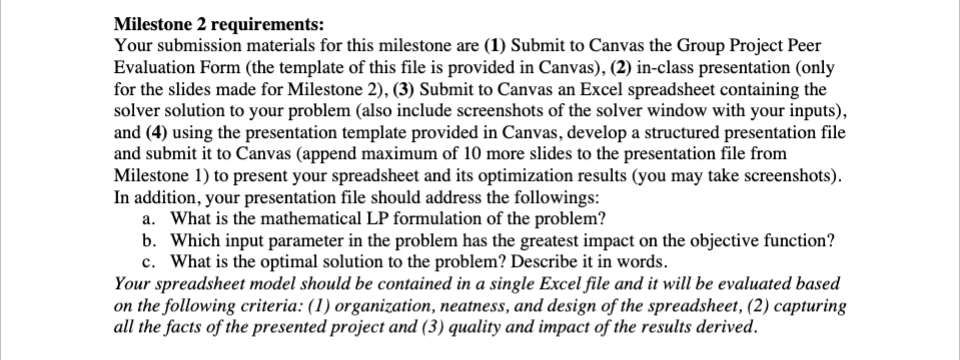
Oxbridge Computer Facility Oxbridge University maintains a powerful mainframe computer for research use by its faculty, Ph.D. students, and research associates. During all working hours, an operator must be available to operate and maintain the computer, as well as to perform some programming services. Beryl Ingram, the director of the computer facility, oversees the operation. It is now the beginning of the fall semester, and Beryl is confronted with the problem of assigning different working hours to her operators. Because all the operators are currently enrolled in the university, they are available to work only a limited number of hours each day, as shown in the following table. Maximum Hours of Availability Operators Wage Rate Mon. Tue. Wed. Thurs. Fri. 0 K. C. D. H. H. B. S. C. K. S. N. K. $10.00/hour $10.10/hour $9.90/hour $ 9.80/hour $10.80/hour $11.30/hour 6 0 4 5 3 0 6 8 5 0 0 6 0 4 5 3 0 0 6 0 0 8 6 6 0 4 5 0 2 There are six operators (four undergraduate students and two graduate students). They all have different wage rates because of differences in their experience with computers and in their programming ability. The above table shows their wage rates, along with the maximum number of hours that each can work each day. Each operator is guaranteed a certain minimum number of hours per week that will maintain an adequate knowledge of the operation. This level is set arbitrarily at 8 hours per week for the undergraduate students (K.C., D. H., H. B., and S. C.) and 7 hours per week for the graduate students (K. S. and N. K.). The computer facility is to be open for operation from 8 A.M. to 10 P.M. Monday through Friday with exactly one operator on duty during these hours. On Saturdays and Sundays, the computer is to be operated by other staff. Because of a tight budget, Beryl has to minimize cost. She wishes to determine the number of hours she should assign to each operator on each day. Milestone 2 requirements: Your submission materials for this milestone are (1) Submit to Canvas the Group Project Peer Evaluation Form (the template of this file is provided in Canvas), (2) in-class presentation (only for the slides made for Milestone 2), (3) Submit to Canvas an Excel spreadsheet containing the solver solution to your problem (also include screenshots of the solver window with your inputs), and (4) using the presentation template provided in Canvas, develop a structured presentation file and submit it to Canvas (append maximum of 10 more slides to the presentation file from Milestone 1) to present your spreadsheet and its optimization results (you may take screenshots). In addition, your presentation file should address the followings: a. What is the mathematical LP formulation of the problem? b. Which input parameter in the problem has the greatest impact on the objective function? c. What is the optimal solution to the problem? Describe it in words. Your spreadsheet model should be contained in a single Excel file and it will be evaluated based on the following criteria: (1) organization, neatness, and design of the spreadsheet, (2) capturing all the facts of the presented project and (3) quality and impact of the results derived




