







Question: Specifications: The data you need to read in is in the DataBookDataDataClinical Trial Case Study folder associate a filere named RawData with this location.
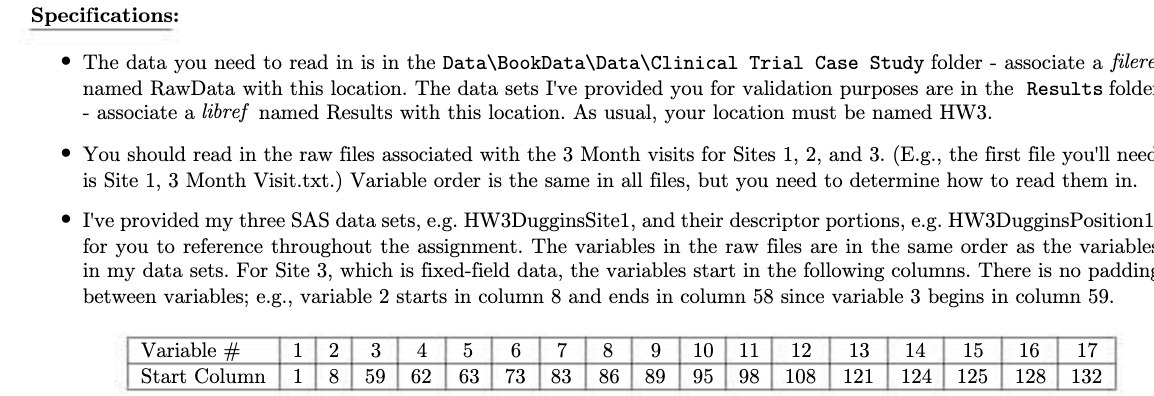
Specifications: The data you need to read in is in the Data\BookData\Data\Clinical Trial Case Study folder associate a filere named RawData with this location. The data sets I've provided you for validation purposes are in the Results folde - associate a libref named Results with this location. As usual, your location must be named HW3. You should read in the raw files associated with the 3 Month visits for Sites 1, 2, and 3. (E.g., the first file you'll need is Site 1, 3 Month Visit.txt.) Variable order is the same in all files, but you need to determine how to read them in. I've provided my three SAS data sets, e.g. HW3DugginsSitel, and their descriptor portions, e.g. HW3DugginsPositionl for you to reference throughout the assignment. The variables in the raw files are in the same order as the variables in my data sets. For Site 3, which is fixed-field data, the variables start in the following columns. There is no padding between variables; e.g., variable 2 starts in column 8 and ends in column 58 since variable 3 begins in column 59. 15 16 17 Variable # 1 2 3 4 5 6 7 8 9 10 Start Column 1 8 59 62 63 73 83 86 89 11 12 95 98 108 13 14 121 124 125 128 132
Step by Step Solution
There are 3 Steps involved in it

Get step-by-step solutions from verified subject matter experts
 Study Help