







Question: split a text file into smaller files using PYTHON : This is the prompt and my code for the first part, i only need help
split a text file into smaller files using PYTHON: This is the prompt and my code for the first part, i only need help writing what is pictured in "split requirements"
Prompt: Write a complete PYTHON program with prompts for the user to get the main text file (checks that it exists, and if not, output an error message and stop), for any possible flags (flags allows the user to change the default conditions or to use the defaults, and for any other input that this program may need from the user: split has an option of naming the smaller files. Your program will open the input file once only and using seek(0) to avoid re-opening the file will cost all points
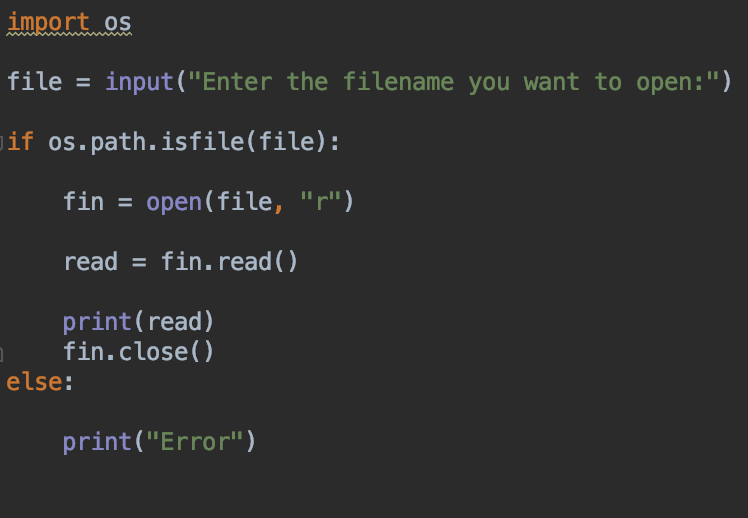
MY CODE FOR OPENING AND ERROR CHECK:
----------------------requirements for split functions----------------
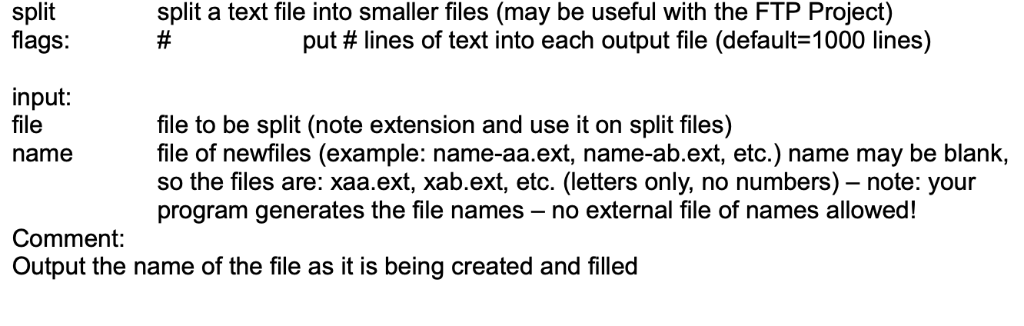
import os file input ("Enter the filename you want to open:") if os.path.isfile(file): fin open(file, "r") read fin.read () print (read) fin.close() else: print("Error") split split a text file into smaller files (may be useful with the FTP Project) flags put # lines of text into each output file (default-1000 lines) input: file name file to be split (note extension and use it on split files) file of newfiles (example: name-aa.ext, name-ab.ext, etc.) name may be blank, so the files are: xaa.ext, xab.ext, etc. (letters only, no numbers) - note: your program generates the file names - no external file of names allowed! Comment: Output the name of the file as it is being created and filled
Step by Step Solution
There are 3 Steps involved in it

Get step-by-step solutions from verified subject matter experts
 Study Help