







Question: Sprint 9:18 PM ggc.view.usg.edu Continue the fruit_stand.py program. It should prompt the vendor for custome names, and then for each customer calculate the total. The
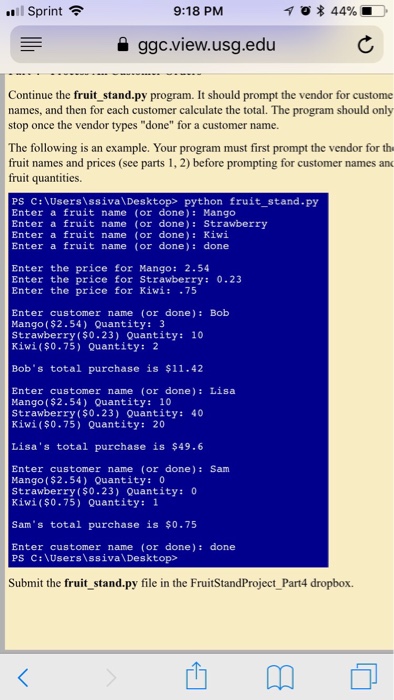
Sprint 9:18 PM ggc.view.usg.edu Continue the fruit_stand.py program. It should prompt the vendor for custome names, and then for each customer calculate the total. The program should only stop once the vendor types "done" for a customer name. The following is an example. Your program must first prompt the vendor for th fruit names and prices (see parts 1, 2) before prompting for customer names an fruit quantities PS C:\UsersissivalDesktop> python fruit_stand.py Enter a fruit name (or done): Mango Enter a fruit name (or done): Strawberry Enter a fruit name (or done) Kiwi Enter a fruit name (or done): done Enter the price for Mango: 2.54 Enter the price for Strawberry: 0.23 Enter the price for Kiwi: .75 Enter customer name (or done): Bob Mango($2.54) Quantity: 3 Strawberry $0.23) Quantity: 10 Kiwi(s0.75) Quantity: 2 Bob's total purchase is 11.42 Enter customer name (or done): Lisa Mango ($2.54) Quantity: 10 Strawberry ($0.23) Quantity: 40 Kiwi ($0.75) Quantity: 20 Lisa's total purchase is $49.6 Enter customer name (or done): Sam Mango($2.54) Quantity: 0 Strawberry ($0.23) Quantity:0 Kiwi ($0.75) Quantity: 1 Sam's total purchase is so.75 Enter customer name (or done): done PS C:\Users ssiva\Desktop> Submit the fruit_stand.py file in the FruitStandProject_Part4 dropbox
Step by Step Solution
There are 3 Steps involved in it

Get step-by-step solutions from verified subject matter experts
 Study Help