







Question: sql deptno number (2,0), dname varchar2 (14), loc varchar2 (13), constraint dept_pk primary key (deptno)); Create Table Emp( empn number (4,0) primary key, empname varchar2
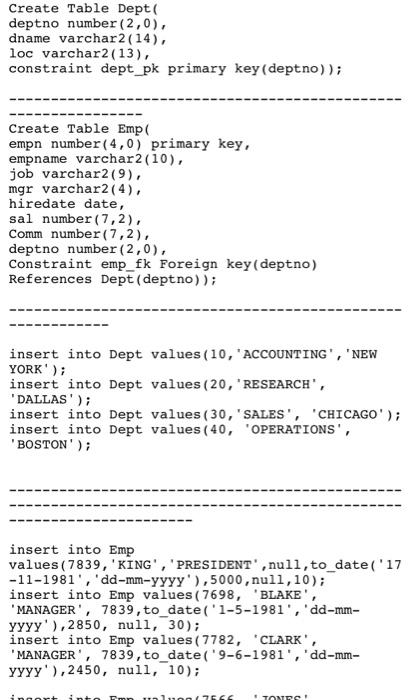
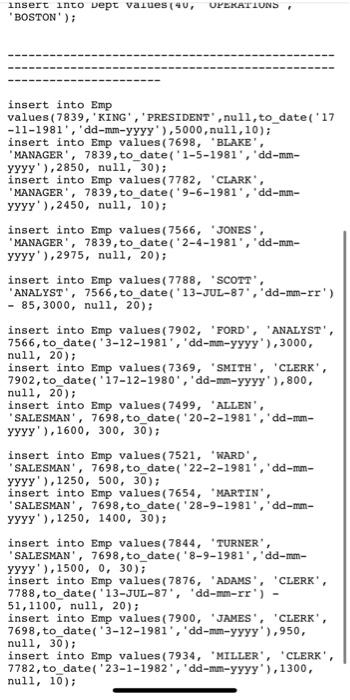
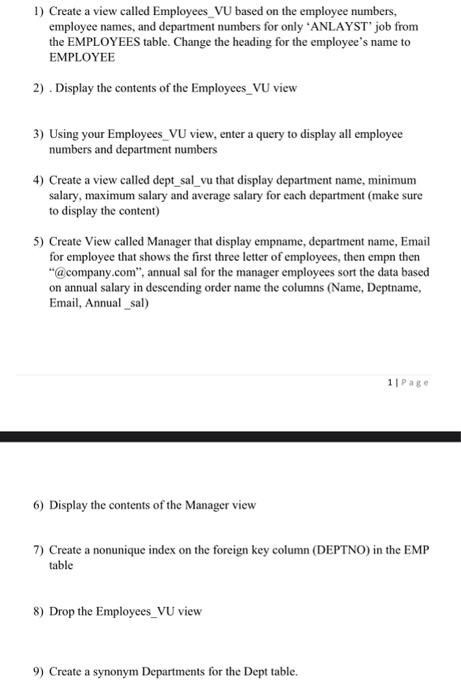
deptno number (2,0), dname varchar2 (14), loc varchar2 (13), constraint dept_pk primary key (deptno)); Create Table Emp( empn number (4,0) primary key, empname varchar2 (10), job varchar2 (9), mgr varchar2 (4), hiredate date, sal number (7,2), Comm number (7,2), deptno number (2,0), Constraint emp_fk Foreign key(deptno) References Dept(deptno)); insert into Dept values ( 10, "ACCOUNTING", 'NEW YORK'); insert into Dept values (20, "RESEARCH", 'DALLAS' ); insert into Dept values(30, 'SALES', 'CHICAGO'); insert into Dept values 40 , 'OPERATIONS', 'BOSTON'); insert into Emp values ( 7839, 'KING', 'PRESIDENT', null, to_date ( '17 -11-1981', 'dd-mm-yyyy' ),5000, nul1, 10); insert into Emp values( 7698 , 'BLAKE', 'MANAGER', 7839, to date ( 1-5-1981', 'dd-mm- YYYY ),2850, null, 30); insert into Emp values(7782, 'CLARK', 'MANAGER', 7839, to date('9-6-1981', 'dd-mm- YYYY '), 2450, nul1, 10); insert into Emp values (7839, 'KING', 'PRESIDENT', nu11, to date ( '17 111981, 'dd-mm-yyyy ),5000, nu11, 10); insert into Emp values(7698, "BLAKE", 'MANAGER', 7839, to_date ( '1-5-1981', 'dd-mm- YYYY'), 2850, nu11, 30); insert into Emp values(7782, "CLARK", 'MANAGER', 7839, to_date ('9-6-1981", 'dd-mm- yyyy' ),2450, nu11, 10 ); insert into Emp values(7566, "JonES", 'MANAGER', 7839, to_date ( '2-4-1981', 'dd-mmYYY ),2975, nul1, 20); insert into Emp values(7788, "SCOTT", 'ANALYST', 7566 , to date ( '13-JUL-87", "dd-mm-rr') 85,3000, nul1, 20); insert into Emp values(7902, "FORD', "ANALYST', 7566 , to date ( '3-12-1981', 'dd-mm-yyyy'), 3000, nul1, 200); insert into Emp values(7369, 'SMITH', 'CLERK', 7902, to date ( '17-12-1980', 'dd-mm-yyyy'), 800, nu11, 20); insert into Emp values(7499, "ALLEN", 'SALESMAN', 7698, to date ('20-2-1981", 'dd-mmYYY ),1600,300,30 ); insert into Emp values(7521, 'WARD', 'SALESMAN', 7698, to date ( '22-2-1981', 'dd-mmYyYy' ,1250,500,30 ); insert into Emp values (7654, "MARTIN", 'SALESMAN', 7698, to date( '28-9-1981', 'dd-mmYYYY ),1250,1400,30 ); insert into Emp values (7844, 'TURNER", 'SALESMAN', 7698, to date('8-9-1981', 'dd-mmYYYY' ),1500,0,30); insert into Emp values(7876, 'ADAMS', 'CLERK', 7788, to_date( '13-JUL-87', 'dd-mm-rr') 51,1100 , nul1, 20); insert into Emp values(7900, "JAMES', 'CLERK', 7698 , to date( '3-12-1981', 'dd-mm-yyyy'), 950, null, 30 ); insert into Emp values(7934, "MILLER', 'CLERK', 7782 , to date ( '23-1-1982', 'dd-mm-yyyy'), 1300 , nul1, 10); 1) Create a view called Employees_VU based on the employee numbers, employee names, and department numbers for only 'ANLAYST' job from the EMPLOYEES table. Change the heading for the employee's name to EMPLOYEE 2). Display the contents of the Employees_VU view 3) Using your Employees_VU view, enter a query to display all employee numbers and department numbers 4) Create a view called dept_sal_vu that display department name, minimum salary, maximum salary and average salary for each department (make sure to display the content) 5) Create View called Manager that display empname, department name, Email for employee that shows the first three letter of employees, then empn then "@ company.com", annual sal for the manager employees sort the data based on annual salary in descending order name the columns (Name, Deptname, Email, Annual_sal) 6) Display the contents of the Manager view 7) Create a nonunique index on the foreign key column (DEPTNO) in the EMP table 8) Drop the Employees_VU view 9) Create a synonym Departments for the Dept table
Step by Step Solution
There are 3 Steps involved in it

Get step-by-step solutions from verified subject matter experts
 Study Help