







Question: SQL QUERIES HELP, Any help would be greatly appreciated! Using sql server please use the attributes and entities listed. thank you! 1. Write a SELECT
SQL QUERIES HELP, Any help would be greatly appreciated! Using sql server please use the attributes and entities listed. thank you! 1. Write a SELECT statement that returns the same result set as this SELECT statement, but dont use a join. Instead, use a subquery in a WHERE clause that uses the IN keyword.
SELECT DISTINCT LastName, FirstName, PaymentType
FROM Customer c JOIN Payment p
ON c.PaymentID = p.PaymentID
ORDER BY LastName, FirstName
2. Write a SELECT statement that answers this question: Which services have prices that thats greater than the average price for all services?
Return the service name, category, price columns for each service.
Sort the result set by the price column in descending sequence.
3. Write a SELECT statement that returns the following
Customer's full name, phone and email
Return one row for each customer who does not have any services requested. To do that, use a subquery introduced with the NOT EXISTS operator.
Sort the result set by the customer's last name then by the first name
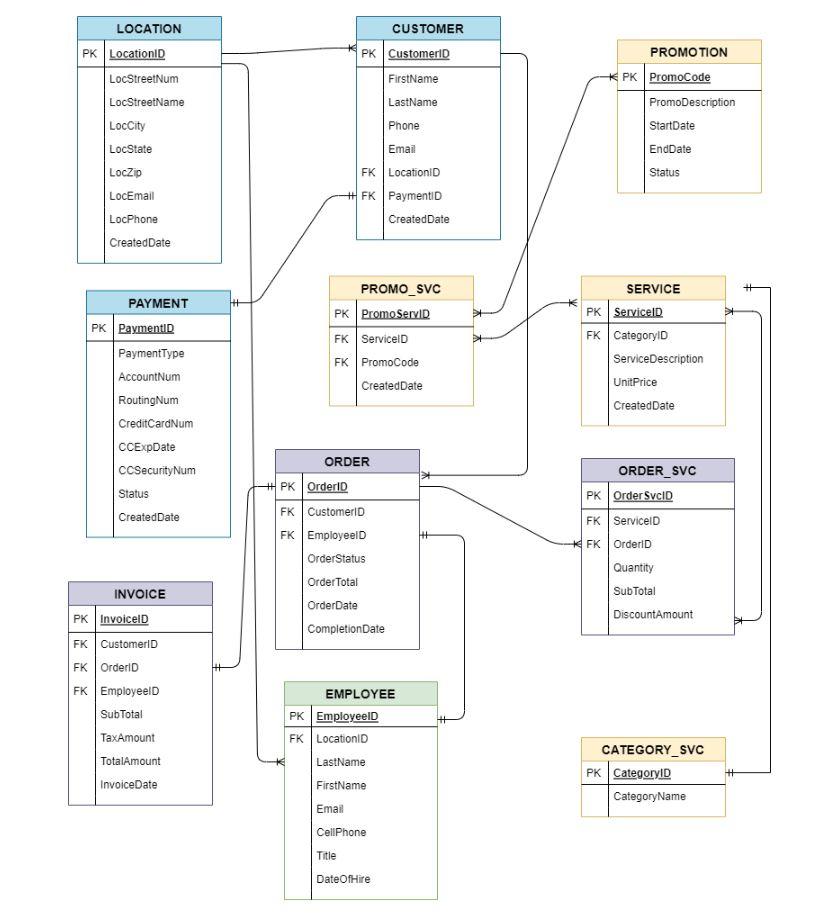
\begin{tabular}{|l|l|} \hline \multicolumn{2}{|c|}{ PAYMENT } \\ \hline PK & PaymentID \\ \hline & PaymentType \\ AccountNum \\ RoutingNum \\ CreditCardNum \\ CCExpDate \\ CCSecurityNum \\ Status \\ CreatedDate \\ \hline \end{tabular} \begin{tabular}{|l|l|} \hline \multicolumn{2}{|c|}{ PROMO_SVC } \\ \hline PK & PromeServID \\ \hline FK & ServicelD \\ FK & PromoCode \\ & CreatedDate \\ \hline \end{tabular} \begin{tabular}{|l|l|} \hline \multicolumn{2}{|c|}{ PROMOTION } \\ \hline PK & PromoCode \\ \hline & PromoDescriptionStartDateEndDateStatus \\ \hline \end{tabular} \begin{tabular}{|l|l|} \hline \multicolumn{2}{|c|}{ INVOICE } \\ \hline PK & InvoicelD \\ \hline FK & CustomerID \\ FK & OrderID \\ FK & EmployeelD \\ & SubTotal \\ TaxAmount \\ TotalAmount \\ InvoiceDate \\ \hline \end{tabular} \begin{tabular}{|l|l|} \hline \multicolumn{2}{|c|}{ CATEGORY_SVC } \\ \hline PK & CategoryID \\ \hline & CategoryName \\ \hline \end{tabular} CellPhone Title DateOfHire
Step by Step Solution
There are 3 Steps involved in it

Get step-by-step solutions from verified subject matter experts
 Study Help