







Question: SQL statements needed - 1. Use the Management Studio to create a new database called Membership2 using the default settings. (If the database already exists,
SQL statements needed
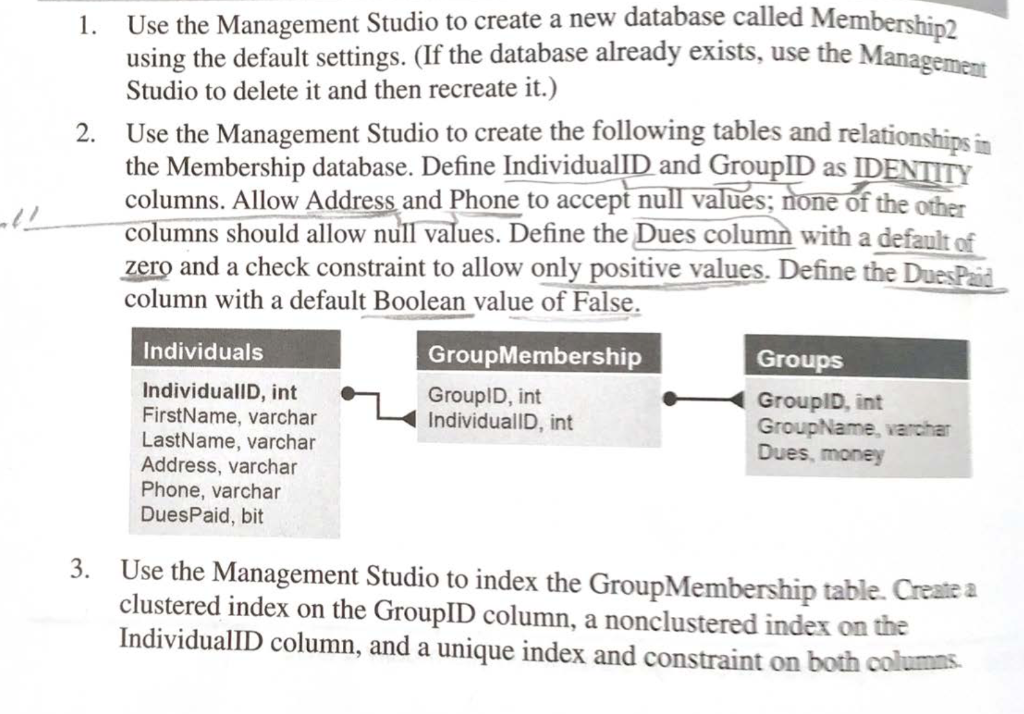
- 1. Use the Management Studio to create a new database called Membership2 using the default settings. (If the database already exists, use the Management Studio to delete it and then recreate it.) 2. Use the Management Studio to create the following tables and relationships in the Membership database. Define IndividuallD and GroupID as IDENTITY columns. Allow Address and Phone to accept null values; none of the other columns should allow null values. Define the Dues column with a default of zero and a check constraint to allow only positive values. Define the Dues Paid column with a default Boolean value of False. Individuals Group Membership Groups GroupID, int GroupID, int GroupName, varchar IndividuallD, int IndividuallD, int FirstName, varchar LastName, varchar Address, varchar Phone, varchar DuesPaid, bit Dues, money 3. Use the Management Studio to index the GroupMembership table. Create a clustered index on the GroupID column, a nonclustered index on the IndividuallD column, and a unique index and constraint on both columns
Step by Step Solution
There are 3 Steps involved in it

Get step-by-step solutions from verified subject matter experts
 Study Help