







Question: Use the Management Studio to create a new database called MyWebDB using the default settings. (If the database already exists, use the Management Studio to
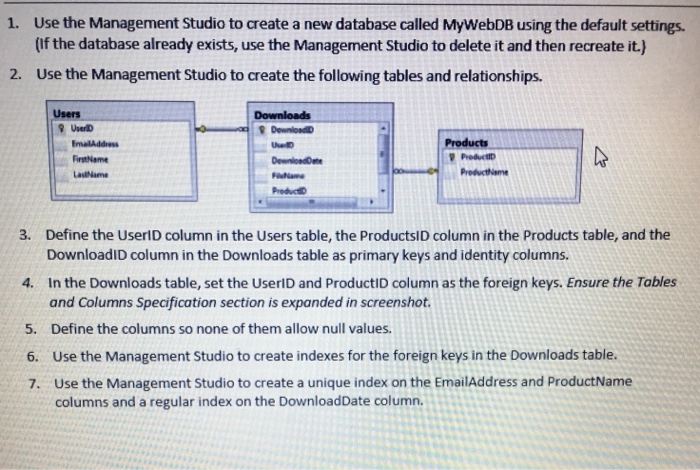
Use the Management Studio to create a new database called MyWebDB using the default settings. (If the database already exists, use the Management Studio to delete it and then recreate it.) Use the Management Studio to create the following tables and relationships. 1. 2. Users Products EmalAddress FirstName Las Name Preductiame PreductD 3. Define the UserID column in the Users table, the ProductsID column in the Products table, and the DownloadID column in the Downloads table as primary keys and identity columns In the Downloads table, set the UserlD and ProductID column as the foreign keys. Ensure the Tables and Columns Specification section is expanded in screenshot. Define the columns so none of them allow null values Use the Management Studio to create indexes for the foreign keys in the Downloads table. Use the Management Studio to create a unique index on the EmailAddress and ProductName columns and a regular index on the DownloadDate column. 4. 5. 6. 7
Step by Step Solution
There are 3 Steps involved in it

Get step-by-step solutions from verified subject matter experts
 Study Help