







Question: StartCo has done really well since you fixed everything in Project 3 . StartCo purchased new Layer 3 switches, router and new PoE phones. Unfortunately,
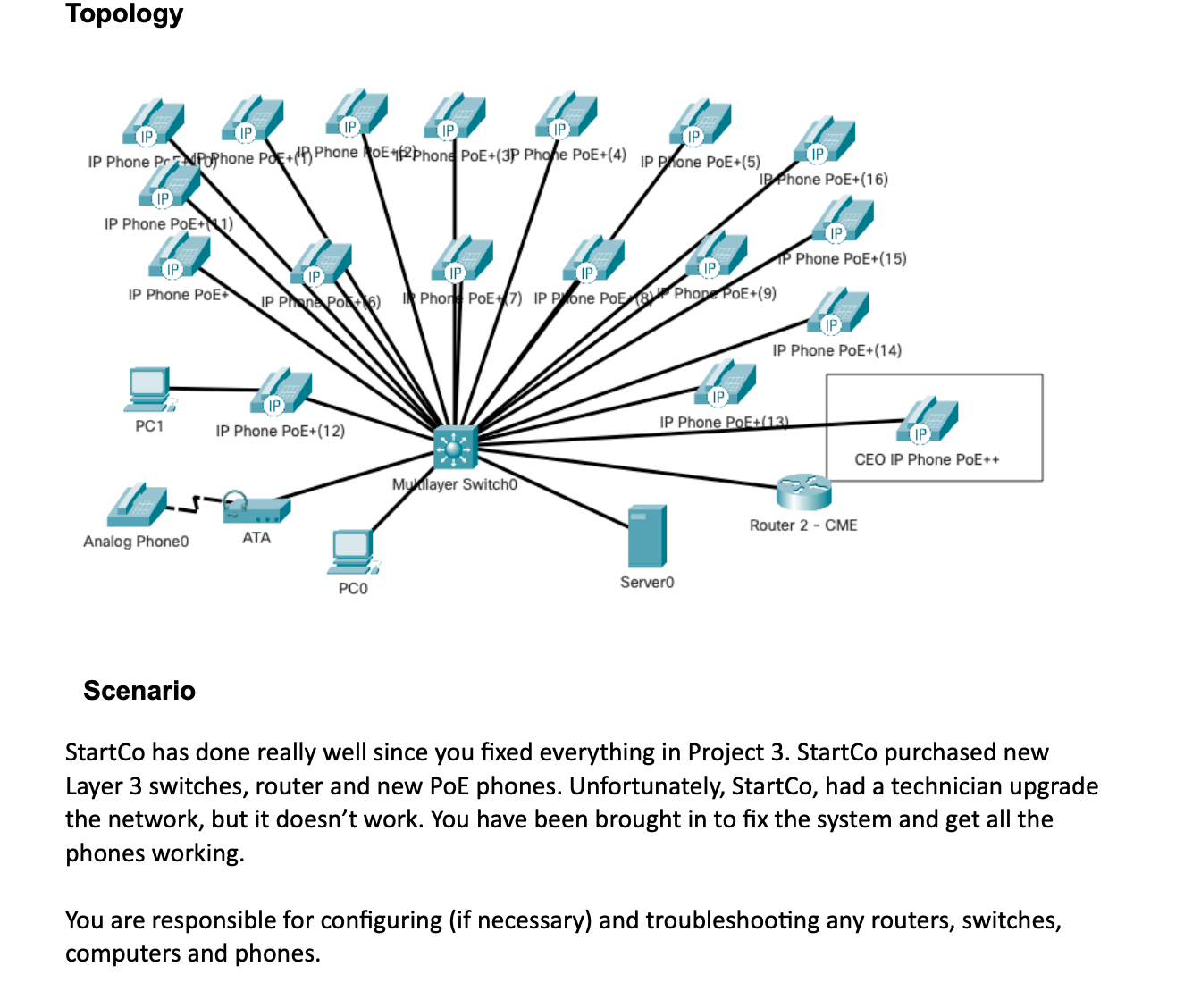
StartCo has done really well since you fixed everything in Project StartCo purchased new Layer switches, router and new PoE phones. Unfortunately, StartCo, had a technician upgrade the network, but it doesnt work. You have been brought in to fix the system and get all the phones working.
You are responsible for configuring if necessary and troubleshooting any routers, switches, computers and phones.
Network Requirements
The requirements for the StartCo Location:
The VLAN numbers should match the second octet of the subnet IP address.
The first ten addresses for both data and voice VLANs should be reserved for static devices.
PCs are located on the data VLAN.
The switch will be configured for Layer routing.
DHCP should configured on Server and used to assign all IP addresses to PCs and phones. Just a reminder that you will need to use the ip helperaddress command on the Layer switch.
CME Router should only have ONE IP address, and be connected to the Voice VLAN on the Layer switch. The CME Router needs to be licensed for Unified Communications. The CME router is ONLY being used for Telephony Services. No DHCP services or routing should be configured on the router.
Phone Requirements
The IP Phone extensions should be assigned phone numbers to
The analog phone should have number assigned.
VOIP ATA Adapter requires the CME IP server address.
Auto Registration of the Phones is preferred.
Phones should be powered using the PoE switch whenever possible.
The CEO is a PoE phone which will not be able to receive power from the PoE switch.
Hints:
To license Unified Communications use the command
license boot module c technologypackage uck
Create the TelephonyServices Auto Assign command to automatically assign DNs to the phones.
Don't forget to create the DNs
Modified
Topology
Scenario
StartCo has done really well since you fixed everything in Project StartCo purchased new Layer switches, router and new PoE phones. Unfortunately, StartCo, had a technician upgrade the network, but it doesn't work. You have been brought in to fix the system and get all the phones working.
You are responsible for configuring if necessary and troubleshooting any routers, switches, computers and phones. Addressing Table
Packet Tracer CIT Project
IP Phone Numbers x to x
Analog Phone x Network Requirements
The requirements for the StartCo Location:
The VLAN numbers should match the second octet of the subnet IP address.
The first ten addresses for both data and voice VLANs should be reserved for static devices.
PCs are located on the data VLAN.
The switch will be configured for Layer routing.
DHCP should configured on Server and used to assign all IP addresses to PCs and phones. Just a reminder that you will need to use the ip helperaddress command on the Layer switch.
CME Router should only have ONE IP address, and be connected to the Voice VLAN on the Layer switch. The CME Router needs to be licensed for Unified Communications. The CME router is ONLY being used for Telephony Services. No DHCP services or routing should be configured on the router.
Phone Requirements
The IP Phone extensions should be assigned phone numbers to
The analog phone should have number assigned.
VOIP ATA Adapter requires the CME IP server address.
Auto Registration of the Phones is preferred.
Phones should be powered using the PoE switch whenever possible.
Packet Tracer CIT Project
The CEO is a PoE phone which will not be able to receive power from the PoE switch. Hints:
To license Unified Communications use the command license boot module c technologypackage uck
Create the TelephonyServices Auto Assign command to automatically assign DNs to the phones.
Don't forget to create the DNs
Modified
Step by Step Solution
There are 3 Steps involved in it
1 Expert Approved Answer
Step: 1 Unlock

Question Has Been Solved by an Expert!
Get step-by-step solutions from verified subject matter experts
Step: 2 Unlock
Step: 3 Unlock
 Study Help