







Question: starter code for gronkyutil.py You will create a program for a brand-new kind of card game. The game is called Gronky . It is based
starter code for gronkyutil.py
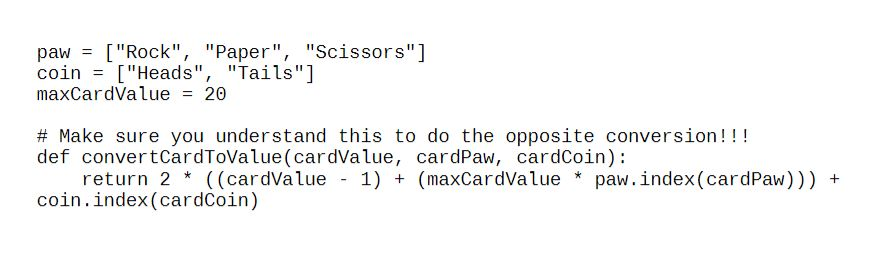
You will create a program for a brand-new kind of card game. The game is called Gronky. It is based on two common ways to select between two people or teams. You will create a deck of cards that can be used to play the game, as well as implement a usage of the cards to show that your deck of cards works properly.
Overview
- You will figure out how many cards you need in the deck to fulfill the requirements
- Each card has four components
- Id: unique integer for each card (lowest id number is 0, largest is one less than number of cards)
- Value: 1 20
- Coin: Heads or Tails
- Paw: Rock, Paper, or Scissors
- Each card is unique, meaning there are no cards that match all three components. The Id can be used to determine its value, coin, and paw.
- Every possible combination of Value/Coin/Paw must be present in the deck of cards
Requirements
- Create a class called Card
- Stores necessary data
- Initializer that takes a single number as a parameter
- All necessary getter type methods
- id
- paw
- value
- coin
- Create a class called Deck
- Used to create a single deck of cards
- Initializer that does not take any parameters
- Methods
- shuffle - resets to a full deck and shuffles
- draw deals out the top card
- Use the module called gronkyutil.py
- This stores the map for paw and coin
- It contains a function you can use to check to see if your id to value/hand/coin conversion is working properly. It may also come in handy somewhere else (hint hint).
- Create a file called assn15-task3.py
- It should contain a main function
- The main function should
- Create an instance of Deck
- Deal a single hand of 30 cards
- Show the user a menu
- Sort by value
- Call a function to sort by card value
- Note: If you have multiple cards of the same value, they may appear in any order
- Display the newly sorted hand
- Print each card on a new line
- Eg:
- 12 of Scissor Tail
- 3 of Rock Head
- Eg:
- Print each card on a new line
- Call a function to sort by card value
- Sort by id
- Call a function to sort by id
- Note: This will always produce the same order
- Display the newly sorted hand
- Same display as above
- Call a function to sort by id
- Find card
- Prompt the user to select:
- Value
- Hand
- Use map!
- Coin
- Use map!
- Check to see if the card with the user selection is in the hand
- Prompt the user to select:
- New hand
- This should start with a newly shuffled deck
- Quit
- Sort by value
- Sort functions
- Takes a list of cards as the parameter
- Does a bubble sort for id
- Do an insertion sort for value
- Search functions
- Takes a list of cards and a key as the parameters
- Perform a binary search to determine if the user selection is contained in the hand. (Hint: remember the requirements to do a binary search)
- Returns true if it is found in the hand
- Returns false if the card is not found in the hand
Rubric
3 pts: SoftwareDevelopment Lifecycle Plan
3 pts: Accurate UML diagrams (Card and Deck)
5 pts: Proper display of all menus and input prompts
15 pts: Card class defined and implemented properly
As described in overview and requirements
10 pts: Deck class defined and implemented properly
As described in overview and requirements
12 pts: Binary search implemented properly
6 pts: Insertion sort by value works properly
6 pts: Bubble sort by id works properly
5 pts: Hand printed properly
5 pts: New hand can be dealt properly
5 pts: Proper use of gronkyutil.py
5 pts: Quit exits program properly
paw = ["Rock", "Paper", "Scissors"] coin = ["Heads", "Tails"] maxCardValue = 20 # Make sure you understand this to do the opposite conversion!!! def convertCardToValue(cardValue, cardPaw, cardCoin): return 2 * ((cardValue - 1) + (maxCardValue * paw.index(cardPaw))) + coin.index(cardCoin) paw = ["Rock", "Paper", "Scissors"] coin = ["Heads", "Tails"] maxCardValue = 20 # Make sure you understand this to do the opposite conversion!!! def convertCardToValue(cardValue, cardPaw, cardCoin): return 2 * ((cardValue - 1) + (maxCardValue * paw.index(cardPaw))) + coin.index(cardCoin)
Step by Step Solution
There are 3 Steps involved in it

Get step-by-step solutions from verified subject matter experts
 Study Help