







Question: Starter Code #include #define MY_PRINT(x,y,z) printf(running average is %d / %d = %.3f , x,y,z) double r_avg(int, int); int main(int argc, char *argv[]) { int
Starter Code
#include#define MY_PRINT(x,y,z) printf("running average is %d / %d = %.3f ", x,y,z) double r_avg(int, int); int main(int argc, char *argv[]) { int input; int count=0; int sum=0; double resu; printf("enter number (-1 to quit): "); scanf("%d", &input); while(input != -1) { ...... ...... resu = r_avg(sum, count); My_PRINT(sum, count, resu); /* read again */ printf("enter number (-1 to quit): scanf("%d", &input); } return 0; } double r_avg(int sum, int count) { }
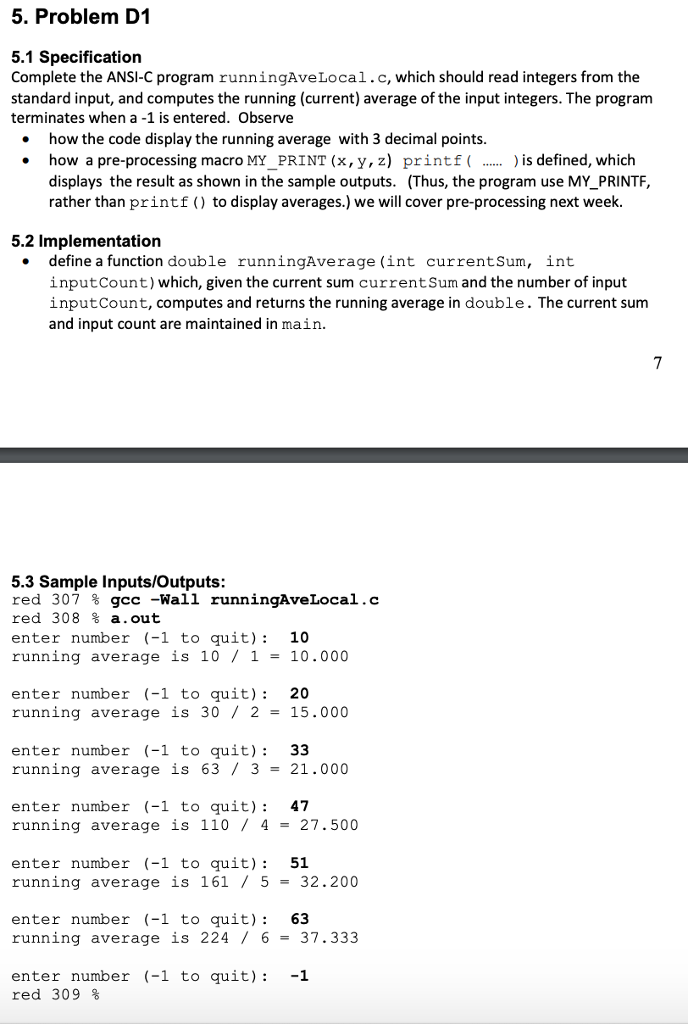
5. Problem D1 5.1 Specification Complete the ANSI-C program runningAveLocal.c, which should read integers from the standard input, and computes the running (current) average of the input integers. The program terminates when a -1 is entered. Observe how the code display the running average with 3 decimal points .how a pre-processing macro MY_PRINT (x, y,z) printf(... ) is defined, which displays the result as shown in the sample outputs. (Thus, the program use MY_PRINTF, rather than printf ) to display averages.) we will cover pre-processing next week. 5.2 Implementation . define a function double runningAverage (int currentSum, int inputCount) which, given the current sum currentSum and the number of input inputCount, computes and returns the running average in double. The current sum and input count are maintained in main. 5.3 Sample Inputs/Outputs: red 307 % gcc -Hall runningAveLocal.c red 308 % .out enter number (-1 to quit): 10 running average is 10 1-10.000 enter number (-1 to quit) 20 running average is 30 / 2 = 15.000 enter number (-1 to quit): 33 running average is 63/ 3-21.000 enter number (-1 to quit): 47 running average is 110/4- 27.500 enter number (-1 to quit) 51 running average is 161 5-32.200 enter number (-1 to quit) 63 running average is 224 / 6 = 37.333 enter number (-1 to quit): -1 red 309 %
Step by Step Solution
There are 3 Steps involved in it

Get step-by-step solutions from verified subject matter experts
 Study Help