







Question: Starting Out with Programming Logic and Design This lab examines how to work with a file by writing pseudocode. Read the following programming problem prior
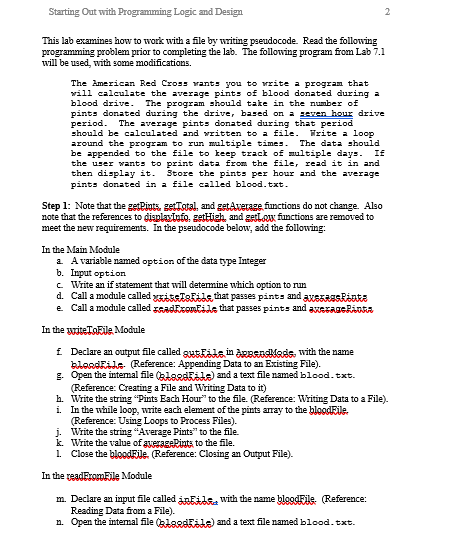
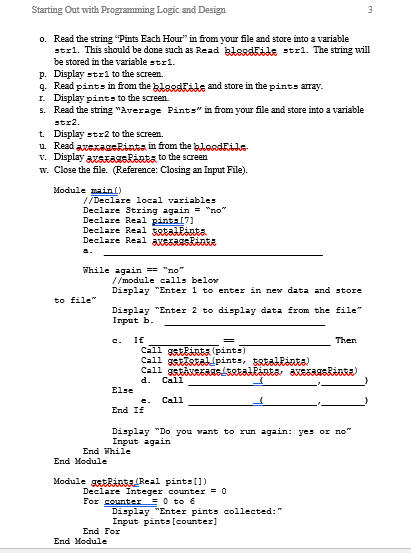
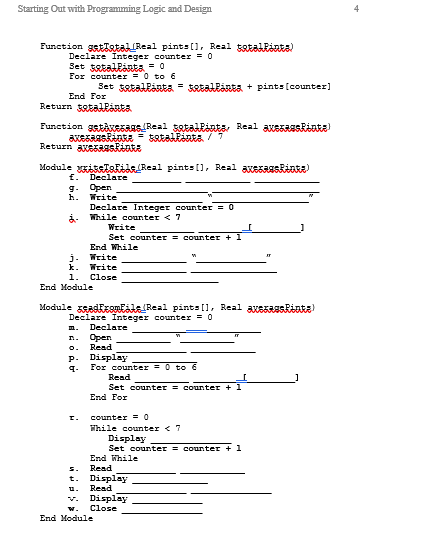
Starting Out with Programming Logic and Design This lab examines how to work with a file by writing pseudocode. Read the following programming problem prior to completing the lab. The following program from Lab 7.1 will be used, with some modifications. The merican Red Cro will calculate the average pints of blood donated during a blood drive. The pints donated during the driver based on a aven hour drive period. The average pints donated during that period should be calculated and vritten to a file. rite a loop around the program to run mltiple time The data should be appended to the file to keep track of multiple days. If the u er want to print dat from the file, read it in and then display it. 3tore the pints per hour and the average pints donated in a file called blood.txt 055 rant you to rite a program that program should take in the number of Step 1: Note that the getBints, getTotal, and getAveraze functions do not change. Also note that the references to gisplaxInfo, gettigh and gettxfanctions are removed to meet the new requirements. In the pseudocode below, add the following: In the Main Module a. A variable named option of the data type Integer b. Input option c. Write an if statement that will determine which option to run d. Call a module called wissTakdd that passes pint, and axssRasRARRA e. Call amodule called zaadFxomFide that passes pints and axeragePinaa In the yriteToEle Module Declare an output file called guiinassndksise with the name blesdRile. (Reference: Appending Data to an Existing File). g. Open the intemal file l) and a text file named blood.txt. Reference: Creating a File and Writing Data to it) h. Write the string "Pints Each Hour to the file. (Reference: Writing Data to a File). i. In the while loop, write each elament of the pints array to the bloodEle Reference: Using Loops to Process Files). j. Write the string "Average Pints" to the file. k. Write the value of averageRints to the file. 1. Close the bloodFle. (Reference: Closing an Output File). In the readomEle Module m. Declare an input file called inEil with the name blgodEle (Reference: Reading Data from a File). n. Open the intemal file l) and a text file named blood.txt. Starting Out with Programming Logic and Design This lab examines how to work with a file by writing pseudocode. Read the following programming problem prior to completing the lab. The following program from Lab 7.1 will be used, with some modifications. The merican Red Cro will calculate the average pints of blood donated during a blood drive. The pints donated during the driver based on a aven hour drive period. The average pints donated during that period should be calculated and vritten to a file. rite a loop around the program to run mltiple time The data should be appended to the file to keep track of multiple days. If the u er want to print dat from the file, read it in and then display it. 3tore the pints per hour and the average pints donated in a file called blood.txt 055 rant you to rite a program that program should take in the number of Step 1: Note that the getBints, getTotal, and getAveraze functions do not change. Also note that the references to gisplaxInfo, gettigh and gettxfanctions are removed to meet the new requirements. In the pseudocode below, add the following: In the Main Module a. A variable named option of the data type Integer b. Input option c. Write an if statement that will determine which option to run d. Call a module called wissTakdd that passes pint, and axssRasRARRA e. Call amodule called zaadFxomFide that passes pints and axeragePinaa In the yriteToEle Module Declare an output file called guiinassndksise with the name blesdRile. (Reference: Appending Data to an Existing File). g. Open the intemal file l) and a text file named blood.txt. Reference: Creating a File and Writing Data to it) h. Write the string "Pints Each Hour to the file. (Reference: Writing Data to a File). i. In the while loop, write each elament of the pints array to the bloodEle Reference: Using Loops to Process Files). j. Write the string "Average Pints" to the file. k. Write the value of averageRints to the file. 1. Close the bloodFle. (Reference: Closing an Output File). In the readomEle Module m. Declare an input file called inEil with the name blgodEle (Reference: Reading Data from a File). n. Open the intemal file l) and a text file named blood.txt
Step by Step Solution
There are 3 Steps involved in it

Get step-by-step solutions from verified subject matter experts
 Study Help