







Question: Starting out with >>> Visual C# - Calories from Fat Using this code- complete the program using System; using System.Collections.Generic; using System.ComponentModel; using System.Data; using
Starting out with >>> Visual C# - Calories from Fat
Using this code- complete the program
using System; using System.Collections.Generic; using System.ComponentModel; using System.Data; using System.Drawing; using System.Linq; using System.Text; using System.Threading.Tasks; using System.Windows.Forms;
namespace Number_of_Calories { public partial class frmCalories : Form { //Field variables (class-level) double _dblFatGrams; double _dblCarbGrams;
public frmCalories() { InitializeComponent(); } private bool Validate_Input() { bool blnValidNumber;
//Clear error messages from possible errors from previous transactions for the Error Provider control
//Validate fat grams input //Call TryParse method of double to convert txtFatGrams.Text string to _dblFatGrams blnValidNumber = double.TryParse(txtFatGrams.Text, out _dblFatGrams); if (blnValidNumber==false) { //display error using Error Provider control //set focus to Fat Grams textbox control //return false }
//Validate carb grams input
//Data is OK return true;
}
private void btnExit_Click(object sender, EventArgs e) { this.Close(); }
private void btnCalories_Click(object sender, EventArgs e) { } } }
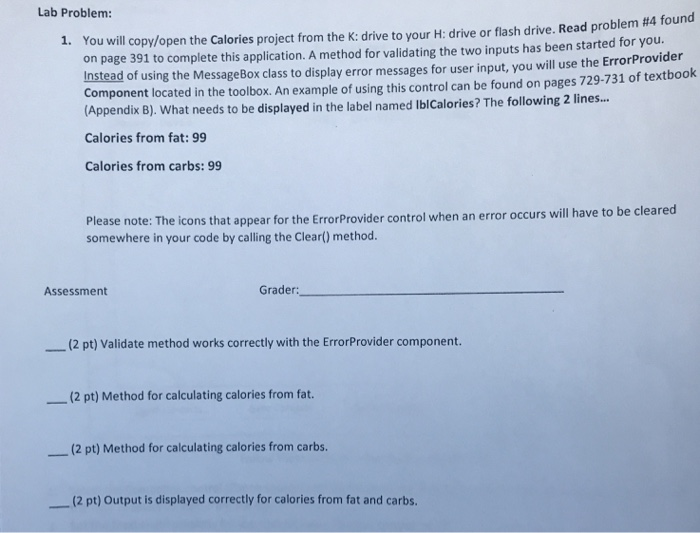
Lab Problem: You will copy open the Calories project from the K: drive to your H: drive or flash drive. Read problem #4 found on page 391 to complete this application. A method for validating the two inputs has been started for you. Instead of using the MessageBox class to display Component located in the toolbox. An example of using this control can be found on pages 729-731 of textbook (Appendix B). what needs to be displayed in the label named ibicalories? The following 2 lines. 1. error messages for user input, you will use the ErrorProvider Calories from fat:99 Calories from carbs: 99 o be cleared Please note: The icons that appear for the ErrorProvider control when an error occurs will have t somewhere in your code by calling the Clear() method. Assessment Grader: (2 pt) Validate method works correctly with the ErrorProvider component. -(2 pt) Method for calculating calories from fat. (2 pt) Method for calculating calories from carbs. (2 pt) Output is displayed correctly for calories from fat and carbs
Step by Step Solution
There are 3 Steps involved in it

Get step-by-step solutions from verified subject matter experts
 Study Help