







Question: Statement purpose To understand how to insert new rows into a table make them permanently stored (COMMIT statement). To Drop a table, run a script
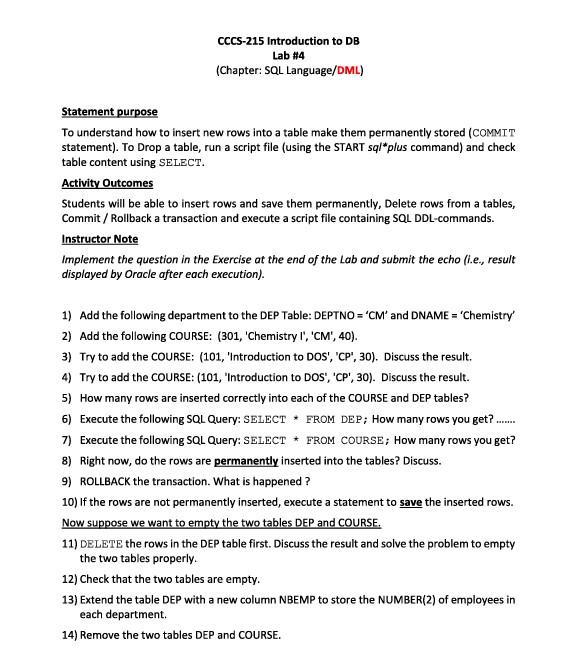
Statement purpose To understand how to insert new rows into a table make them permanently stored (COMMIT statement). To Drop a table, run a script file (using the START sql*plus command) and check table content using SELECT. Activity Outcomes Students will be able to insert rows and save them permanently, Delete rows from a tables, Commit / Rollback a transaction and execute a script file containing SQL DDL-commands. Instructor Note Implement the question in the Exercise at the end of the Lab and submit the echo (i.e., result displayed by Oracle after each execution). 1) Add the following department to the DEP Table: DEPTNO = 'CM' and DNAME = 'Chemistry' 2) Add the following COURSE: (301, 'Chemistry I', 'CM', 40). 3) Try to add the COURSE: (101, 'Introduction to DOS', 'CP', 30). Discuss the result. 4) Try to add the COURSE: (101, 'Introduction to DOS', 'CP', 30). Discuss the result. 5) How many rows are inserted correctly into each of the COURSE and DEP tables? 6) Execute the following SQL Query: SELECT * FROM DEP; How many rows you get? 7) Execute the following SQL Query: SELECT FROM COURSE; How many rows you get? 8) Right now, do the rows are permanently inserted into the tables? Discuss. 9) ROLLBACK the transaction. What is happened ? 10) If the rows are not permanently inserted, execute a statement to save the inserted rows. Now suppose we want to empty the two tables DEP and COURSE. 11) DELETE the rows in the DEP table first. Discuss the result and solve the problem to empty the two tables properly. 12) Check that the two tables are empty. 13) Extend the table DEP with a new column NBEMP to store the NUMBER(2) of employees in each department. 14) Remove the two tables DEP and COURSE
Step by Step Solution
There are 3 Steps involved in it

Get step-by-step solutions from verified subject matter experts
 Study Help